

User Guide (ArduPilot)
The settings and configuration in this chapter apply to using C-COMPASS with a controller running ArduPilot firmware.
Enable compass
Run Mission Planner and go to Config > FULL Parameter List, set the following parameters and restart the controller.
CAN_P1_DRIVERset to 1 (connected to CAN1).CAN_P2_DRIVERset to 1 (connected to CAN2).
Compass page annotations
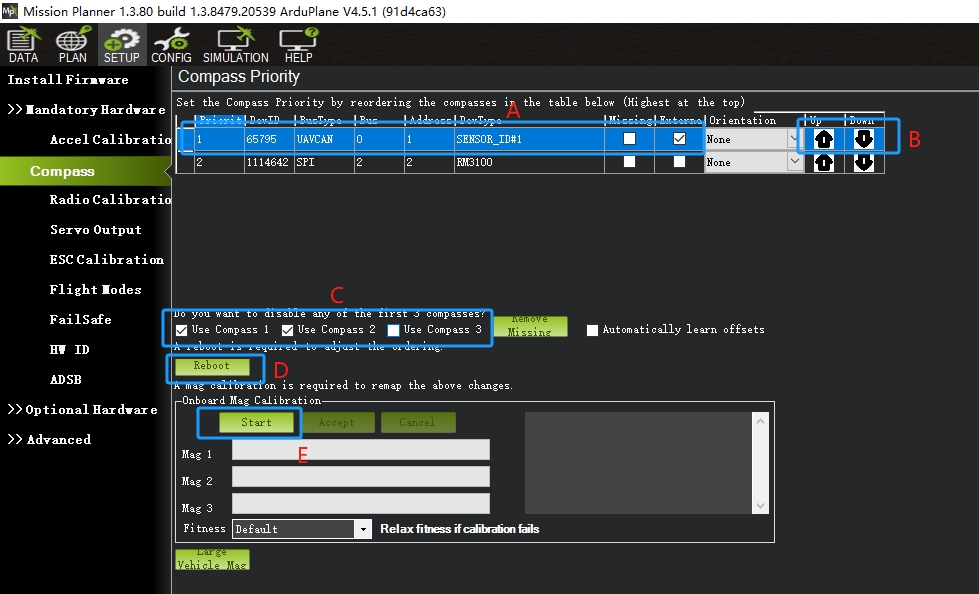
- A: Magnetometer information panel. For C-COMPASS, the BUS type is UAVCAN, External.
- B: Adjust the compass order with the up and down arrows; the first one has the highest priority.
- C: Select which magnetometers are calibrated (unchecked ones are neither used nor calibrated).
- D: After changing the magnetometer order, click Reboot to restart the controller.
- E: Click to start compass calibration.
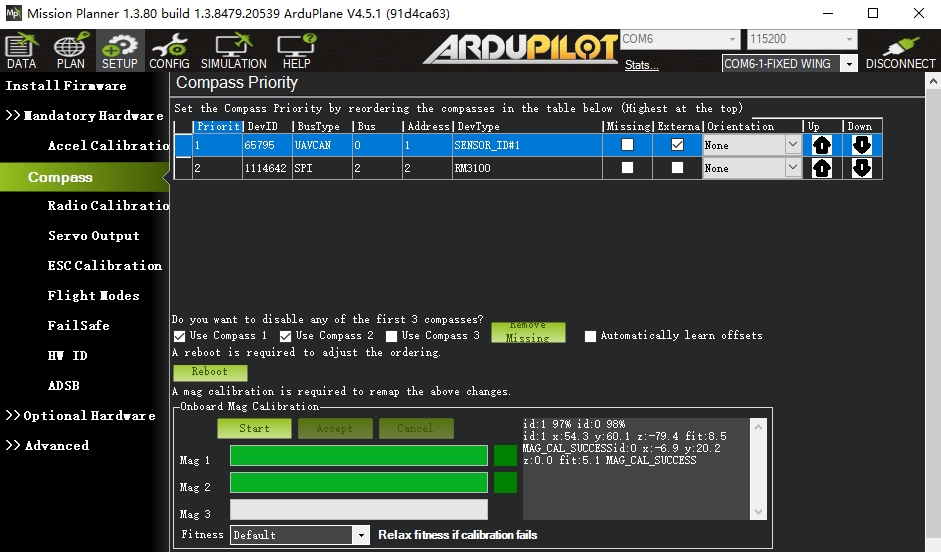
Start calibration
- Click the "Start" button to begin calibration.
- Rotate the vehicle in a "spherical" pattern until calibration is complete.
- The system prompts that calibration is complete.
Tip
Install the controller and magnetometer on the vehicle for calibration and do not move them afterwards. For larger vehicles, the arms or wings can be removed to make calibration easier (keep the compass away from arms or wings).