

Skye 2 Nano Quick Start Guide(ArduPilot)
The setup and configuration described in this chapter apply when using the Skye2 Nano with a controller running ArduPilot firmware.
Enable
Set the following parameters in all parameter tables of Mission planner and restart after writing
CAN_P1_DRIVERset to 1 (connected to CAN1).CAN_D1_PROTOCOLset to 1 (connected to CAN1).CAN_P2_DRIVERset to 1 (connected to CAN2).CAN_D2_PROTOCOLset to 1 (connected to CAN2).ARSPD_TYPEset to 8 (UAVCAN airspeed sensor).ARSPD_USEset to 1 (enable airspeed).
Airspeed offset calibration
When there is no wind and the airspeed display is greater than 3 m/s, perform airspeed offset calibration before takeoff:
提示
SKYE2 Nano has good consistency in general environments. You can set ARSPD_SKIP_CAL to 1 to skip airspeed zero calibration.
- Connect the smart controller and open Mission Planner.
- Make sure the pitot tube is in a windless environment.
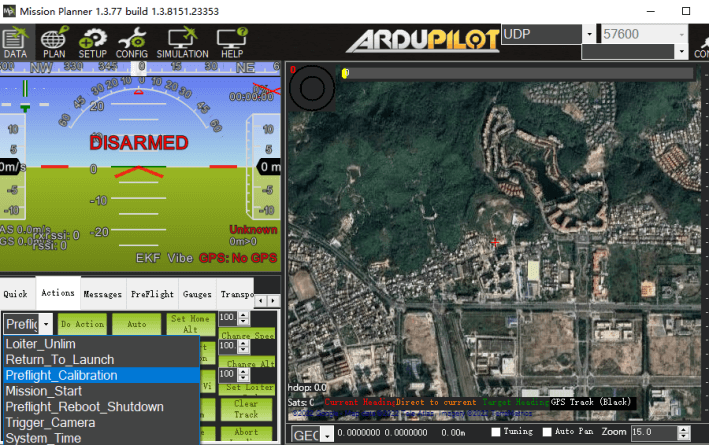
- Open Mission planner>Flight data>Action bar.
- Select "Preflight Calibration" and click "Perform Action".
Pre-flight inspection
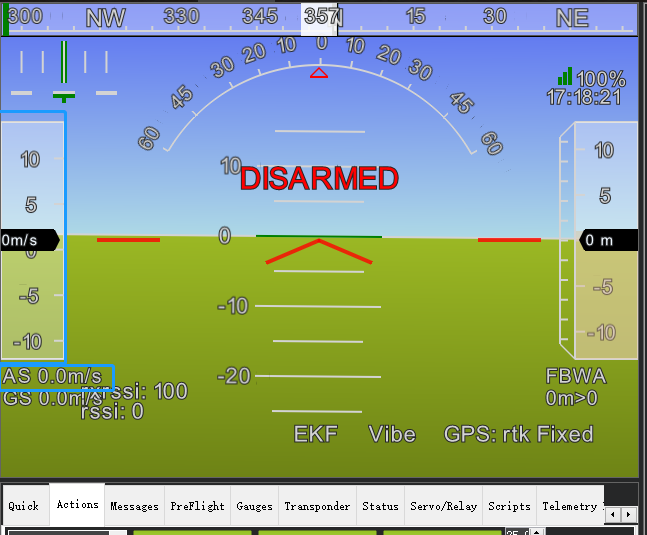
Before flying, please connect to the ground station to check that there is no wind and ensure that the airspeed value is within the range of 0~3m/s (if it exceeds the range, need perform airspeed offset calibration)
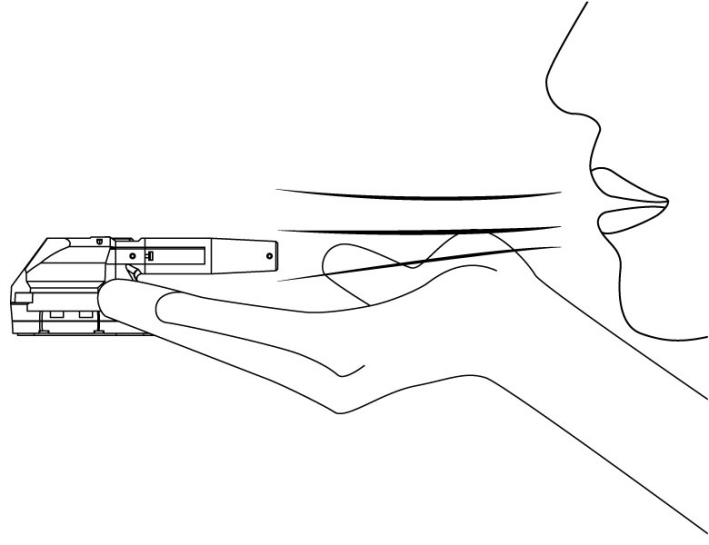
- Hold the pitot tube with your hand and blow air into the pitot tube. If the airspeed value changes according to the airflow speed, the inspection is complete.
Airspeed calibration
说明
The airspeed ratio of different installations and individual airspeed gauges will be somewhat different. The airspeed gauge needs to be calibrated on the first flight. Set smart controller parameter ARSPD_AUTOCAL to 1 to enable automatic calibration.
Perform calibration (choose one of the following two methods):
- A: Lift off in
QStabilizeorQLoitermulti-axis mode and convert toFBWA(self-stabilizing A mode) to control the drone to fly and hover for about 5 circles. After the ground station message bar prompts that the calibration is completed, execute the landing. After calibration, setARSPD_AUTOCALto 0. - B: If you don’t know how to fly in
FBWAmode, you can fly with the airspeed sensor enabled but not using it (ARSPD_USE=1;ARSPD_TYPE=8; do not fly in a windy environment Perform this operation); the aircraft will fly using ground speed (relative ground speed), and use Loiter mode to hover for about 5 circles after takeoff. The ground station message bar prompts that after the calibration is completed, perform landing. After calibration, setARSPD_AUTOCALto 0.