

Configuration
Factory Configuration
The P8 is fully configured at the factory and supports plug-and-play for most use cases. If you have specific requirements, follow the instructions below.
Entering Configuration Mode
- Install a serial port assistant tool or other serial debugging software, connect the radio over USB and open the software.
- Set data bits to 8, parity to none, stop bit to 1, and both transmission and reception to ASCII.
Method 1: Buttons
- Set the baud rate to 9600.
- Press and hold both CONFIG and RESET, release RESET first, then CONFIG.
Method 2: Command
- Set the baud rate to the module's current baud rate (factory default 57600), then send:
+++Command Format
Method 2 is recommended with the SSCOM serial assistant, as some tools cannot send this command. Do not press Enter after +++. Every other AT command must end with a carriage return, including the last one.
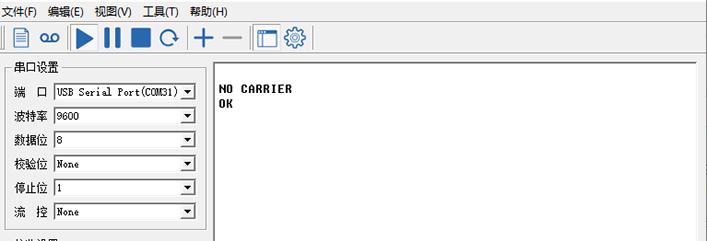
The serial assistant returns NO CARRIER ok when AT configuration mode is active. Send the parameters and each successful one returns ok.
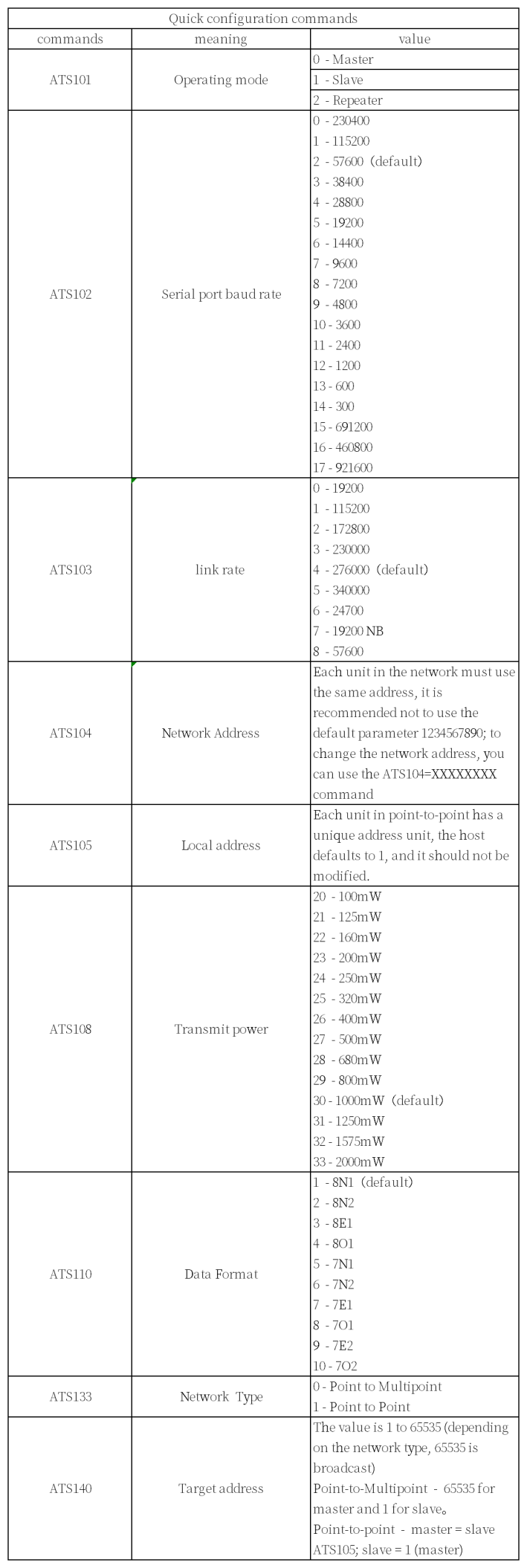
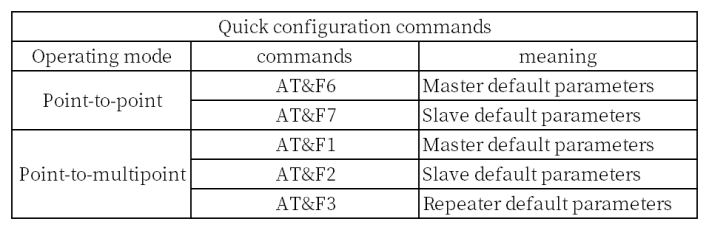
Common Parameter Explanations
Query Current Configuration
Use the AT&V command to query the current configuration.
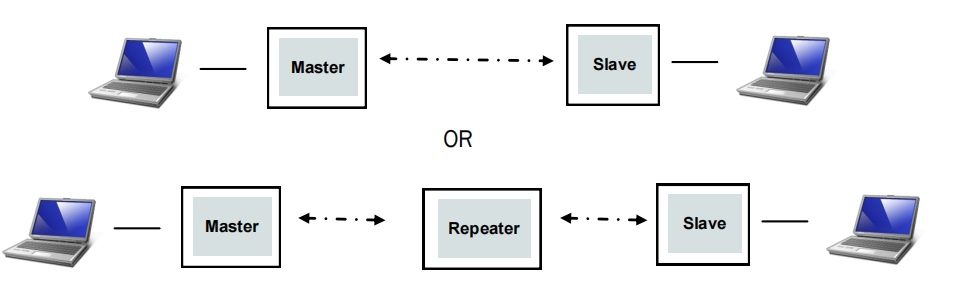
Point-to-Point Communication
Copy the parameters below into the serial assistant, press Enter and send; each successful one returns ok.
Master (ground)
Restrictions: ATS105 range 1, ATS140 range 2 ~ 65535. Set master mode, baud rate 57600, air data rate 276000, network IP 725527, transmit power 1000 mW, device address 1, target address 2.
AT&F6
ATS102=2
ATS103=4
ATS104=725527
ATS108=30
ATS105=1
ATS140=2
AT&W
Slave (air)
Restrictions: ATS105 range 2 ~ 65535, ATS140 range 1. Set slave mode, baud rate 57600, air data rate 276000, network IP 725527, transmit power 1000 mW, device address 2, target address 1.
AT&F7
ATS102=2
ATS103=4
ATS104=725527
ATS108=30
ATS105=2
ATS140=1
AT&W
Point-to-Point with a Repeater
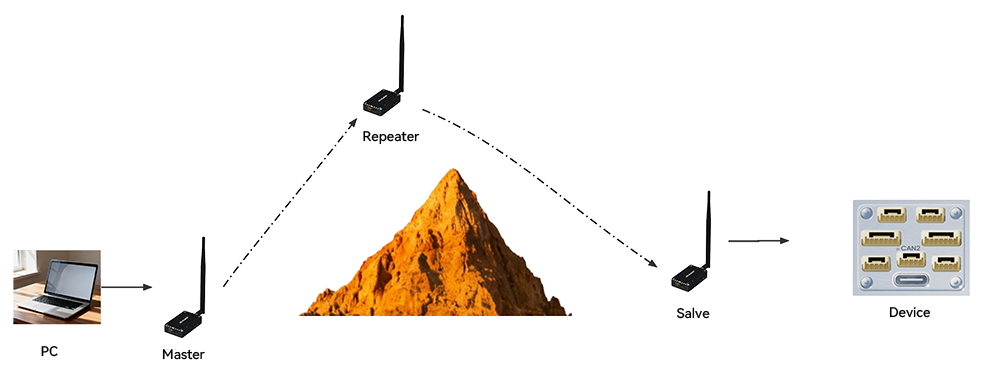
Master (ground)
Restrictions: ATS105 range 1, ATS140 range 2 ~ 65535. Set master mode, baud rate 57600, data rate 276000, network IP 725527, transmit power 1000 mW, device address 1, target address 2.
AT&F6
ATS102=2
ATS103=4
ATS104=725527
ATS108=30
ATS105=1
ATS140=2
ATS141=1
AT&W
Slave (ground)
Restrictions: ATS105 range 1, ATS140 range 2 ~ 65535. Set master mode, baud rate 57600, data rate 276000, network IP 725527, transmit power 1000 mW, device address 2.
AT&F7
ATS102=2
ATS103=4
ATS104=725527
ATS108=30
ATS105=2
ATS118=3
ATS140=1
AT&W
Repeater (air)
Restrictions: ATS105 range 2 ~ 65535, ATS140 range 1. Set slave mode, baud rate 57600, data rate 276000, network IP 725527, transmit power 1000 mW, device address 2.
AT&F7
ATS101=1 (Repeater)
ATS102=2
ATS103=4
ATS104=725527
ATS108=30
ATS105=3
ATS118=1
ATS140=1
AT&W
Point-to-Multipoint Communication
Copy the parameters below into the serial assistant, press Enter and send; each successful one returns ok.
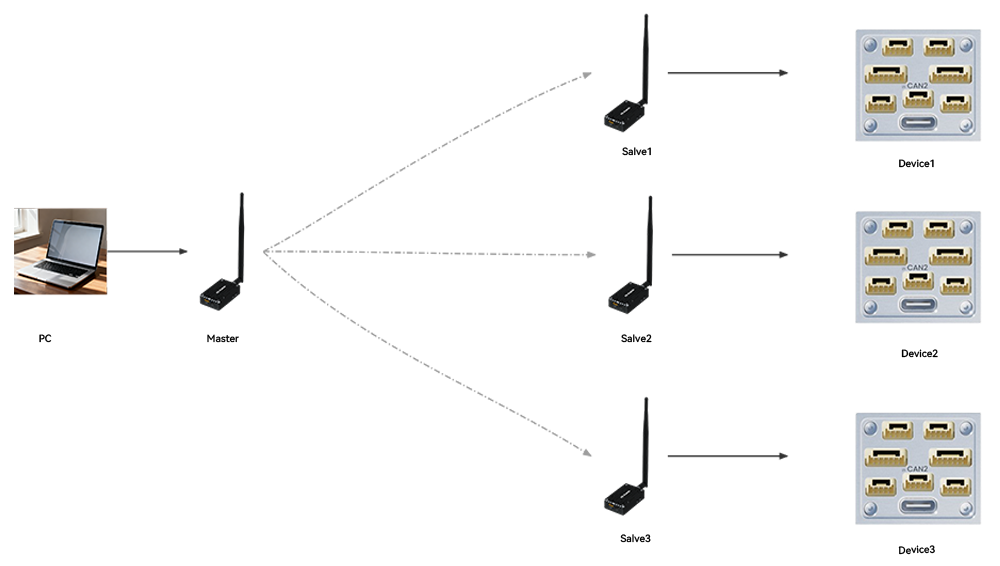
Master
Restrictions: ATS105 range 1, ATS140 range 65535. Set master mode, baud rate 230400, data rate 340000 bps, network IP 725527, transmit power 1000 mW, device address 1, target address 65535.
AT&F1
ATS102=0
ATS103=5
ATS104=725527
ATS108=30
ATS105=1
ATS118=3
AT&W
Slave 1
Restrictions: ATS105 range 2 ~ 65535 (must be unique among slaves), ATS140 range 1. Set slave mode, baud rate 230400, data rate 340000 bps, network IP 725527, transmit power 1000 mW, device address 2, target address 1.
AT&F2
ATS102=0
ATS103=5
ATS104=725527
ATS108=30
ATS105=2
ATS140=1
AT&W
Slave 2
Restrictions: ATS105 range 2 ~ 65535 (must be unique among slaves), ATS140 range 1. Set slave mode, baud rate 230400, data rate 340000 bps, network IP 725527, transmit power 1000 mW, device address 3, target address 1.
AT&F2
ATS102=0
ATS103=5
ATS104=725527
ATS108=30
ATS105=3
ATS140=1
AT&W
Slave 3
Restrictions: ATS105 range 2 ~ 65535 (must be unique among slaves), ATS140 range 1. Set slave mode, baud rate 230400, data rate 340000 bps, network IP 725527, transmit power 1000 mW, device address 4, target address 1.
AT&F2
ATS102=0
ATS103=5
ATS104=725527
ATS108=30
ATS105=4
ATS140=1
AT&W
For additional slave stations, follow the same pattern.
Frequency Setting
Frequencies
Do not modify the frequencies unless necessary. If the master and slave are configured consistently but fail to communicate, check that their frequency settings match; a mismatch prevents communication. A maximum of 50 frequencies can be set.
Query frequencies:
ATP0?Set frequencies (factory default example):
ATP0=
840.000000
840.500000
841.000000
841.500000
842.000000
842.500000
843.000000
843.500000
844.000000
844.500000
845.000000
840.000000
840.500000
841.000000
841.500000
842.000000
842.500000
843.000000
843.500000
844.000000
844.500000
845.000000
840.000000
840.500000
841.000000
841.500000
842.000000
842.500000
843.000000
843.500000
844.000000
844.500000
845.000000
840.000000
840.500000
841.000000
841.500000
842.000000
842.500000
843.000000
843.500000
844.000000
844.500000
845.000000
840.000000
840.500000
841.000000
841.500000
842.000000
842.500000