

Firmware Update
The PW-Link module does not support online updates; the firmware must be updated manually. Download the flashing tool and the latest firmware package, then extract both archives.
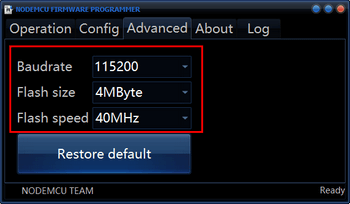
- Run ESP8266Flasher.exe, open the Advanced tab and set the options as shown.
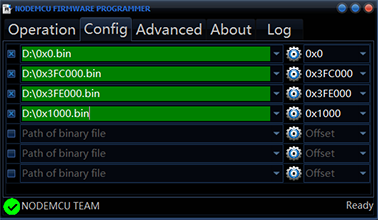
- Open the Config tab and use the triangle icon on the right to select the files (the path in the green area must match the file names shown in white on the right).
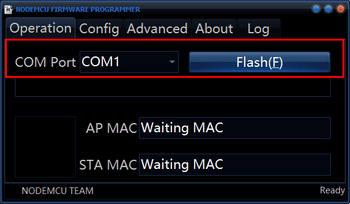
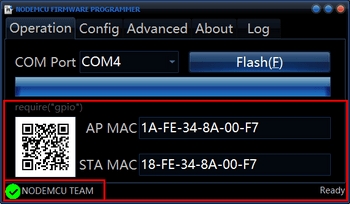
- Open the Operation tab and connect the TTL board to the computer's USB port with a flashing cable (a custom cable works: match GND and 5 V according to the markings on the TTL board and the back of the PW-Link, and cross-connect RX and TX). Look up the port in Device Manager and select it, hold the module's recovery button while powering it on, then click Flash.
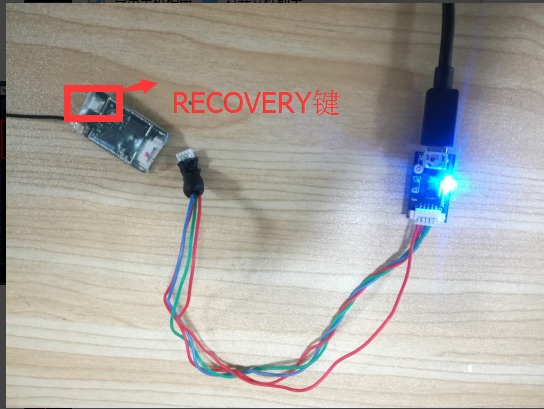
- After a successful flash the module's blue LED blinks, as shown below.
Version
The latest version is 2.0.0. Once the module is running, short IO0 to GND for more than 5 s to restore the default network configuration; a steady or off blue LED means the reset is complete. Do not short the pins while powering on, or the module will enter flashing mode.