

GPS for Yaw(ArduPilot)
Two C-RTK 9Ps modules can be used to estimate yaw in place of a magnetic compass, which may be subject to external magnetic interference or electromagnetic interference from the drone's motors and ESCs.
NOTE
Some other manufacturers' flight controller interfaces cannot provide enough power for two C-RTK 9Ps, it is recommended to provide a 5V (more than 2A current) independent power supply for C-RTK 9ps
Hardware
- C-RTK 9Ps(Rover)*2
- X7+ flight controller*1 (other flight controllers can also be used)
NOTE The C-RTK 9Ps needs to run firmware 1.13 and later; the flight controller needs to run firmware 4.04 and later.
Hardware connection
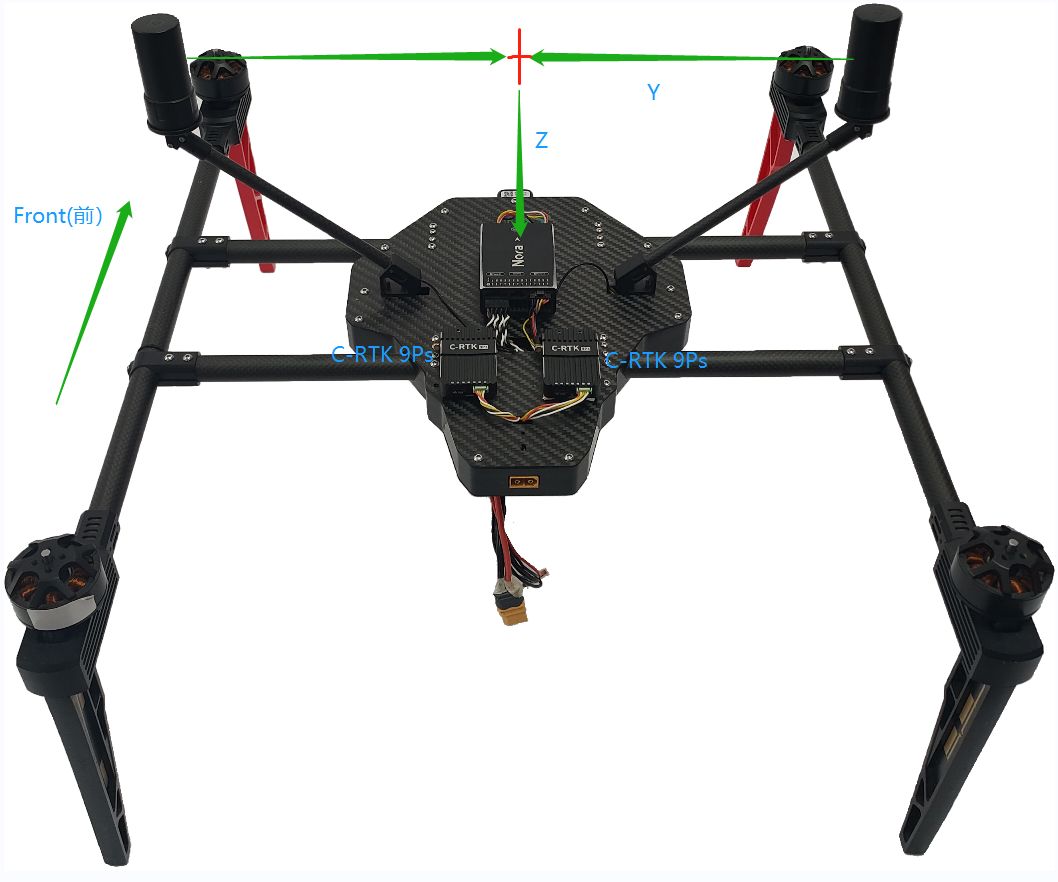
- Each of the two RTK modules is connected to an antenna, and the module installation distance is not required;
- The horizontal distance between the two antennas should be at least 30 cm apart, and the greater the distance, the higher the direction accuracy;
- The first C-RTK 9Ps is connected to the X7+ flight control GPS interface, and the second module is connected to the X7+ flight control UART4 interface.
Flight control parameter settings
Please go to Mission planner->Configuration and debugging->All parameter list
SERIAL4_PROTOCOLset to 5 (“GPS”) (assuming the 2nd GPS is connected to serial port 4).GPS_TYPEset to 17 (“moving baseline base”).GPS_TYPE2set to 18 (“moving baseline rover”).- Set the
GPS_POS1_X/Y/ZandGPS_POS2_X/Y/Zparameters for the GPSsGPS_POS1_X,GPS_POS1_Y,GPS_POS1_Z(the first GPS’s position from the vehicle’s IMU or center-of-gravity)GPS_POS2_X,GPS_POS2_Y,GPS_POS2_Z(the second GPS’s position from the vehicle’s IMU or center-of-gravity)
AHRS_EKF_TYPEset to 3 (use EKF3).EK2_ENABLEset to 0 (disable EKF2).EK3_ENABLEset to 1 (to enable EKF3).
If using 4.0
EK3_MAG_CALset to 5 (“Use external yaw sensor”).
If using 4.1 (or higher)
EK3_MAG_CALis not used for this feature so it can be left at its default value (“0” for Plane, “3” for Copter, “2” for Rover).EK3_SRC1_YAWset to 2 (“GPS”) or 3 (“GPS with Compass Fallback”).
Testing
In a location with good GPS reception, point the vehicle at a landmark some distance away and then check the heading on the ground station matches. Rotate the vehicle and ensure the heading on the ground station updates correctly.
If the heading is reversed, then the GPS_POS_xxx parameters have probably been set incorrectly.
Note that it can take some time for the two GPS modules to get a sufficiently good fix for yaw to work. The ArduPilot GPS driver validates that the fix is good enough in several ways:
- that the rover GPS module is in fix type 6 (fixed RTK)
- that the reported distance between the two modules matches the distance given by the GPS position parameters within 20%
- that the reported heights of the two GPS modules match the attitude of the vehicles is within 20% of the distance between the two GPS modules