Firmware Upgrade
This page describes how to upgrade the firmware of the C-RTK3 X20P.
Firmware release notes
Firmware v1.11 was released on 2026-10-14, with the following main updates:
New parameters
GNSS_PPP_ENABLE: enables/disables the PPP quick configuration. Default 0 (disabled), 1 to enable. It is recommended to keep it disabled in mainland China.MAG_CAN_SEND: enables/disables compass data. Default 1 (enabled), 0 to disable.CAN1_BITRATE: sets the bitrate of the standard CAN bus (without CAN FD) to remain compatible with other devices on the same bus. Default 1000000; can be changed to 500000.
Fixes
- Fixed abnormal positioning caused by interference.
NOTE
This firmware affects positioning performance and the upgrade is mandatory. Modules delivered on or after 2026-10-14 already have this upgrade applied at the factory; no action is needed.
Preparations before upgrade
- A flight controller running ArduPilot firmware
- Download Mission Planner
- Download the C-RTK3 X20P firmware package (contains the system firmware and the receiver firmware)
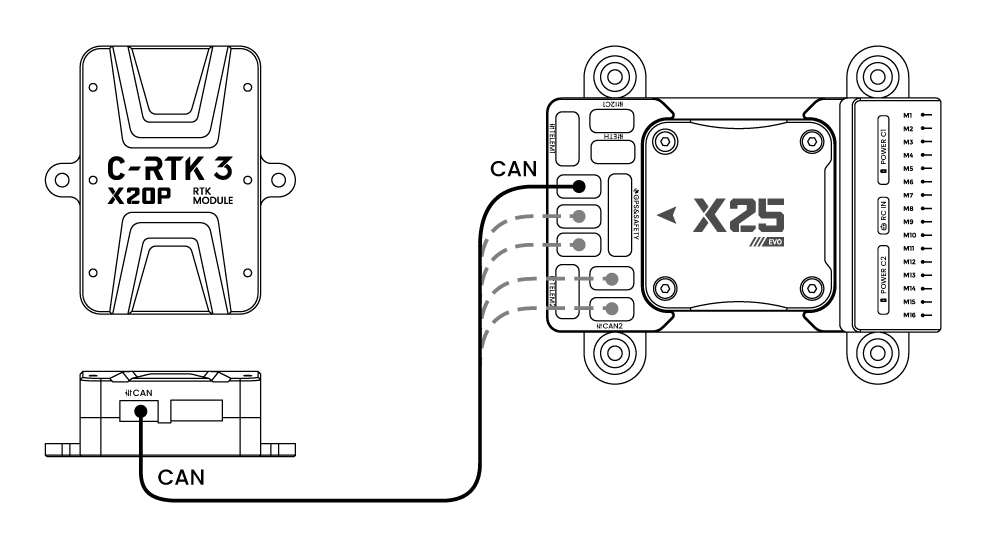
- Connect the C-RTK3 X20P to the controller
Upgrade system firmware
The system firmware is the C-RTK3 X20P device firmware. After the upgrade, you can check the software version in the DroneCAN/UAVCAN screen of Mission Planner.
- Connect the C-RTK3 X20P to the controller (the controller must run ArduPilot firmware).
- Download the firmware file C-RTK3-X20P-v1.11.bin.
- Connect the controller to the computer with a USB cable.
- Run Mission Planner, connect, and go to Initial Setup → Optional Hardware → DroneCAN/UAVCAN.
- Select MAVLinkCAN1/2 according to your hardware connection to obtain the CAN device list; click the Menu control on the right side of the C-RTK3 X20P device and choose Update, then choose No in the online-upgrade dialog to upgrade from a local file.
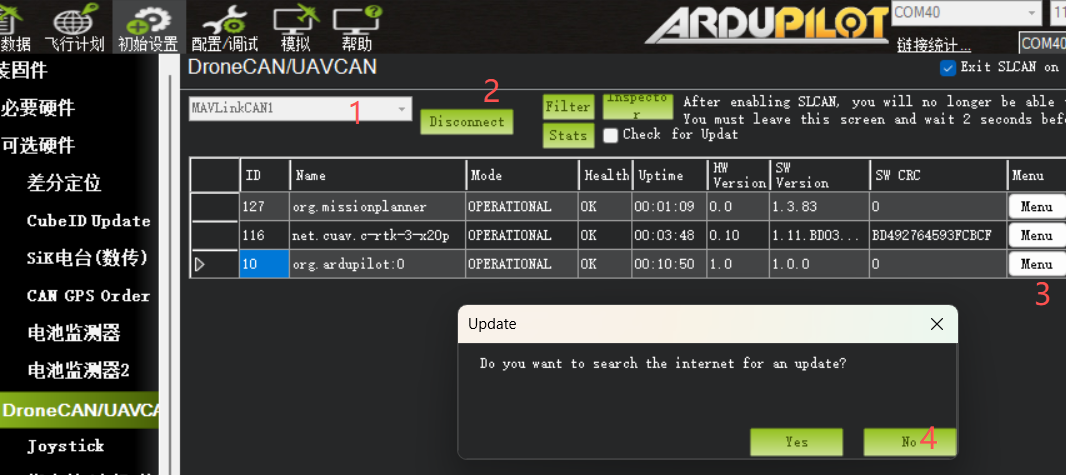
- In the file selector, select the firmware file and open it, then wait for the upgrade to finish.
Upgrade GNSS receiver firmware
The receiver firmware is the firmware of the GNSS positioning module inside the C-RTK3 X20P. Use the receiver firmware upgrade tool (Windows only) to upgrade it.
- Download the C-RTK3 X20P receiver firmware upgrade tool (Windows only).
- Download the X20P GNSS firmware file.
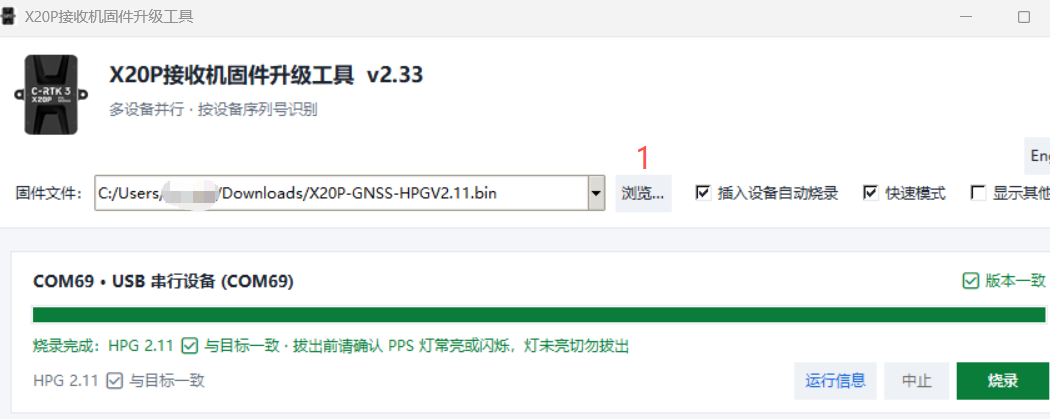
- Run the C-RTK3 X20P receiver firmware upgrade tool, click Browse and select the
X20P-GNSS-HPGV2.11.binfirmware file. - Plug the C-RTK3 X20P into the computer with a USB cable; the tool automatically detects the device and flashes the firmware to the GNSS receiver.