LBA3 First Use
1. Connect to the computer
Connection method
WIFI is affected by interference and signal strength; a wired connection (Ethernet) provides more stable communication and smoother video.
Wired connection
- Connect the LBA base station to the computer with a network cable.
- After starting the base station, set DHCP (Network Connections > Internet Protocol Version 4) to obtain an IP automatically.
- The computer will detect the LBA base station network.
WIFI connection
- Base station WIFI names:
LBA3_5G_xxxxxx(5G WIFI),LBA3_xxxxxx - LW mobile terminal WIFI name:
LBA3_AG_xxxxxx - Default password:
12345678
2. Connect the ground station
Take QGroundControl as an example:
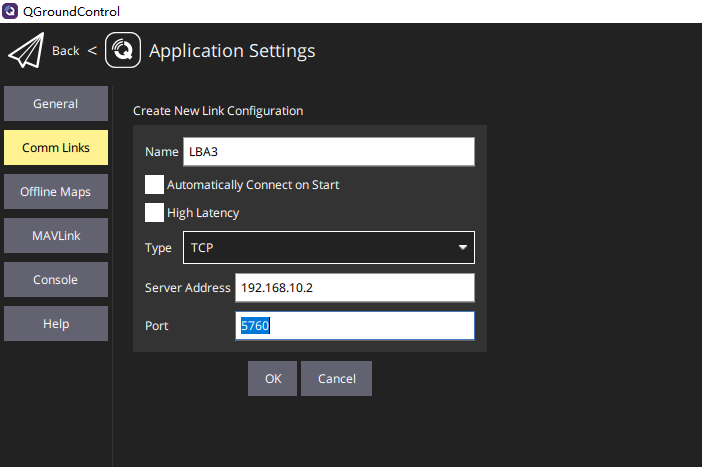
- Add a new link in application settings (application settings > Comm links > add).
- Enter a link name.
- Select
TCPas the connection type. - Enter the AG gateway / base station IP.
- Set the port to
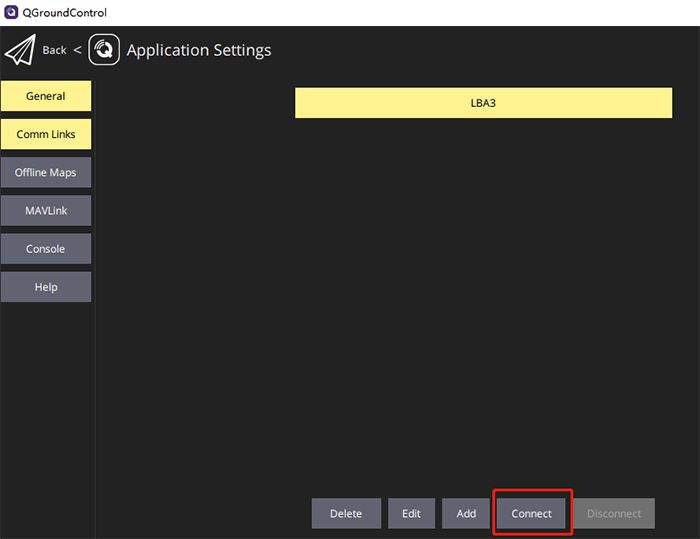
5760(as configured) and click "OK". - Select the new link and click
connect.
3. Display gimbal video and control commands
To display gimbal video, use the software provided by the gimbal supplier and follow its tutorial.
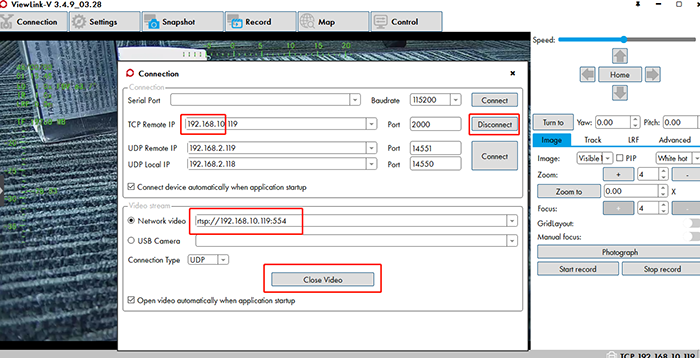
Take one gimbal as an example: enter the RTSP stream address in the software, rtsp://192.168.10.119:554 (set according to the camera's actual IP; 192.168.10 is the network segment). Establish a TCP connection to control the gimbal and camera through the software.