

OLED Information
Note
The information shown on LTE-LINK SE is roughly the same as LTE-LINK and will not be described separately.
Main Screen
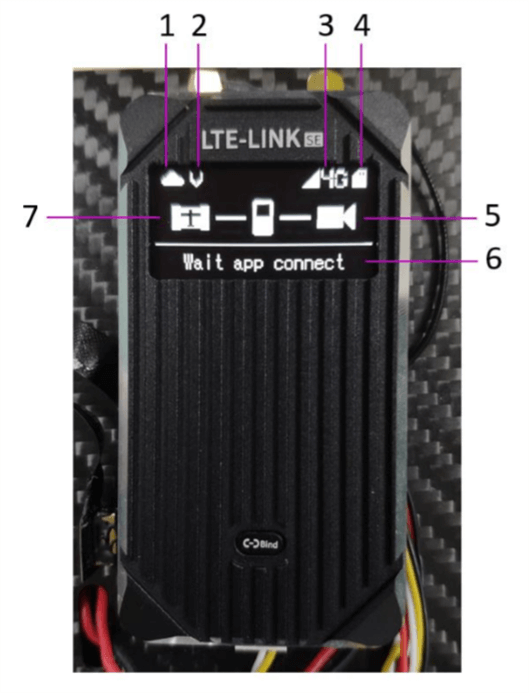
1. Cloud connection status
Indicates whether the device is connected to the cloud server normally (a backslash in the icon means the connection is disconnected). A connection to the cloud server is required for normal communication between the terminal and the client.
2. Video transmission status
Shown/hidden indicates video transmission is enabled/disabled.
3. Signal status
Network signal strength and network mode.
4. SD card status
SD card inserted/removed status.
5. Video input
Normal/off status of the HDMI video stream.
6. Device information
All device information and status messages.
- "Devinit" - device initialization.
- "simpppdcall" - dialing up via the SIM card.
- "pppfailed" - dial-up failed; wait and dial again. If it keeps failing, check whether the SIM card has run out of credit or data.
- "Waittimesync" - waiting for time synchronization.
- "connectingserver" - connecting to the server.
- "Waitappconnect" - the network is normal and the client can connect.
- "checkedupdate" - checking for update files.
7. Data connection status
Normal/off status of the UAV data input over UART (MAVLink 1/2 data required).