

Firmware Update
At present, there is no online update program for the wtr-Link module, which requires the user to manually update the program. Need to download burn software and the latest version of the package and unzip Packages. The specific programming steps are as follows:
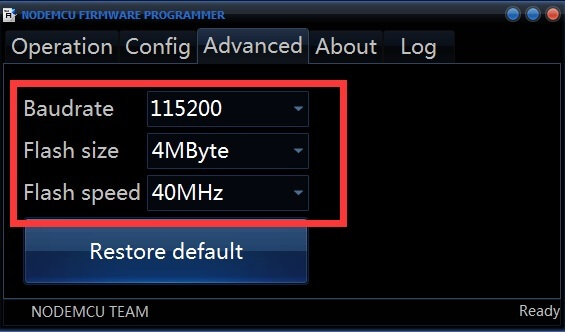
1 line burning software ESP8266Flasher.exe, click the ** Advanced** option, modify the corresponding options as shown;
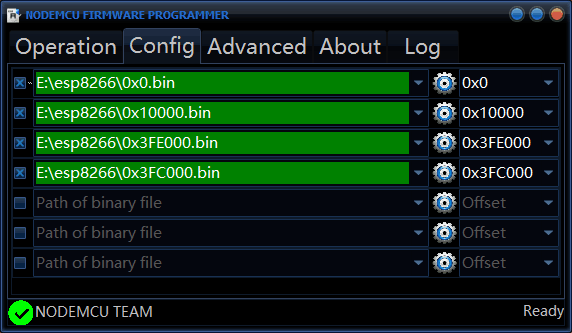
- Click on the Config option and click on the right triangle to change the file name to the following image. Look at the green font area and click on the area triangle icon
Find the file with the same name on the right and click Open to set the file path.
(Note that the file path of the green area corresponds to the file name of the right white font)
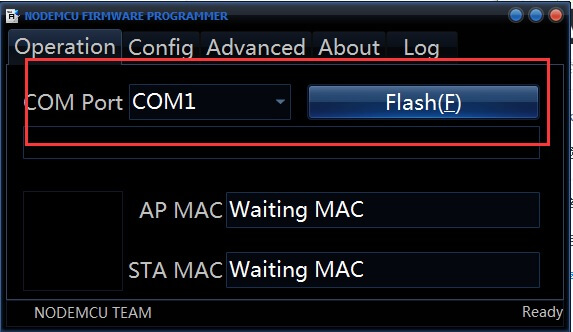
- Click Operation option, use ** burn line ** to connect the TTL board with the computer usb (you can make a burn line, see the ttl board and wtr_link behind the logo, the gnd, 5v corresponding to connect , rx, tx cross-connect) Select the corresponding port \ (port can be viewed at the My Computer "device manager" port), hold down the data recovery module recovery button and power module, click the ** Flash** button;
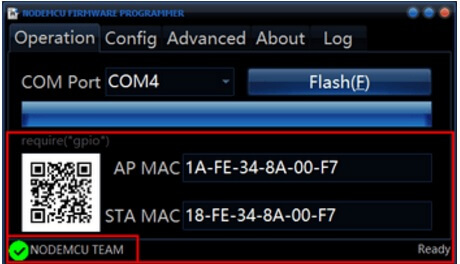
- Prompt success map is as follows (D2 will be flashed after successful burning module)
Note
The latest version is: 2.0.0. After the module is running normally, IO0 is shorted to GND over 5S to restore the default configuration of the network. The blue light is on or off indicates that the recovery is complete. Remember not to short-circuit and power up at the same time. This is to enter the programming mode.