

Flashing Rover Firmware
Rover, Copter and Plane are different branches of the same ArduPilot code, so flashing works exactly the same way. The only difference is picking “rover” when you choose the vehicle type, and downloading the matching ardurover.apj. Only after flashing does the controller have the rover parameter tree, and only then does FRAME_CLASS offer vehicle or boat.
Flashing
Connect the controller to the computer over USB first. Do not connect the battery.
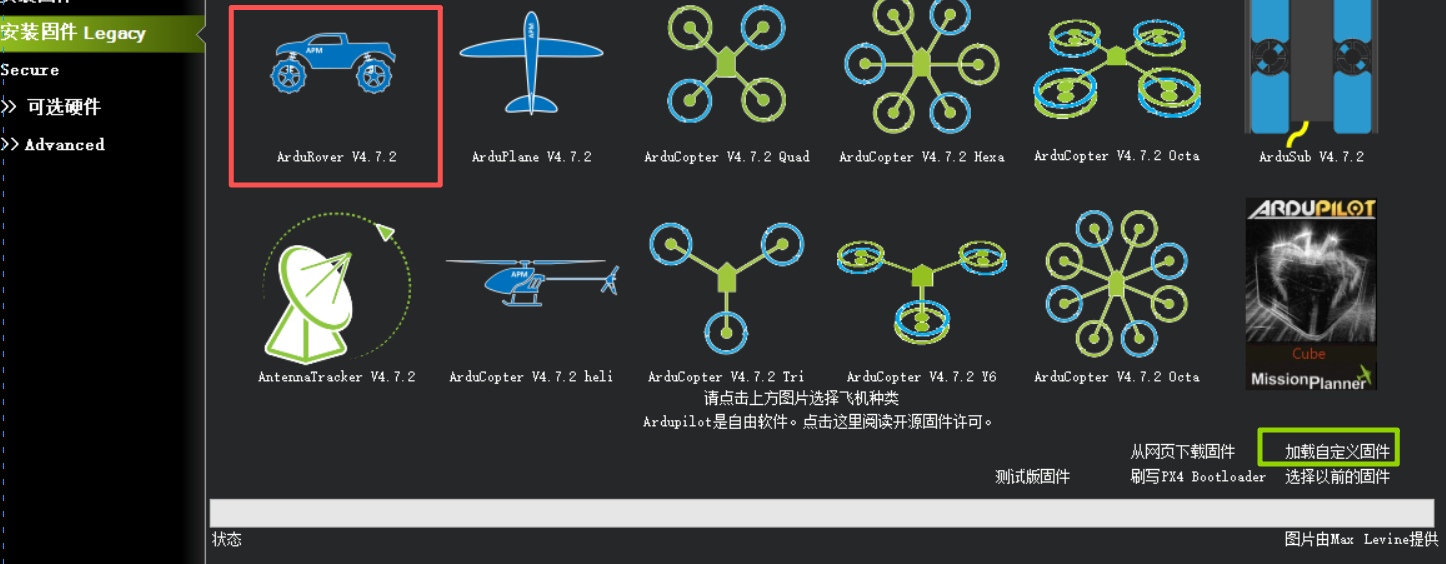
▲ Flashing rover firmware: click the ArduRover icon to flash online, or Load Custom Firmware at bottom right to import a local file. The screen is shown in the Chinese UI; the English build uses the same buttons
Use either method below.
Method 1: flash online
Open Mission Planner → Setup → Install Firmware → click the rover firmware icon and wait for flashing to finish.
Method 2: flash from a local file
Download the firmware from the download table below, then in the Mission Planner firmware screen choose Load Custom Firmware → select the downloaded file and wait for flashing to finish.
Disconnect everything else before flashing
Only one ground station can hold the serial port at a time. Close other ground stations, serial tools and radio configuration software first, or flashing stalls at "entering bootloader".
LGC ground station can flash firmware too; the steps are in Writing ArduPilot firmware.
Controller rover firmware
| Controller | Firmware source | Download |
|---|---|---|
| X25 MEGA | Maintained by CUAV, Rover 4.6.3 | CUAV-X25-MEGA_Rover_4.6.3.apj |
| X25 SUPER | Maintained by CUAV, Rover 4.7.1 | CUAV-X25-SUPER_Rover_4.7.1.apj |
| X25 EVO | Official ArduPilot stable | ardurover.apj |
| 7-Nano V2 | Official ArduPilot stable | ardurover.apj |
| Pixhawk V6X v2 | Official ArduPilot stable | ardurover.apj |
| X7+ Pro | Official ArduPilot stable | ardurover.apj |
| X7+ | Official ArduPilot stable | ardurover.apj |
| Nora+ | Official ArduPilot stable | ardurover.apj |
| V5 nano | Official ArduPilot stable | ardurover.apj |
| V5+ | Official ArduPilot stable | ardurover.apj |