

Flashing Boat Firmware
Rover, Copter and Plane are branches of the same ArduPilot code base, and a boat uses the Rover branch — the same firmware file as a ground vehicle. The flashing procedure is identical; the only difference is that FRAME_CLASS must be set to 2 afterwards before the controller works as a boat.
Flashing
Connect the controller to the computer over USB first, without the battery connected.
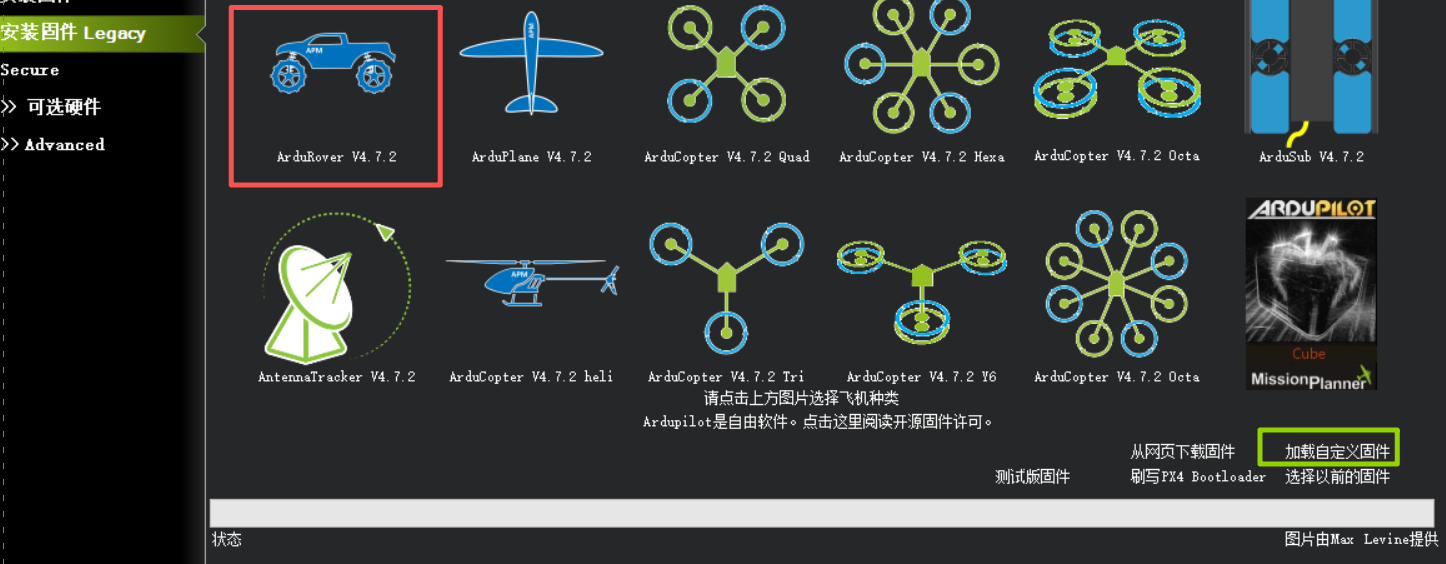
▲ Flashing boat firmware: click the ArduRover icon for an online flash, or Load custom firmware at the bottom right for a local file
Use either method below.
Method 1: Online flash
Open Mission Planner → Setup → Install Firmware → click the ArduRover icon and wait for the flash to finish.
Method 2: Local flash
Download the firmware from the table below, then in the Mission Planner firmware screen choose Load custom firmware → select the downloaded file and wait for the flash to finish.
Disconnect everything else before flashing
Only one ground station can hold the serial port at a time. Close other ground stations, serial tools and radio configuration software before flashing, or the flash stalls at entering the bootloader.
LGC ground station can flash the same way; see Writing ArduPilot firmware.
Controller firmware for boats
| Controller | Firmware source | Download |
|---|---|---|
| X25 MEGA | CUAV maintained, Rover 4.6.3 | CUAV-X25-MEGA_Rover_4.6.3.apj |
| X25 SUPER | CUAV maintained, Rover 4.7.1 | CUAV-X25-SUPER_Rover_4.7.1.apj |
| X25 EVO | ArduPilot stable | ardurover.apj |
| 7-Nano V2 | ArduPilot stable | ardurover.apj |
| Pixhawk V6X v2 | ArduPilot stable | ardurover.apj |
| X7+ Pro | ArduPilot stable | ardurover.apj |
| X7+ | ArduPilot stable | ardurover.apj |
| Nora+ | ArduPilot stable | ardurover.apj |
| V5 nano | ArduPilot stable | ardurover.apj |
| V5+ | ArduPilot stable | ardurover.apj |