

Variable-Pitch Multicopter (HeliQuad) Setup
A HeliQuad — also called a collective-pitch quadcopter or variable-pitch quad — replaces the four variable-speed motors of a normal quad with four variable-pitch rotors. A single motor drives all four rotors at a constant speed through belts and a torque tube, and four servos change each rotor's blade pitch to distribute lift. Response is fast and inverted flight is possible, but vibration is clearly higher and setup is harder than a conventional multicopter.
NOTE
HeliQuad is based on the traditional helicopter (Heli) firmware, not the normal multicopter firmware. Pick the Heli build on the firmware server; when Copter is compiled from source, the Heli and multicopter firmwares are built together.
How it works: RPM or pitch?
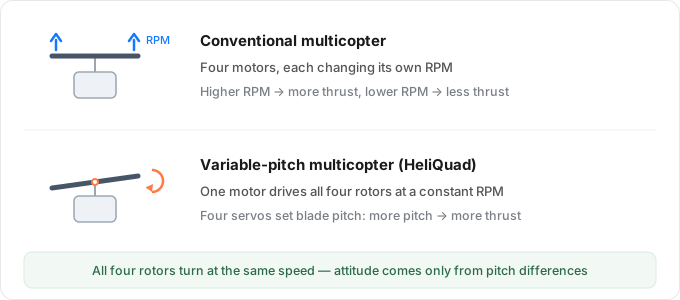
| Conventional multicopter | Variable-pitch multicopter | |
|---|---|---|
| How lift changes | Motor RPM | Constant RPM, blade pitch |
| Power train | 4 motors + 4 ESCs | 1 motor + 1 ESC + 4 servos |
| Frame and firmware | Multicopter firmware, quad | Helicopter firmware, FRAME_CLASS=13 |
| Traits | Simple and reliable | Fast response, inverted flight, high vibration |
All four rotors always turn at the same speed, so roll and pitch are not produced by "one side faster than the other" — they come from the pitch difference between adjacent rotors. The wiring, parameters and checkout below all follow from this.
Hardware
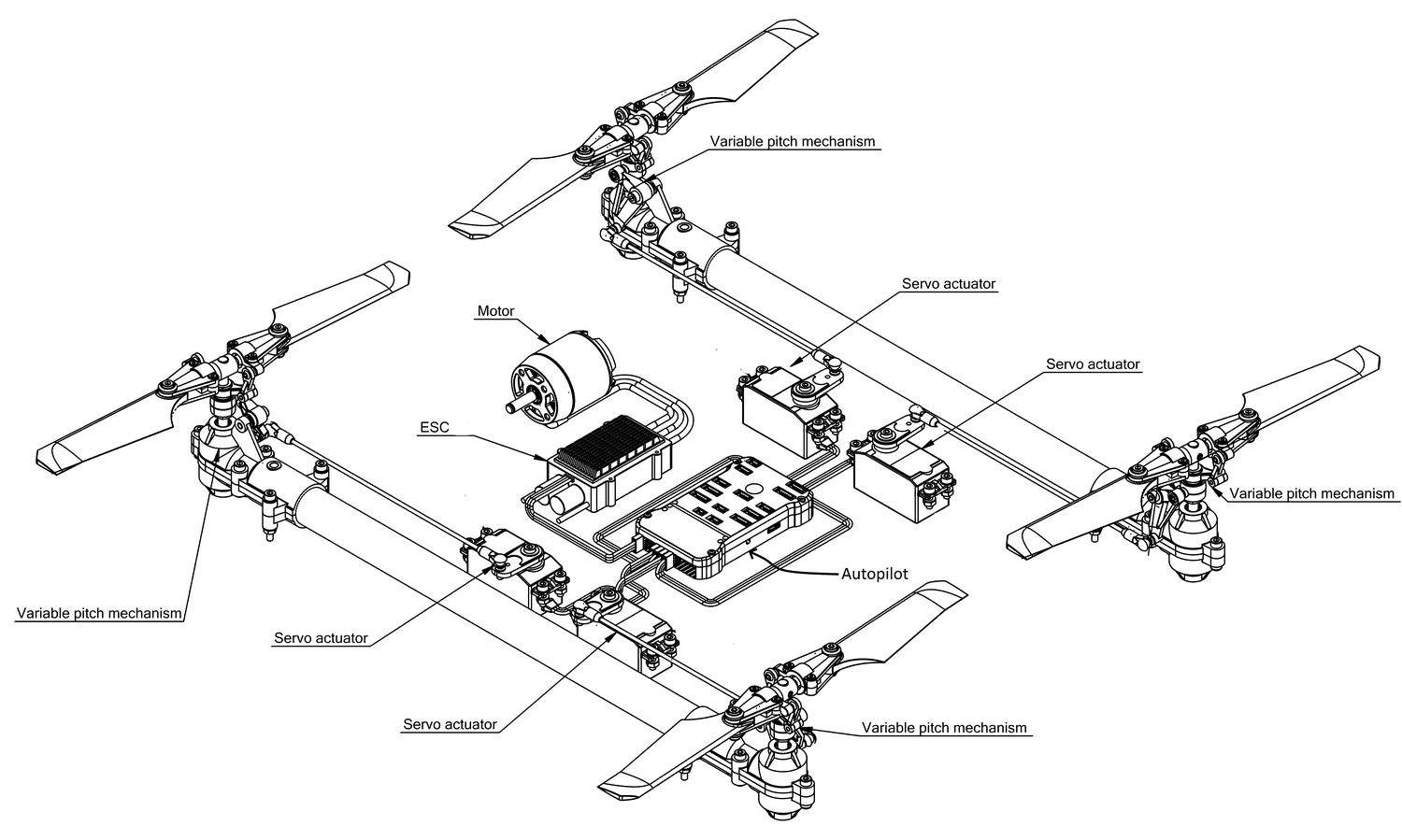
| Part | Qty | Role |
|---|---|---|
| Motor | 1 | Drives all four rotors through belts and a torque tube, at constant speed |
| ESC | 1 | Connects to M8; only starts, stops and holds the speed |
| Servos | 4 | One per rotor, sets blade pitch |
| Pitch mechanisms | 4 | Convert servo motion into blade angle |
| Controller | 1 | Runs Heli firmware, outputs four pitch channels + one motor channel |
Real vehicle
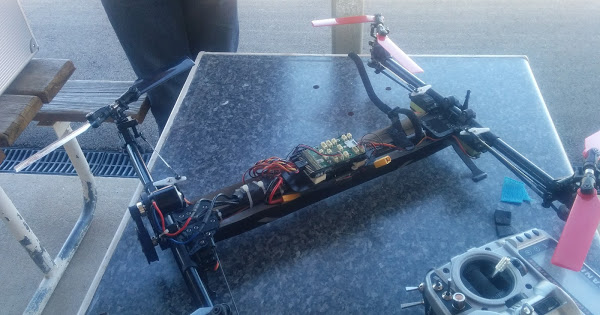
Wiring
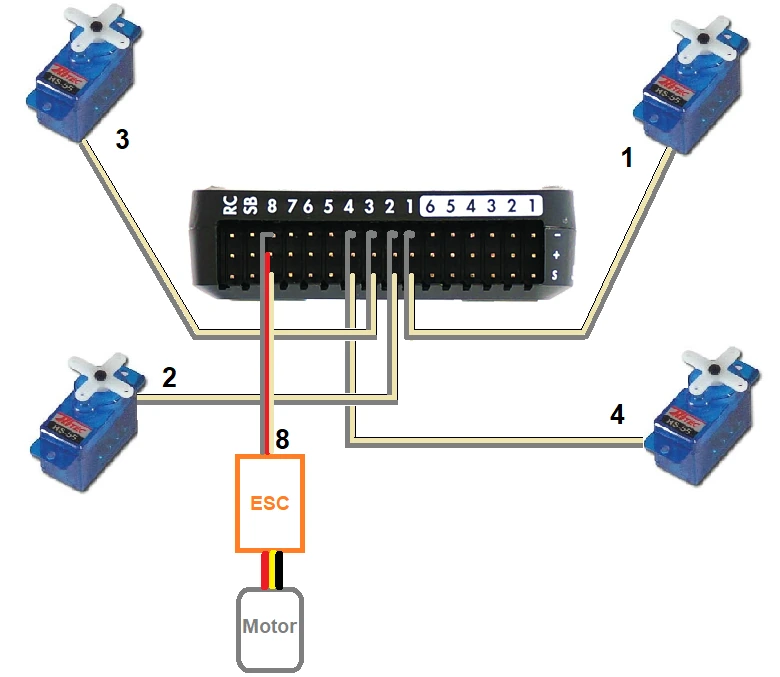
| Part | Connects to | Position |
|---|---|---|
| Servo 1 | M1 | Front right |
| Servo 2 | M2 | Rear left |
| Servo 3 | M3 | Front left |
| Servo 4 | M4 | Rear right |
| ESC | M8 | Drives the motor |
The servo order is identical to a normal quad (X layout) — see quadcopter layouts, there is no separate order to learn for a variable-pitch machine.
TIP
Four servos moving together draw real current. Give them their own 5–6 V supply (UBEC) instead of relying only on the controller's servo rail.
Parameters
| Parameter | Value | Notes |
|---|---|---|
FRAME_CLASS | 13 | HeliQuad frame |
FRAME_TYPE | 1 or 3 | X or H, see below |
RC8_OPTION | 32 | RC channel 8 = Motor Interlock |
Choosing FRAME_TYPE: look at the front-right (number 1) rotor — counter-clockwise means 1 (X), clockwise means 3 (H).
What RC8_OPTION (set to 32) does: a helicopter has no "armed means spinning" logic; the motor is switched on and off by Motor Interlock, normally on channel 8. Note that this is an RC input channel — it is not the output M8 that the ESC plugs into.
TIP
ArduPilot ships a ready-made parameter file for the WLToys Assassin V383; import it and fine-tune for your own frame.
Power-up and checkout
- Flash the Heli firmware following Writing ArduPilot Firmware, then wire it as in the table above.
- Set
FRAME_CLASSto 13, thenFRAME_TYPEaccording to the number 1 rotor direction, and reboot. - Set RC channel 8 to Motor Interlock (
RC8_OPTIONset to 32) and confirm the switch starts and stops the motor. - Leave the blades off: with motor interlock off, move the pitch and roll sticks — all four servos should change pitch together and in the direction of the stick (push forward, the nose-side blades go down in pitch).
- Fit the blades and run up slowly. Once all four rotors spin up together with normal vibration, lift off into a hover.
Cautions
- Vibration: one motor driving four rotors through a long drivetrain vibrates more than a normal quad — balance the blades and check vibration levels before touching PID.
- Do not copy PID values: a variable-pitch machine has different response and inertia; multicopter defaults will overshoot badly.
- Pitch range: the servo pitch range follows the helicopter
H_COL_*parameters. If pitch is too small or binds at the ends, calibrate the range the way it is done for a helicopter.
FAQ
- Is the Heli firmware really required?
- Yes. HeliQuad is a frame branch of the helicopter firmware, which provides the four-channel pitch mixing; multicopter firmware treats M1–M4 as motor outputs and the servos will not move as expected.
- The switch is on but the motor still will not turn?
- Check that
RC8_OPTIONis 32, then confirm on the ground station's RC page that channel 8 actually changes; finally check that the ESC is on M8, not M1–M4.
- It flips on takeoff?
- First check whether
FRAME_TYPEX/H is reversed, then check servo direction: if one servo changes pitch opposite to the other three, the attitude correction makes the tilt worse.