

Arming Alerts and Troubleshooting
ArduPilot runs a set of pre-arm checks and refuses to arm when something is wrong. The checks exist to prevent crashes and fly-aways, though some can be turned off if you really need to (see the end of this page).
Sensor problems
1.1 Accelerometer
| Message | Meaning | Fix |
|---|---|---|
| 3D Accel calibration needed | Accelerometer not calibrated | Run accelerometer calibration |
| Accels calibrated requires reboot | Reboot needed after calibration | Restart the controller |
| Accels inconsistent | The two accelerometers differ by more than 0.75 m/s² | Recalibrate, warm up, restart |
| Accels not healthy | At least one accelerometer is not reporting | Restart the controller, or contact support |
1.2 Gyro
| Message | Meaning | Fix |
|---|---|---|
| Gyros inconsistent | The two gyros differ by more than 5 deg/s | Restart and keep the aircraft still |
| Gyros not calibrated | Gyro calibration failed at boot | Restart and keep the aircraft still |
| Gyros not healthy | At least one gyro is not reporting | Restart the controller, or contact support |
| Gyro x rate yHz < loop rate z Hz | Gyro output rate is below the main loop rate | Lower SCHED_LOOP_RATE |
1.3 Compass
| Message | Meaning | Fix |
|---|---|---|
| Compass not calibrated | Compass not calibrated — COMPASS_OFS_X, _Y, _Z | Run compass calibration |
| Compass calibrated requires reboot | Reboot needed after calibration | Restart the controller |
| Compass calibration running | Compass calibration in progress | Finish or cancel it |
| Compass not healthy | At least one compass is not reporting | Check the wiring and configuration |
| Compass offsets too high | Compass offsets too large | Move the compass away from metal, remount, recalibrate |
| Compasses inconsistent | The two compasses disagree on heading or field strength | Check mounting orientation, recalibrate, keep away from metal |
| Check mag field (xy diff:x>875) | Horizontal field out of range | Keep away from metal, recalibrate |
| Check mag field (z diff:x>875) | Vertical field out of range | Keep away from metal, recalibrate |
| Check mag field: x, max y, min z | Magnetic field out of range | Keep away from metal, recalibrate |
1.4 Barometer
| Message | Meaning | Fix |
|---|---|---|
| Altitude disparity | Baro and EKF altitude differ by more than 1 m | Wait for the EKF to settle, or restart |
| EKF height variance | Baro data unstable or vibration too high | Check vibration, improve isolation |
| Baro not healthy | The barometer is reporting bad data or has failed | Restart the controller, or contact support |
1.5 Airspeed
| Message | Meaning | Fix |
|---|---|---|
| Airspeed 1 not healthy | No data from the airspeed sensor | Check the wiring and configuration |
1.6 Rangefinder
| Message | Meaning | Fix |
|---|---|---|
| Rangefinder x: Not Connected | No data from the rangefinder | Check the wiring, the power, and whether the firmware includes the driver |
| RNGFNDx_PIN not set | Rangefinder pin not configured | Set RNGFNDx_PIN |
| RNGFNDx_PIN=y invalid | Rangefinder pin configured wrongly | Check the pin setting |
| RNGFNDx_PIN=y, set SERVOx_FUNCTION=-1 | Pin conflict | Set SERVOx_FUNCTION to -1 |
1.7 Visual odometry
| Message | Meaning | Fix |
|---|---|---|
| VisOdom: not healthy | No data from visual odometry | Check the wiring and configuration |
| VisOdom: out of memory | The controller has run out of memory | Disable the feature or use a different controller |
1.8 Proximity
| Message | Meaning | Fix |
|---|---|---|
| PRXx: No Data | No data from the proximity sensor | Check the wiring and configuration |
| PRXx: Not Connected | Proximity sensor not connected | Check the wiring and configuration |
GPS / AHRS / EKF problems
2.1 GPS
| Message | Meaning | Fix |
|---|---|---|
| GPS x: Bad fix | No usable GPS fix | Move outdoors with a clear view of the sky |
| GPS x: not healthy | No data from the GPS | Check the wiring and power |
| GPS x: was not found | GPS not connected or misconfigured | Check the wiring and parameters |
| GPS positions differ by Xm | The two GPS units differ by more than 50 m | Wait for the signal to improve |
| GPS blending unhealthy | At least one GPS has poor data | Check the antenna and interference sources |
| GPS and AHRS differ by Xm | GPS and EKF differ by more than 10 m | Wait for the GPS to improve |
| GPS alt error xm | GPS and baro altitudes differ too much | See BARO_ALTERR_MAX |
| GPSx yaw not available | GPS heading not available | Improve the GPS signal |
| GPS Node x not set as instance y | DroneCAN GPS misconfigured | Check GPS1_CAN_NODEID / GPS2_CAN_NODEID |
| Same Node Id x set for multiple GPS | Duplicate DroneCAN GPS node ID | Give each node a different ID |
2.2 AHRS / EKF
| Message | Meaning | Fix |
|---|---|---|
| AHRS not healthy | AHRS/EKF not ready | Wait for initialisation, or restart |
| AHRS: not using configured AHRS type | EKF3 not ready, using DCM | Move outdoors and get a good GPS fix |
| AHRS: waiting for home | No GPS fix | Wait for a GPS lock |
| EKF attitude is bad | EKF attitude unreliable | Wait, restart, check the sensors |
| EKF3 Roll/Pitch inconsistent by x degs | Attitude estimates disagree | Improve GPS, wait |
| EKF3 Yaw inconsistent by x degs | Yaw estimates disagree | Wait, or restart |
| EKF3x vel error y | Velocity residual too large | Check the GPS |
| EKF3 waiting for GPS config data | GPS auto-configuration not finished | Check the GPS connection |
RC problems
| Message | Meaning | Fix |
|---|---|---|
| RC not calibrated | Transmitter not calibrated | Run RC calibration |
| RC calibrating | RC calibration in progress | Finish calibration |
| RC not found | No RC signal, with failsafe enabled | Power on the transmitter or check the connection |
| Radio failsafe on | RC failsafe triggered | Check the transmitter, receiver and FS_THR_VALUE |
| Roll (RCx) is not neutral | Roll stick not centred | Centre it or recalibrate |
| Pitch (RCx) is not neutral | Pitch stick not centred | Centre it or recalibrate |
| Yaw (RCx) is not neutral | Yaw stick not centred | Centre it or recalibrate |
| Throttle (RCx) is not neutral | Throttle stick not centred | Centre it or recalibrate |
| Roll radio max too low | Roll channel maximum below 1700 | Recalibrate |
| Roll radio min too high | Roll channel minimum above 1300 | Recalibrate |
| Pitch radio max too low | Pitch channel maximum below 1700 | Recalibrate |
| Pitch radio min too high | Pitch channel minimum above 1300 | Recalibrate |
| Yaw radio max too low | Yaw channel maximum below 1700 | Recalibrate |
| Yaw radio min too high | Yaw channel minimum above 1300 | Recalibrate |
| Throttle radio max too low | Throttle channel maximum below 1700 | Recalibrate |
| Throttle radio min too high | Throttle channel minimum above 1300 | Recalibrate |
| RCx_MAX is less than RCx_TRIM | RC configured wrongly | Adjust TRIM or recalibrate |
| RCx_MIN is greater than RCx_TRIM | RC configured wrongly | Adjust TRIM or recalibrate |
| Multiple SERIAL ports configured for RC input | RC input configured on more than one port | Check the RC input configuration |
Motor / servo / output problems
| Message | Meaning | Fix |
|---|---|---|
| Motors: no SERVOx_FUNCTION set to MotorX | Motor output not configured | Check SERVOx_FUNCTION |
| Motors: Check MOT_PWM_MIN and MOT_PWM_MAX | PWM range configured wrongly | Set 1000 / 2000 and recalibrate the ESCs |
| Motors: MOT_SPIN_ARM > MOT_SPIN_MIN | Motor start value set wrongly | Adjust the parameters |
| Motors: MOT_SPIN_MIN too high | Minimum motor speed too high | Lower MOT_SPIN_MIN |
| Motors Emergency Stopped | Motors emergency stopped | Release the emergency stop switch |
| Servo voltage to low (Xv < 4.3v) | Servo supply voltage too low | Check the servo power |
| SERVOx_FUNCTION=y on disabled channel | Output channel disabled | Check the servo configuration |
| SERVOx_MAX is less than SERVOx_TRIM | Servo output configured wrongly | Adjust the parameters |
| SERVOx_MIN is greater than SERVOx_TRIM | Servo output configured wrongly | Adjust the parameters |
| FETtec: Not initialised | FETtec ESCs not initialised | Check the configuration and wiring |
| FETtec: x of y ESCs are not running | Some ESCs not running | Check the ESCs and their wiring |
| FETtec: x of y ESCs are not sending telem | Some ESCs not sending telemetry | Check the ESCs and their wiring |
Battery problems
| Message | Meaning | Fix |
|---|---|---|
| Battery failsafe | Battery failsafe triggered | Check the battery voltage and capacity |
| Battery low voltage failsafe | Voltage < BATT_LOW_VOLT | Change the battery or adjust the parameters |
| Battery critical voltage failsafe | Voltage < BATT_CRT_VOLT | Change the battery or adjust the parameters |
| Battery low capacity failsafe | Capacity < BATT_LOW_MAH | Change the battery or adjust the parameters |
| Battery critical capacity failsafe | Capacity < BATT_CRT_MAH | Change the battery or adjust the parameters |
| Battery below minimum arming voltage | Voltage < BATT_ARM_VOLT | Change the battery or adjust the parameters |
| Battery below minimum arming capacity | Capacity < BATT_ARM_MAH | Change the battery or adjust the parameters |
| Battery unhealthy | No data from the battery monitor | Check the wiring and configuration |
| Battery voltage failsafe critical >= low | BATT_LOW_VOLT >= BATT_CRT_VOLT | Swap the thresholds |
| Battery capacity failsafe critical >= low | BATT_LOW_MAH >= BATT_CRT_MAH | Swap the thresholds |
Geofence problems
| Message | Meaning | Fix |
|---|---|---|
| Fence requires position | Fence enabled but no position estimate | Wait for the GPS to settle |
| FENCE_ALT_MAX < FENCE_ALT_MIN | Fence altitude configured wrongly | Adjust the parameters |
| FENCE_MARGIN is less than FENCE_RADIUS | Fence margin configured wrongly | Adjust the parameters |
| FENCE_MARGIN too big | Margin larger than the altitude range | Adjust the parameters |
| Fences enabled, but none selected | Fence enabled but none defined | Define a fence or disable it |
| Fences invalid | Polygon fence invalid | Check for crossing segments |
| vehicle outside fence | The aircraft is outside the fence | Move it back inside |
Rally point problems
| Message | Meaning | Fix |
|---|---|---|
| Can’t check rally without position | No position estimate | Wait for the GPS |
| No sufficiently close rally point located | The nearest rally point is further than RALLY_LIMIT_KM | Adjust the parameter or add a closer rally point |
| No rally library present | Firmware built without rally point support | Rebuild the firmware |
Scripting (Lua) problems
| Message | Meaning | Fix |
|---|---|---|
| Scripting: loaded CRC incorrect want: x | Script CRC mismatch | Replace it with the correct version |
| Scripting: running CRC incorrect want: x | Script CRC mismatch | Replace it with the correct version |
| Scripting: xxx failed to start | Script failed to start | Check the memory or the script |
| Scripting: xxx out of memory | Script out of memory | Increase SCR_HEAP_SIZE |
DroneCAN problems
| Message | Meaning | Fix |
|---|---|---|
| DroneCAN: Duplicate Node x../y! | Duplicate node ID | Clear the DNS table or change the node ID |
| DroneCAN: Failed to access storage! | Storage access failed | Restart the controller |
| DroneCAN: Failed to add Node x! | Could not initialise the node | Check the sensor wiring |
| DroneCAN: Node x unhealthy! | Node not reporting | Check the wiring and power |
Other system problems
11.1 Safety switch
| Message | Meaning | Fix |
|---|---|---|
| Safety Switch | Safety switch not pressed | Press it, or disable BRD_SAFETY_DEFLT |
11.2 Logging
| Message | Meaning | Fix |
|---|---|---|
| Logging failed | Cannot write logs | No SD card detected — reseat or format it |
| Logging not started | Cannot start logging | No SD card detected — reseat or format it |
| Downloading logs | Cannot arm while logs are downloading | Wait, or cancel the download |
11.3 Out of memory
| Message | Meaning | Fix |
|---|---|---|
| ADSB out of memory | Out of memory | Disable the feature |
| Scripting: xxx out of memory | Script out of memory | Disable the feature or use a different controller |
| Terrain out of memory | Terrain data out of memory | Disable the feature or use a different controller |
11.4 System initialisation
| Message | Meaning | Fix |
|---|---|---|
| System not Initialized | Still booting | Wait |
| temperature cal running | Temperature calibration running | Wait |
Pre-arm checks
WARNING
If you are only testing or debugging on the bench, you can disable the pre-arm checks. Doing so makes the system skip them, which can lead to a crash.
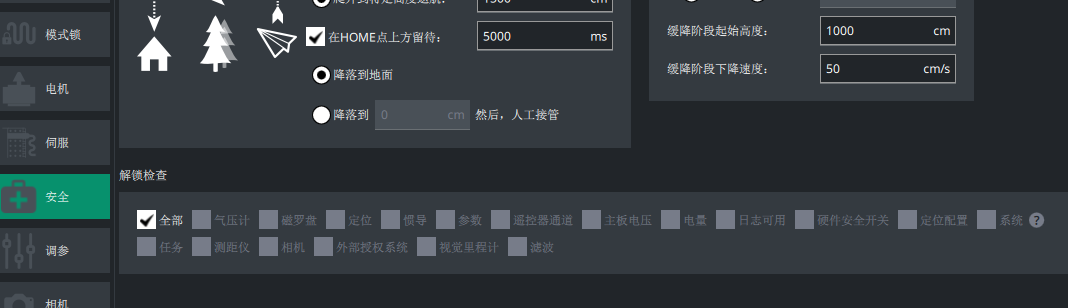
Configure them in LGC Ground Station under UAV Setup > Safety > Pre-arm checks:
WARNING
Unticking an item means it is not checked before arming. You can also pick individual checks by setting ARMING_CHECK to something other than 1; setting it to 0 turns every pre-arm check off.