

Wind Estimation and Barometer Compensation
A multirotor needs no airspeed sensor for the EKF to work out what wind it is flying in — how strong, and from where.
That estimate does two jobs:
- Gives the pilot a real-time reference
- Compensates for wind disturbing the barometer: when the controller is exposed to airflow, pressure readings get pushed around, which shows up as a few metres of climb or sink after fast forward flight slows down
There are three steps: airframe drag coefficient, propeller drag coefficient, then barometer compensation.
1. Working out the airframe drag coefficient
1. Weigh it
Weigh the aircraft with its battery, in kg.
2. Measure the frontal and side areas
Take two photos from a few metres away — one of the front, one of the side — and use them to measure the frontal and side areas. An online tool can overlay a grid on the photo or trace the outline:
- Add grid to image (free): scale the grid to a known dimension of the aircraft in cm, count the squares covering the airframe (propellers excluded) and that count is the area in cm²
- SketchAndCalc (one-hour free trial): draw a polygon around the airframe outline and read the area in cm² straight off
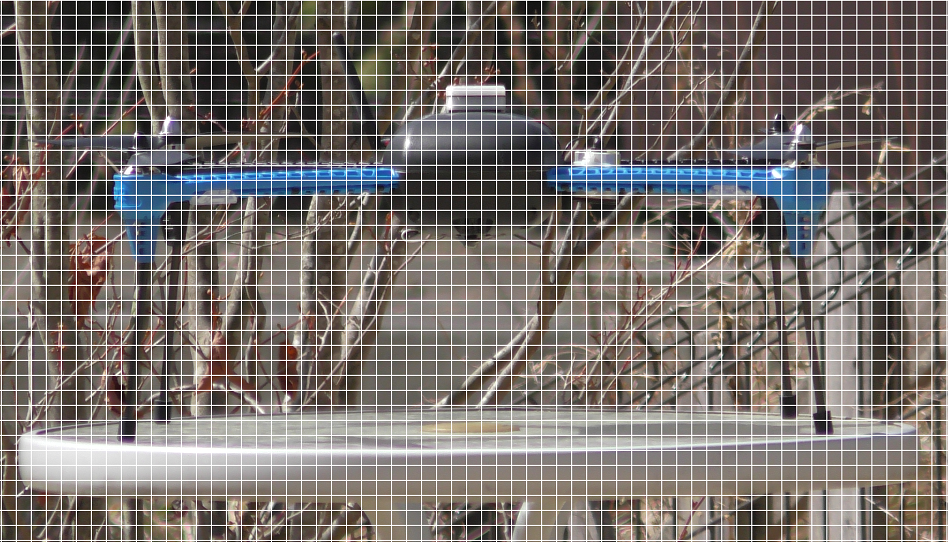
▲ Grid overlaid on the photo — count the squares covering the airframe
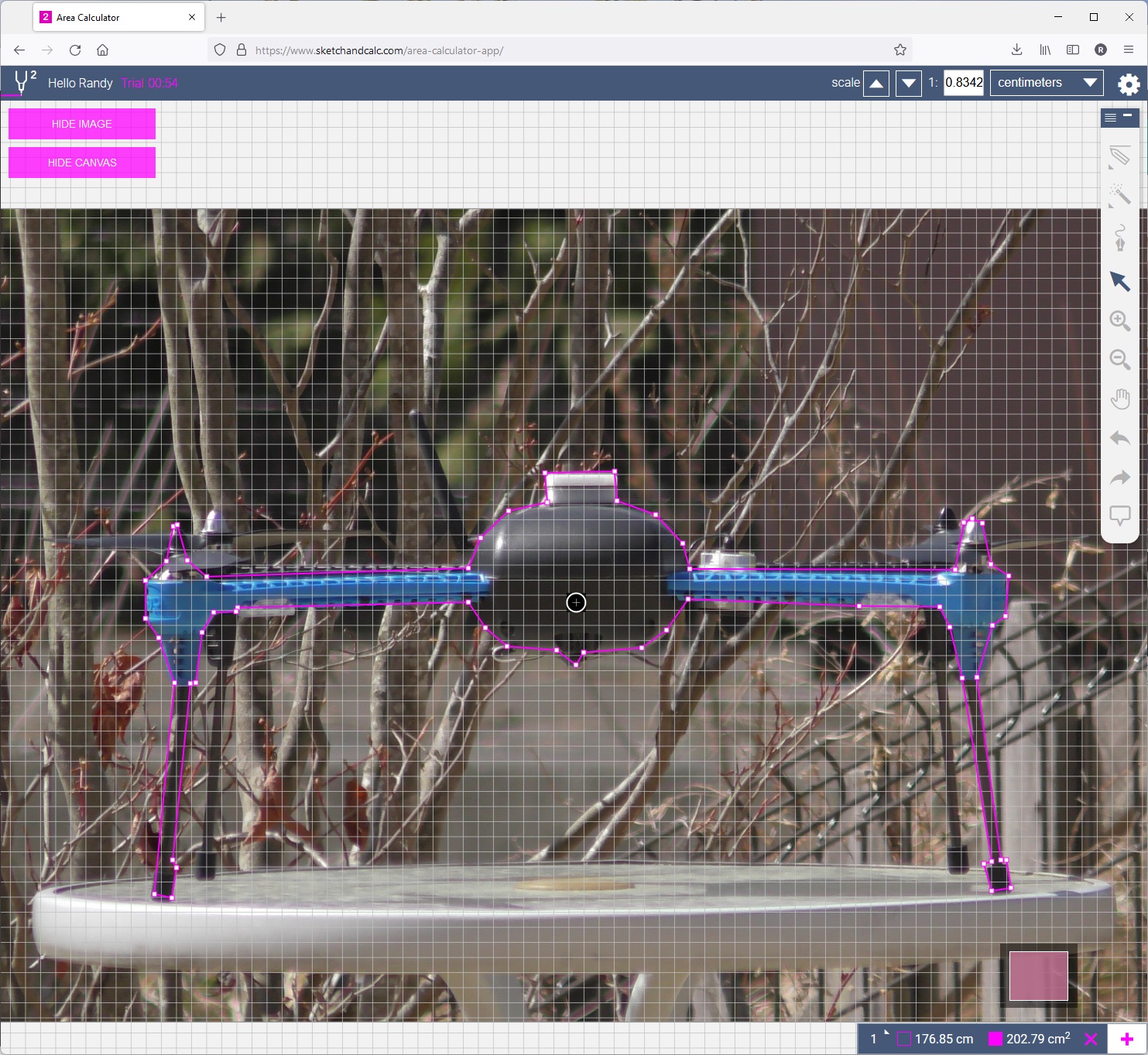
▲ Tracing the outline in SketchAndCalc, which shows the area directly
Divide the area in cm² by 10000 to get m².
3. Enter the parameters
| Parameter | How to calculate |
|---|---|
EK3_DRAG_BCOEF_X | weight (kg) ÷ frontal area (m²) |
EK3_DRAG_BCOEF_Y | weight (kg) ÷ side area (m²) |
The IRIS in the photo, as an example:
| Item | Value |
|---|---|
| Weight | 1.45 kg |
| Frontal area | 203 cm² = 0.0203 m² |
| Side area | 217 cm² = 0.0217 m² |
EK3_DRAG_BCOEF_X | 1.45 ÷ 0.0203 = 71.4 |
EK3_DRAG_BCOEF_Y | 1.45 ÷ 0.0217 = 66.8 |
2. Working out the propeller drag coefficient
The propeller drag coefficient, EK3_DRAG_MCOEF, can only come from flight testing. The calculation and how to read it are covered in this official ArduPilot video.
- Pick an open site with little wind
- Optional: set
LOG_DISARMED= 1 andLOG_REPLAY= 1 so you can replay the flight afterwards - Arm and take off in Loiter (so the EKF position estimate stays good) and fly to the middle of the test area
- Switch to AltHold and let the aircraft drift downwind so you can see the wind direction and strength
- Point the nose into wind, hold full pitch stick to accelerate upwind until acceleration stops
- Release pitch, let it decelerate and drift back downwind to the start line
- Reposition the aircraft somewhere comfortable
- Yaw 90° (clockwise, say) so one side faces the wind, hold full roll stick to accelerate, release and drift back
- Reposition again
- Repeat step 8 with the tail into wind (accelerate by pulling back)
- Repeat step 8 with the other side into wind (accelerate with the opposite roll direction)
- Land, then download the onboard log — see downloading flash logs
TIP
EK3_DRAG_MCOEF normally ends up somewhere between 0.1 and 1.0.
3. Watching wind speed and direction live in the ground station
Once enabled, the estimated wind goes to the ground station in the MAVLink WIND message.
In Mission Planner: Flight Data screen, Quick tab, double-click any value and pick wind_dir or wind_vel.
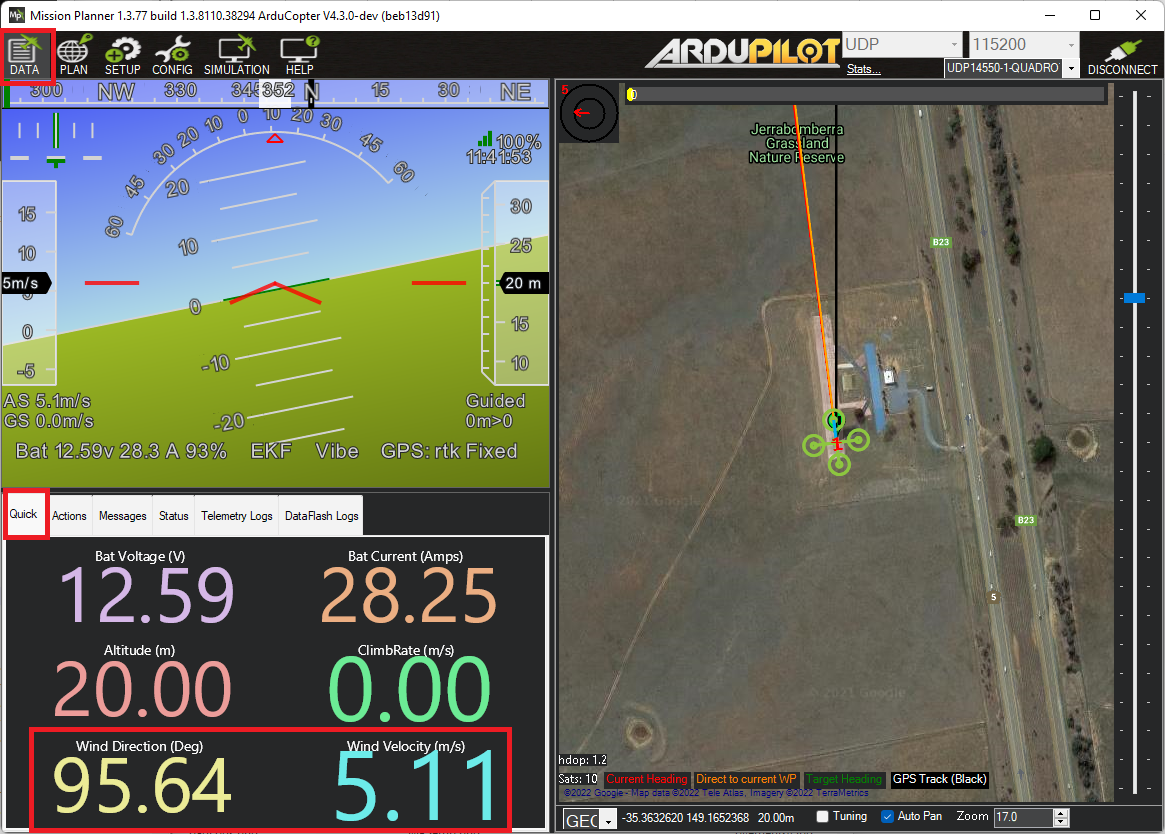
▲ Bringing up wind direction and speed on the Quick tab in Mission Planner
4. Reading wind speed from a log
The EKF wind estimate is logged in the XKF2 message — look at VWN (north wind) and VWE (east wind).
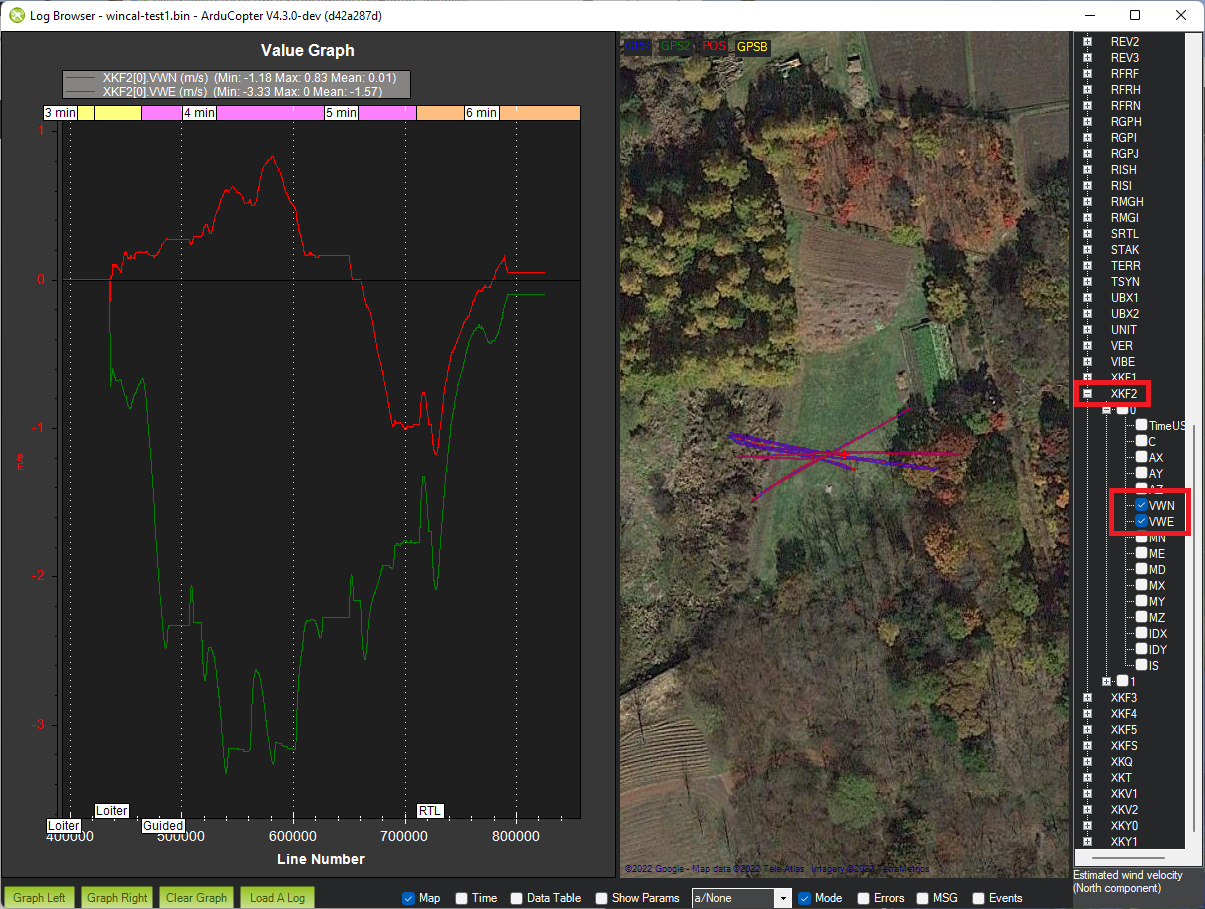
▲ Expanding XKF2 in the log browser and ticking VWN / VWE
5. Barometer position error compensation
With a wind estimate you can compensate the pressure error wind causes at each barometer, in four directions (front, back, left, right). The calculation is shown in this official ArduPilot video.
1. Test flights
Fly once with the nose into wind, once tail into wind, once right side into wind and once left side into wind, then download the onboard log.
2. Work out the position error coefficient for each direction
- Get air density in kg/m³ from an air density calculator
- Static pressure error (Pa) = −height × gravitational acceleration × air density
- Dynamic pressure = 0.5 × air density × wind speed²
- Position error coefficient = static pressure error ÷ dynamic pressure
NOTE
The coefficient should land between -1 and +1.
3. Enable compensation and enter the coefficients
Set BARO1_WCF_ENABLE to 1, then restart the controller.
Parameters for the first barometer:
| Parameter | Direction |
|---|---|
BARO1_WCF_FWD | Positive X (front) |
BARO1_WCF_BCK | Negative X (back) |
BARO1_WCF_RGT | Positive Y (right) |
BARO1_WCF_LFT | Negative Y (left) |
BARO1_WCF_UP | Positive Z (up) |
BARO1_WCF_DN | Negative Z (down) |
NOTE
With more than one barometer, the prefix becomes BARO2_WCF_*, BARO3_WCF_* and so on — each one is calculated and entered separately.