

Flight Mode Setup
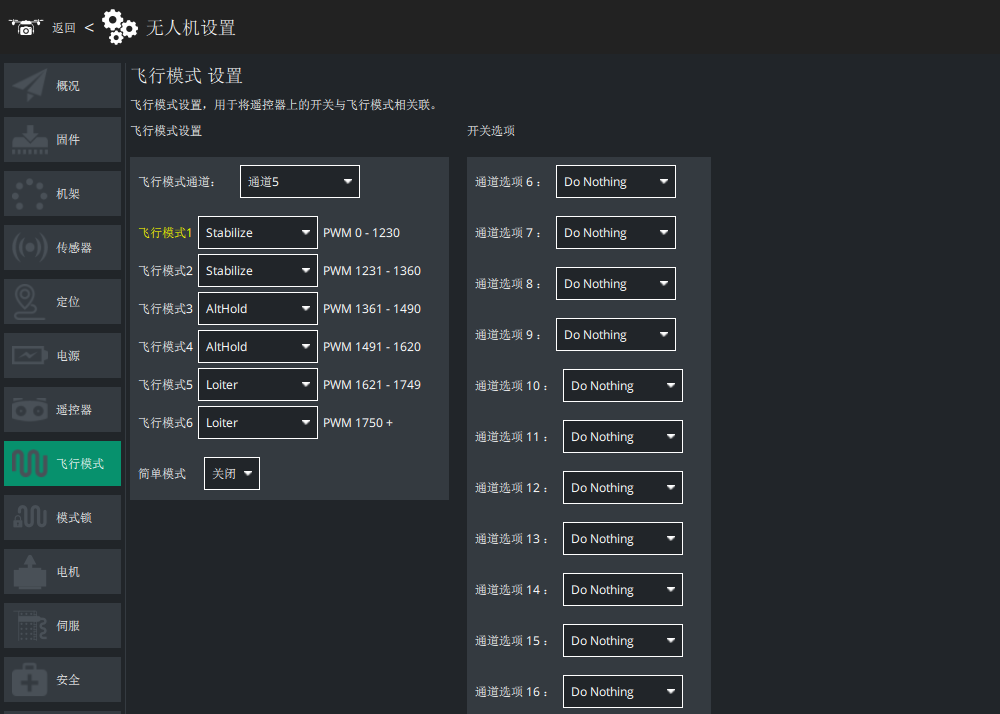
Flight modes are switched with a channel on the RC transmitter. The channel is set by FLTMODE_CH, which defaults to channel 5 on multirotors.
Configuring flight modes
- Map RC channel 5 to a 3-position or 2-position switch.
- Connect the controller to LGC Ground Station.
- Open UAV Setup and go to the flight mode screen.
- Toggle the flight mode switch on the transmitter (CH5 by default on multirotors) and watch which mode position lights up. Assign the mode you want to each position.
TIP
Three flight modes are normally enough. The usual set is Stabilize, AltHold and Loiter. You can also use the channel mode option to reach a few more modes (RTL, AUTO and so on), or set them up in the transmitter itself.
NOTE
On VTOL fixed-wing aircraft, leave the flight mode channel on channel 5.