

Parachute Configuration
When a multirotor loses control in the air and starts to fall, an automatic parachute deployment brings the descent rate under 5 m/s and saves the airframe and payload.
ArduPilot's parachute feature is not limited to multirotors — helicopters, fixed-wing aircraft and VTOLs use it too, with the same parameters. Motor failure, a jammed control surface, a violent spin, a flat battery: once the pilot can no longer fly it out with attitude control, the parachute is the last line of defence.
There are three ways to trigger it: automatic on loss of control, manual from a transmitter switch, and a command from the ground station or a mission.
Hardware requirements
Parachute unit
- The release mechanism must be electrically driven: a servo, a solenoid valve or a pyro cutter all work
- A ready-made chute built for PWM servo or relay triggering is the easiest to wire and configure — Fruity Chutes, Mars Mini and SkyCat, for example
- The canopy has to be big enough: once fitted it must hold the whole aircraft below 5 m/s descent. A home-made setup is simply "a servo pulling a pin, plus a chute bag"
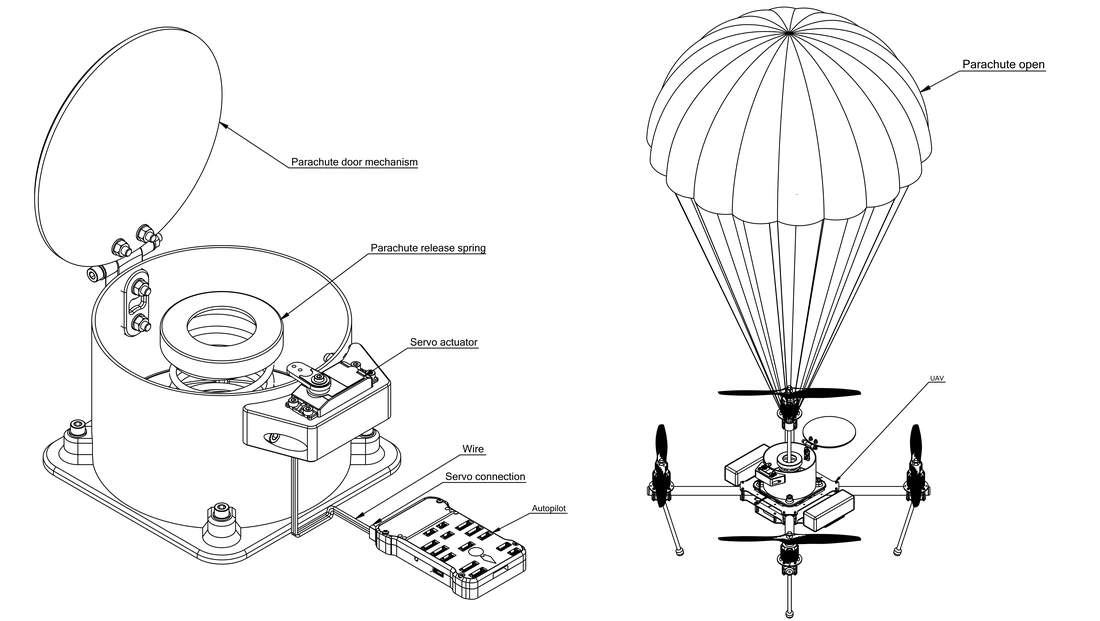
▲ Left: door, release spring, servo and the wiring to the controller; right: deployed
Controller interface
Two options, pick one:
| Method | Connects to | Parameters |
|---|---|---|
| Servo (preferred) | Any free PWM output | SERVOx_FUNCTION = 27 (Parachute Release) |
| Relay | A free GPIO | RELAYX_PIN + RELAYX_FUNCTION = 3 |
Pins and wiring are covered in the next section.
Power
Give the servo (or the pyro igniter) its own BEC or battery. If the main pack comes loose or a wire is torn out, the chute still has to open — that is the whole point of the separate supply. Sharing the main pack hands the last line of defence to the system that has already failed.
Mechanical installation
- The bay door opens outward — otherwise prop wash can suck it shut
- Fire the chute upward, clear of the blades and arms, so the lines cannot tangle
- Put the bridle attachment slightly below the aircraft's centre of gravity so it does not hang upside down after deployment
Wiring
The servo signal wire goes to one of the controller's PWM outputs. Which pin SERVO9 lands on depends on whether the controller has an IOMCU:
| Controller type | Pin for SERVO9 |
|---|---|
| With IOMCU (outputs split into MAIN and AUX) | A1 (AUX OUT 1) |
| Without IOMCU (a single bank of M outputs) | M9 |
Check the silkscreen on the controller before wiring, and confirm which number SERVO9 maps to.
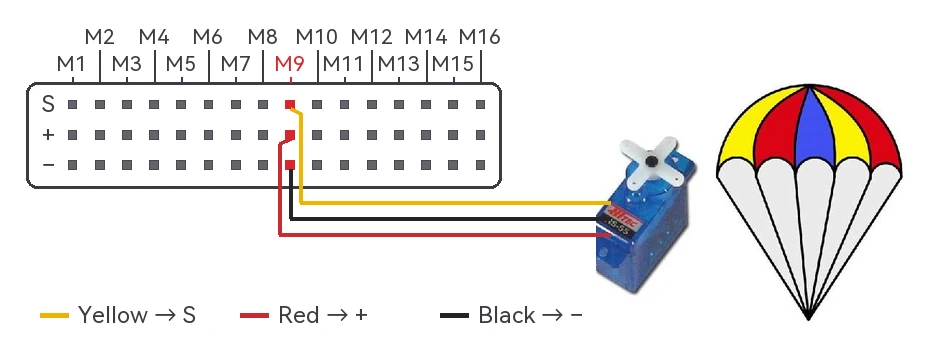
▲ X25 EVO as the example: the servo's three wires go to M9 (colour coding is in the legend), and the servo pulls the pin to release the chute
Two things to watch when triggering with a relay:
- GPIO output current is tiny — never drive a heavy load from it directly
- GPIO is low by default while the bootloader runs, so choose a mechanism that triggers on a high level and set
RELAYx_DEFAULTtoOFForNo Change, so powering up cannot fire the chute by accident
WARNING
Deployment is violent. Take the propellers and the chute off before any bench or ground test.
Parameters
| Parameter | What it does | Values |
|---|---|---|
CHUTE_ENABLED | Master switch for the parachute | 0 off1 on |
CHUTE_TYPE | Release mechanism type | 10 servo0 relay |
CHUTE_SERVO_ON | Servo PWM on deployment | 1000 ~ 2000 µs |
CHUTE_SERVO_OFF | Servo PWM at rest (not deployed) | 1000 ~ 2000 µs |
CHUTE_CRT_SINK | Sink rate that triggers deployment | 0 ~ 15 m/s |
CHUTE_ALT_MIN | Minimum height above the takeoff point for automatic deployment | 0 ~ 32000 m; 0 disables the check, default 10 m |
CHUTE_DELAY_MS | Delay from motor stop to deployment | 0 ~ 5000 ms |
CHUTE_OPTIONS | Extra behaviours, see below | bitmask |
Setup steps
1. Turn it on
Set CHUTE_ENABLED to 1, then refresh parameters or reboot — the other CHUTE_ parameters only appear after that.
2. Choose the release method
Servo release
| Parameter | Set to |
|---|---|
CHUTE_TYPE | 10 |
CHUTE_SERVO_ON | PWM that pulls the pin |
CHUTE_SERVO_OFF | PWM at rest |
SERVO9_FUNCTION | 27 (Parachute), which is A1 or M9; for another output just shift the number, so A2 or M10 uses SERVO10_FUNCTION |
Relay release
| Parameter | Set to |
|---|---|
CHUTE_TYPE | 0 |
RELAY1_PIN | GPIO pin number for that relay |
RELAY1_FUNCTION | 3 (Parachute) |

▲ Set the output that drives the servo to function 27 (Parachute)
3. Set the trigger conditions
CHUTE_CRT_SINK: deploy once the sink rate reaches this value, in m/sCHUTE_ALT_MIN: minimum height above the takeoff point — below it there is no automatic deployment;0disables the height check
4. Manual deployment (optional)
Give the transmitter a switch and set that channel's RCx_OPTION to:
| Value | Meaning |
|---|---|
22 | Switch high deploys the chute |
23 | Three-position: low = deployment disabled, middle = enabled, high = forced deployment |
21 | Enable/disable only: high = deployment allowed, anything else = blocked |
5. Ground station or mission deployment (optional)
Use MAV_CMD_DO_PARACHUTE (command 208); parameter 1 sets the action — 0 disable, 1 enable, 2 release now. It also works as a DO_PARACHUTE waypoint in a mission.
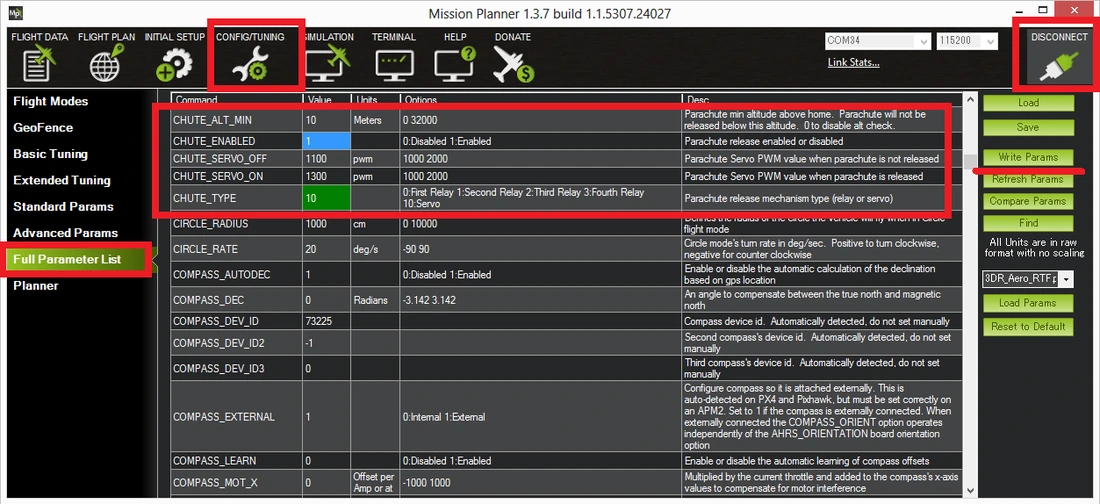
▲ Search for CHUTE_ in the full parameter list to find these (the screenshot is an older interface; trust what you see)
When it deploys automatically
All of these must hold for a full second before it deploys:
- Armed, and not landed
- Not in FLIP or ACRO
- Roll or pitch more than 30° away from the target attitude
- The barometer shows the aircraft is not climbing
- At the moment the loss of control is first detected, higher than
CHUTE_ALT_MIN(in a fast fall, the actual deployment may already be below that height)
NOTE
Too much barometer noise can make the check fail; the other way round, a false detection deploys the chute for nothing. Set the sink rate and minimum height for your own airframe — do not copy the defaults.
The two CHUTE_OPTIONS bits
| Bit | Meaning |
|---|---|
| 0 | Hold the released state until reboot. For cold high-altitude work, where the servo or relay may be frozen and only moves once it warms up lower down |
| 1 | Do not disarm the aircraft before deploying (by default the motors are stopped and the aircraft disarmed first) |
Testing deployment
Take the propellers and the chute off first; watch only the servo or relay and the ground station messages.
Manual test
- Set
CHUTE_ALT_MINto0to skip the height check - Arm in Stabilize and raise the throttle past minimum (motors disconnected or props off)
- Flip the transmitter switch set up above, or trigger it from the Servo / Relay screen in the ground station
- The motors stop, the release fires and the HUD shows
Parachute: Released!
Automatic test
- Set
CHUTE_ALT_MINto0 - Arm and raise the throttle
- Tilt the aircraft more than 30° while lowering it, so the barometer reading keeps falling
After about a second the motors stop, the release fires and the HUD shows Parachute: Released.
TIP
Put CHUTE_ALT_MIN back to the value you need afterwards — the factory default is 10 m.
References
- ArduPilot documentation: Parachute