

Reviewing PIDs from a Log
Tuning by feel alone gets hard — you cannot always tell which way to go or how far. Log analysis gives you a fast, objective answer, and the PID review tool makes it easy.
TIP
The PID review tool needs fast attitude and PID logging enabled in the logging configuration.
- Download the log file, or pull it off the SD card
- Open the PID review tool
- Click Choose file and load the log
- AXIS offers rate and PID plots for roll, pitch and yaw. Pick the axis you want to look at.
- The tool splits into flight data, time domain, frequency domain, step response and PID spectrum.
- In practice you work mainly from the step response, the time-domain plot and the frequency-domain plot.
NOTE
The rate time-domain plot is clean — desired, actual and output only — so you can compare desired against actual directly. The PID plot carries the full set: error, P, I, D and feed-forward.
Getting around the plots
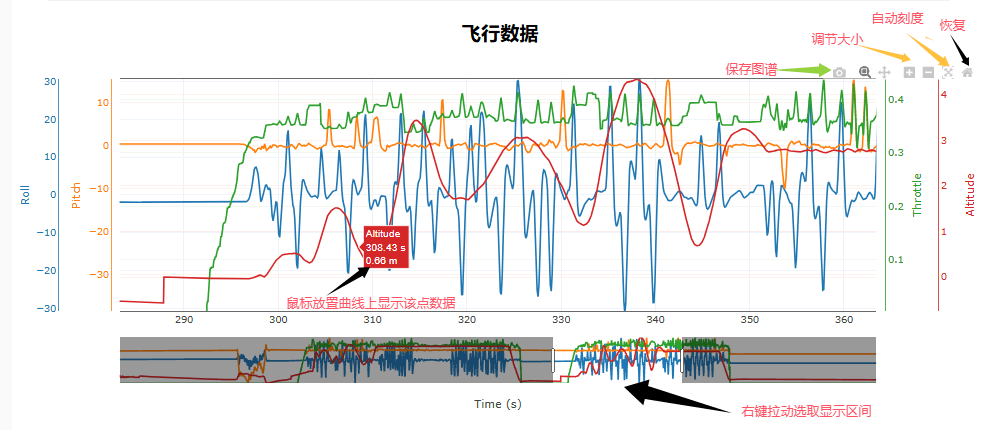
Hovering over a plot brings up its toolbar, which lets you save the plot and adjust the scale. Right-drag selects a time range. The auto scale option rescales a curve that runs off the top of the plot.
Reading the time-domain plot
Start with the PID time-domain plot. It shows desired against actual, and ideally the actual curve hugs the desired one:
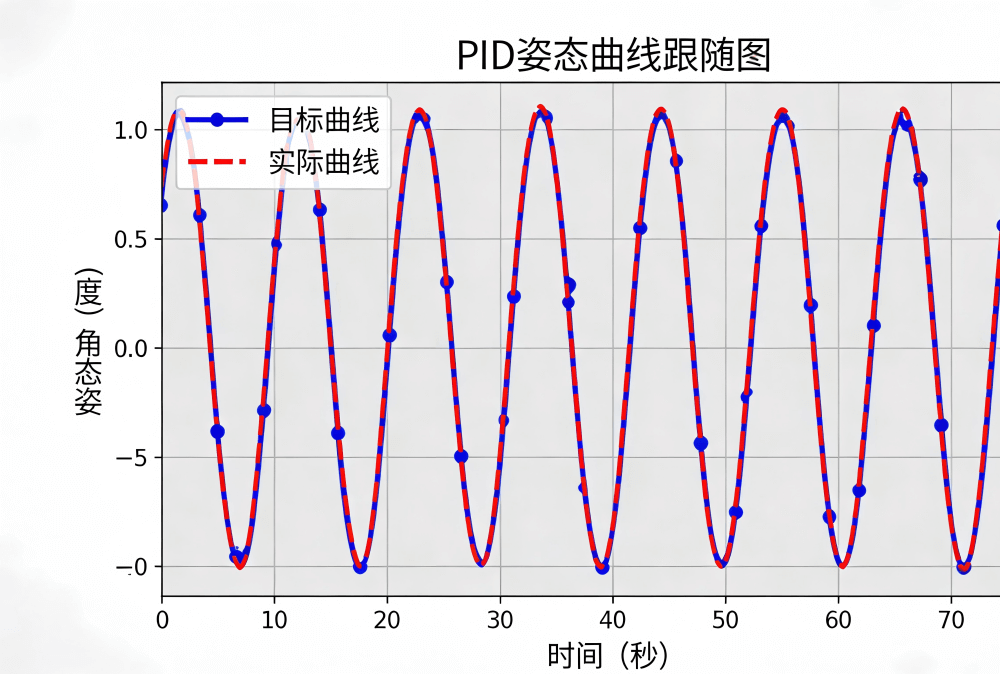
- The tighter the two follow each other, the better the P term is matched. In real flight vibration and external disturbance always spoil the ideal, so what you are after is "as tight as possible".
TIP
Analyse roll and pitch first, then yaw — all three axes need work. Keep the usual ratio in mind: yaw I is about one tenth of the rate P, while roll and pitch I tend toward the P value (usually equal to it). The analysis method is the same for every axis.
Reading the step response
TIP
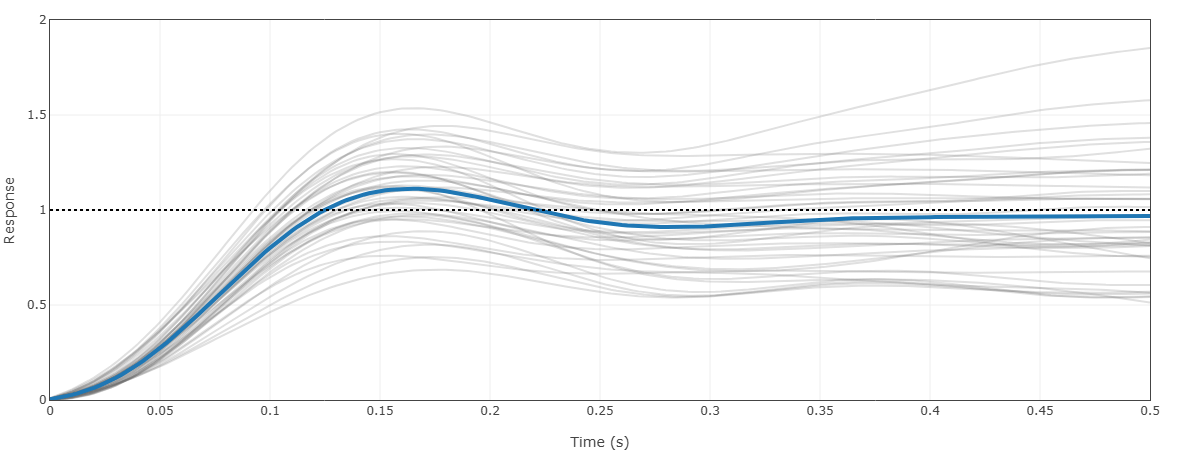
In the plot above the blue curve settles around the target of 1.0 with almost no steady-state error, and overshoots by about 10%. That is a fast, accurate, well-damped response.
A step response is what you get when you feed the system one sudden, constant input and watch how the output moves over time. The PID step response plot shows the attitude response, the spread of the curve cluster, the dynamic behaviour and the steady state.
What to look at:
- Blue curve: the reference response for one fixed set of gains. Reaching the target quickly means a fast response — 0.08~0.15 s is good. A smooth curve means a stable attitude. A curve that stays below 1 all the way means P is too small and steady-state error is not being corrected. A peak above 1 means overshoot. A curve that bends means oscillation, and D needs to go up.
- Grey cluster: Monte Carlo simulation results (responses across many gain sets and disturbances). The tighter the cluster, the more stable the system and the better the gains fit.
- Black dashed line: the step target (1.0), the steady state the system should converge to.
What does too little rate P look like?
In the time-domain plot:
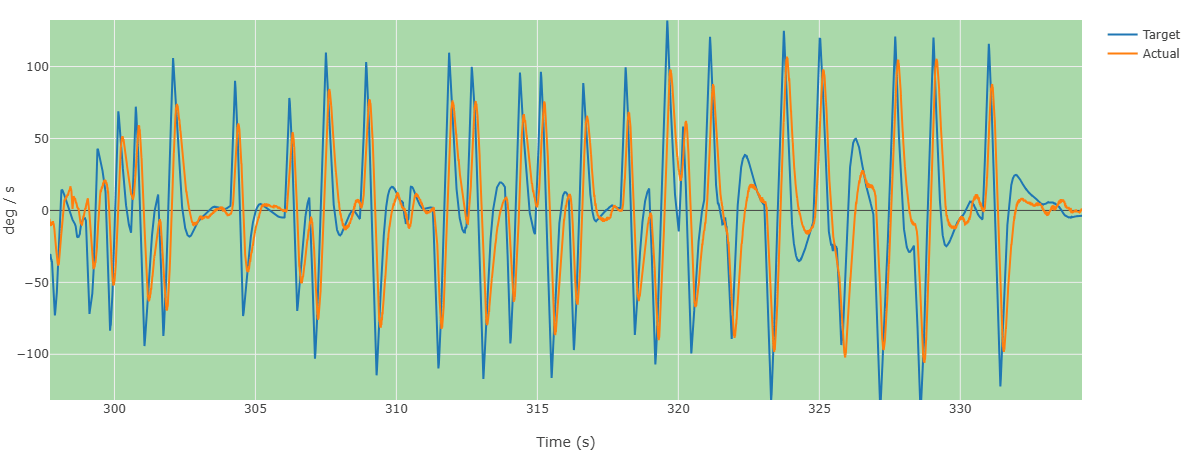
The target attitude is always ahead of the actual attitude. P is too small, so the controller corrects too weakly to keep up with the target.
Confirmed on the step response
The green reference curve never reaches 1.0; it creeps toward it, which means the system corrects error slowly and responds poorly — both P and I are too small. A good response climbs to the black 1.0 line within 0.08~0.15 s.
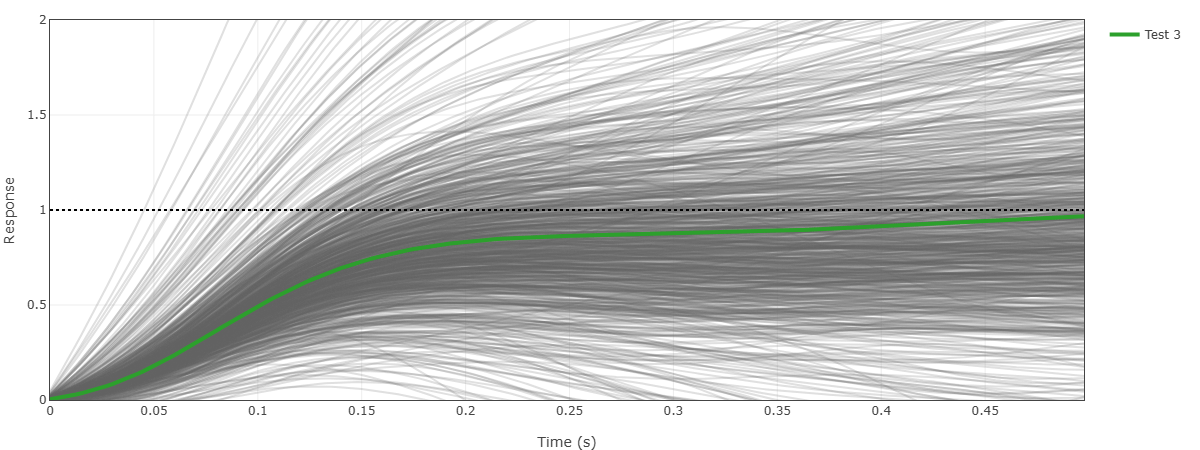
Here the response at 0.1 s is around 0.5, so P is roughly 50% short. Increase P and I by 50~60%.
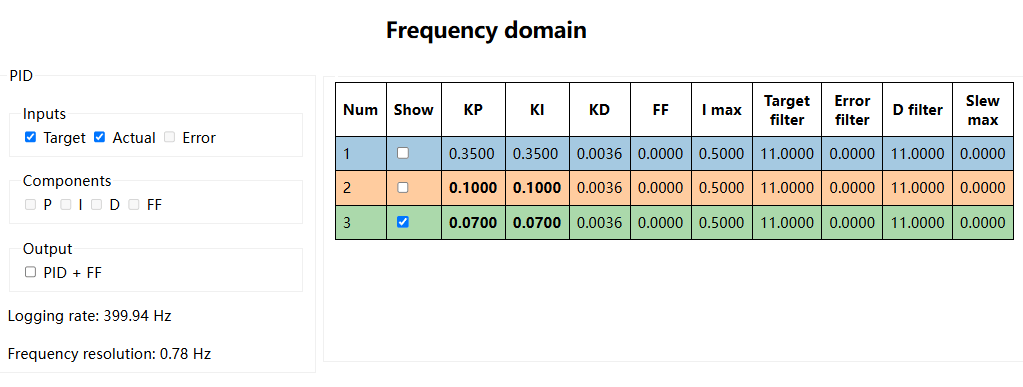
Check the frequency-domain plot: the aircraft is running P and I of 0.07, while the step response suggests about 0.14 for that axis.
- Analyse the other two axes the same way, apply the estimated values, then fly and log again to check.
What does too much rate P (or too little D) look like?
In the time-domain plot:
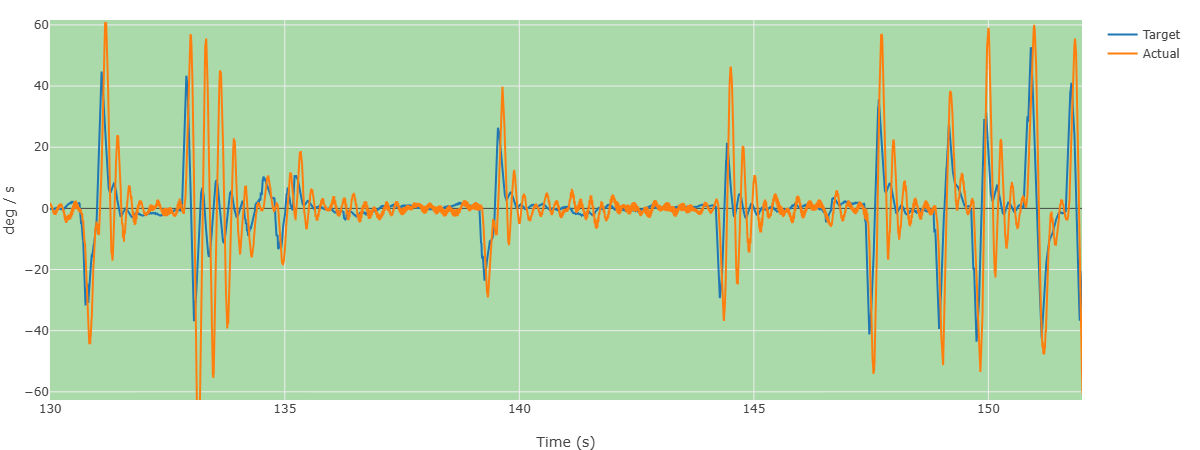
- The actual attitude vibrates about zero. P is too large relative to D — the correction is too aggressive — so lower P.
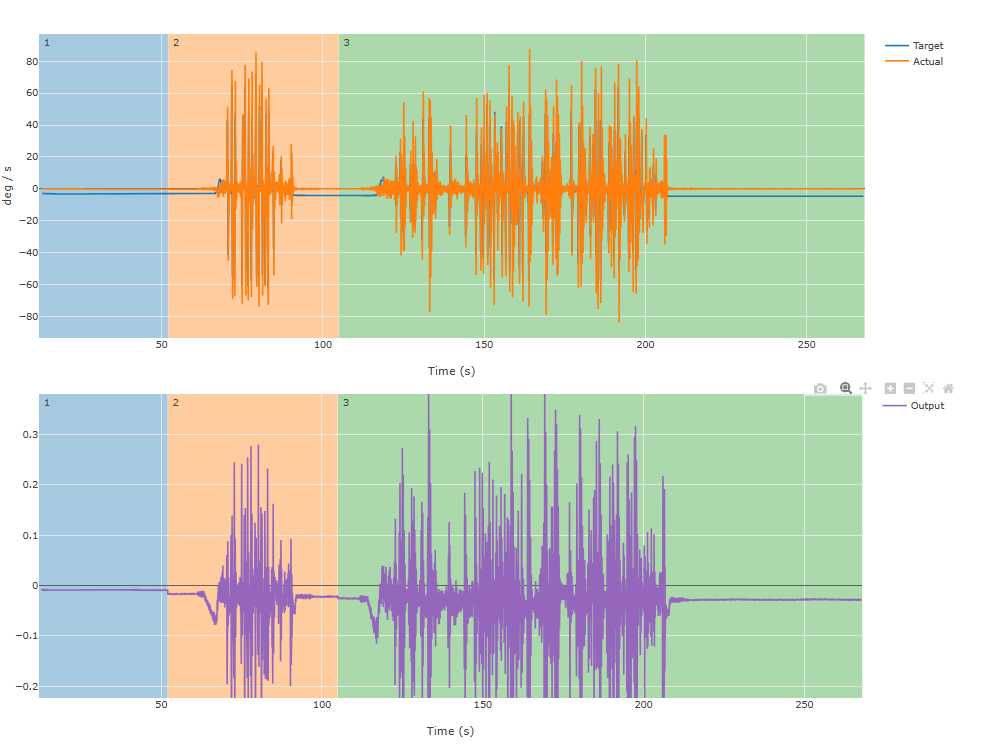
- The output oscillates in step with the actual attitude, which again points to P being too large relative to D.
Confirmed on the step response
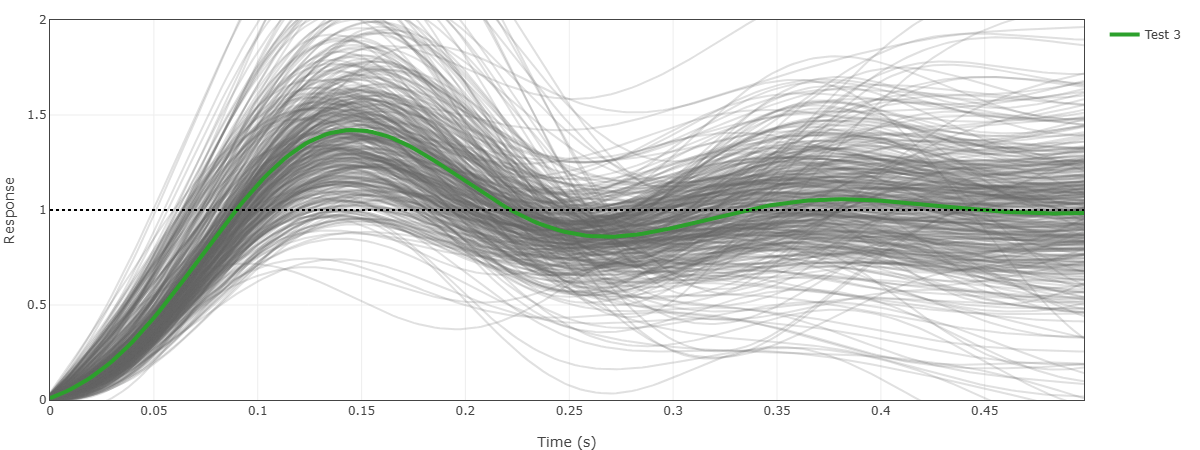
The green reference curve overshoots the target, reaching about 1.4, then bottoms out around 0.25 s. That is overshoot and ringing, and the grey cluster is spread out, so the response is not robust. Overshoot here is roughly 40%.
With 40% overshoot, cut the P gain by 40% or raise D.
Notes
- Cross-axis coupling blurs the analysis. On a symmetric airframe you can lock roll and pitch together, get that stable, and then fine-tune.
- Log analysis tells you which direction to move and roughly how far. It still takes several flight-and-log cycles to land on good values.
- Some overshoot — around 10% — is actually desirable for wind rejection and payload handling.
- The PID review tool is still being improved and has some bugs, so treat its numbers as guidance.