

Software Filter Configuration
Filters strip the vibration and noise coming from the motors, propellers and the outside world, so the EKF gets clean IMU attitude data. That avoids bad attitude estimates and makes the aircraft steadier and nicer to fly.
ArduPilot has two software filters:
- Low-pass filter: passes everything below the cutoff frequency (the control signal) and suppresses everything above it.
- Notch filter: cuts deeply at one narrow band of frequencies (digs a hole) while leaving the rest of the spectrum as intact as possible.
WARNING
Filters add phase delay and CPU load, so use them carefully on slower processors (STM32F7/F4 for example). Software filtering only eases vibration — it cannot fix a serious mechanical problem. If the vibration is severe, change the hardware or add better damping. And tune the PIDs until the aircraft flies steadily before you start configuring filters.
Low-pass filter
Match the low-pass filter to the aircraft's weight, inertia and how responsive you want the control. ArduPilot's low-pass filtering is set by INS_GYRO_FILTER (gyro) and INS_ACCEL_FILTER (accelerometer). For manual setup you normally only need INS_GYRO_FILTER; INS_GYRO_FILTER=20 (the default) suits most aircraft.
Mission Planner, LGC and other ground stations can match the filter parameters to the frame, power system and propeller size automatically.
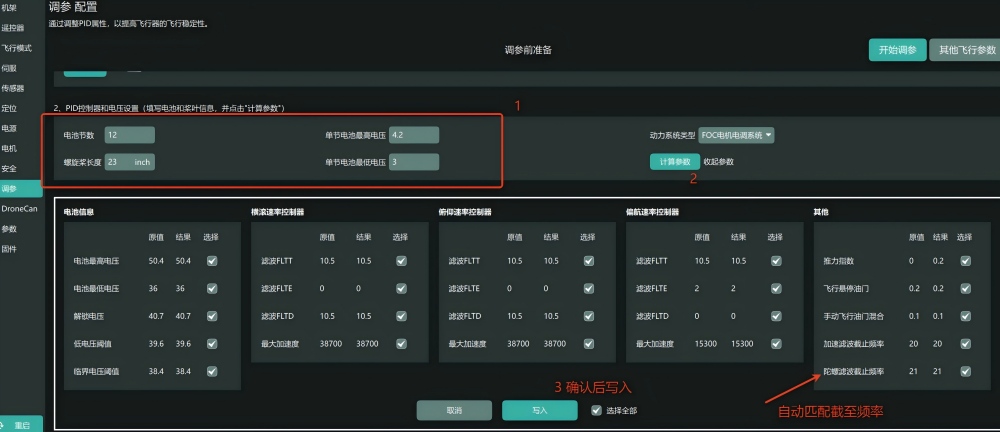
What the wrong value looks like
| Value | Setting | Downside | Upside |
|---|---|---|---|
| Too high | INS_GYRO_FILTER = 60 | More IMU noise, which can make the aircraft twitch or the motors screech and overheat | Less control-loop delay, livelier response; if you want that response, add a notch filter to calm it down |
| Too low | INS_GYRO_FILTER = 15 | Large phase lag, sluggish, soft attitude | Filters more noise out |
NOTE
The principle is to push the cutoff as high as the filtering allows — find the balance between the two.
Notch filter
What the notch filter does
A dynamic notch filter is an adaptive narrow-band filter: it follows the motors' actual speed and moves its centre frequency to stay on the vibration, which is how it suppresses the periodic mechanical noise the motors make. It complements the low-pass filter.
It tracks the motor's fundamental frequency and each harmonic in real time, attenuating energy exactly where the vibration peaks sit, so the rest of the spectrum — the attitude signal you need — comes through untouched and the controller keeps its responsiveness.
Put simply: the low-pass filter pushes the broadband noise down, the dynamic notch cuts out the fixed, periodic motor vibration, and together they give you both quiet data and good feel at the sticks.
How to configure it
- Before anything else, enable the logging you need (
INS_RAW_LOG_OPT= 10).
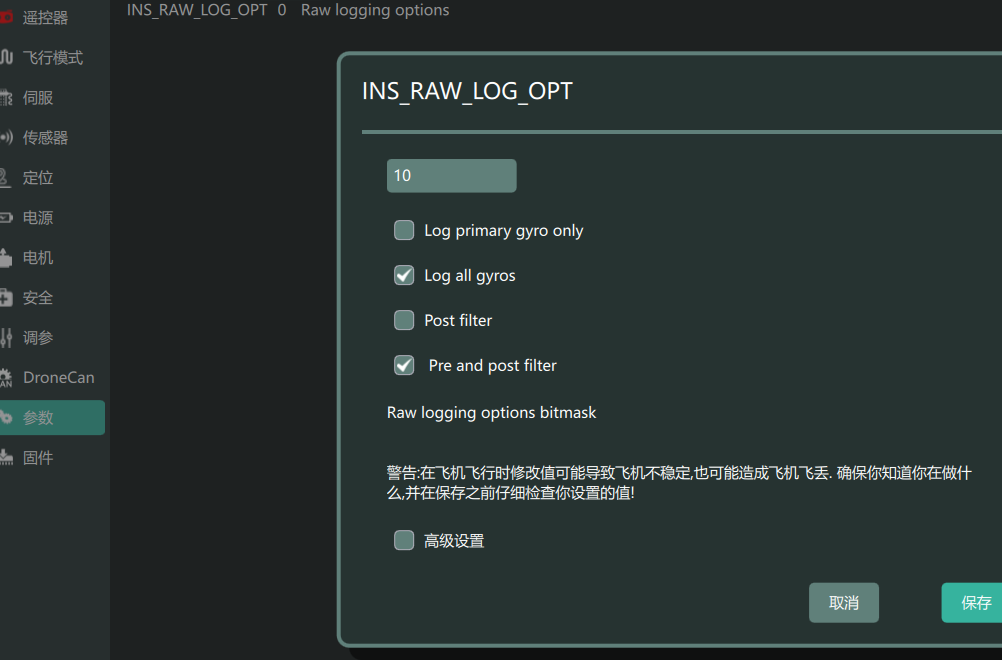
On firmware before 4.5.0, use the IMU batch sampling instead:
INS_LOG_BAT_OPT= 4    //sample at 1 kHz before and after filtering
INS_LOG_BAT_MASK = 1    //record the first IMU
INS_LOG_BAT_LGIN        //sampling interval; no need to change it normally
LOG_BITMASK //do not tick RAW IMU; on top of the defaults tick Fast Attitude / PID / Fast IMU / Fast harmonic notch logging- If the power system has RPM telemetry (DroneCAN or BDShot ESCs), turn the telemetry on.
- Hover in Loiter for over 30 seconds, then fly in each direction for several tens of seconds.
- Download the log and load it into the official filter analysis tool.
Matching the filter in the analysis tool
- Load the log, open the analysis and select the part of the flight to analyse.
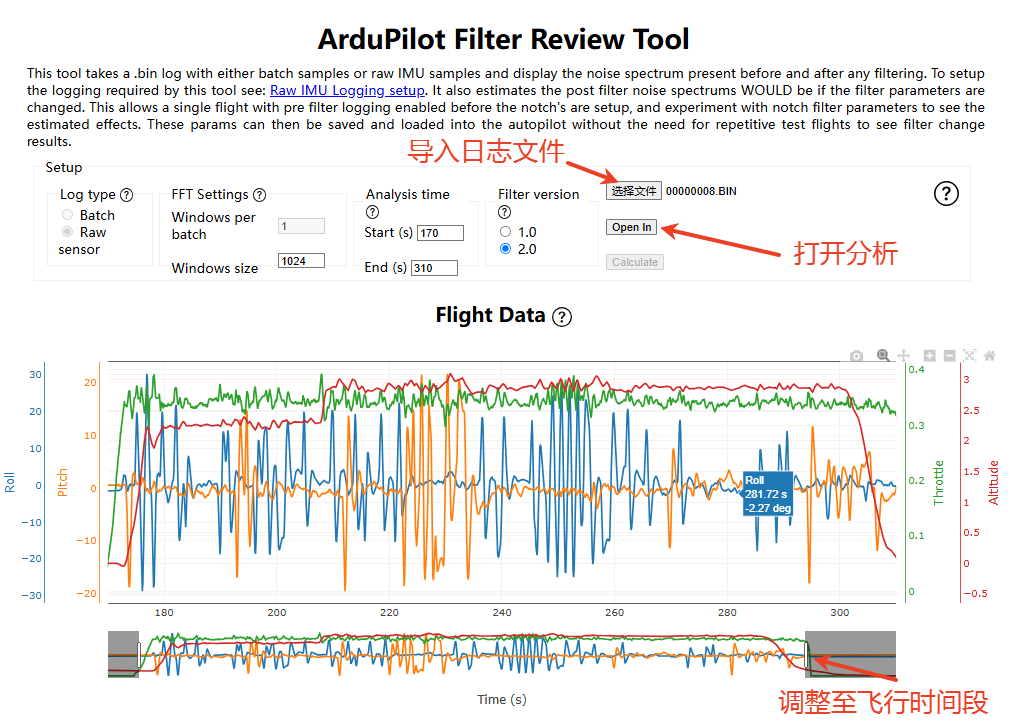
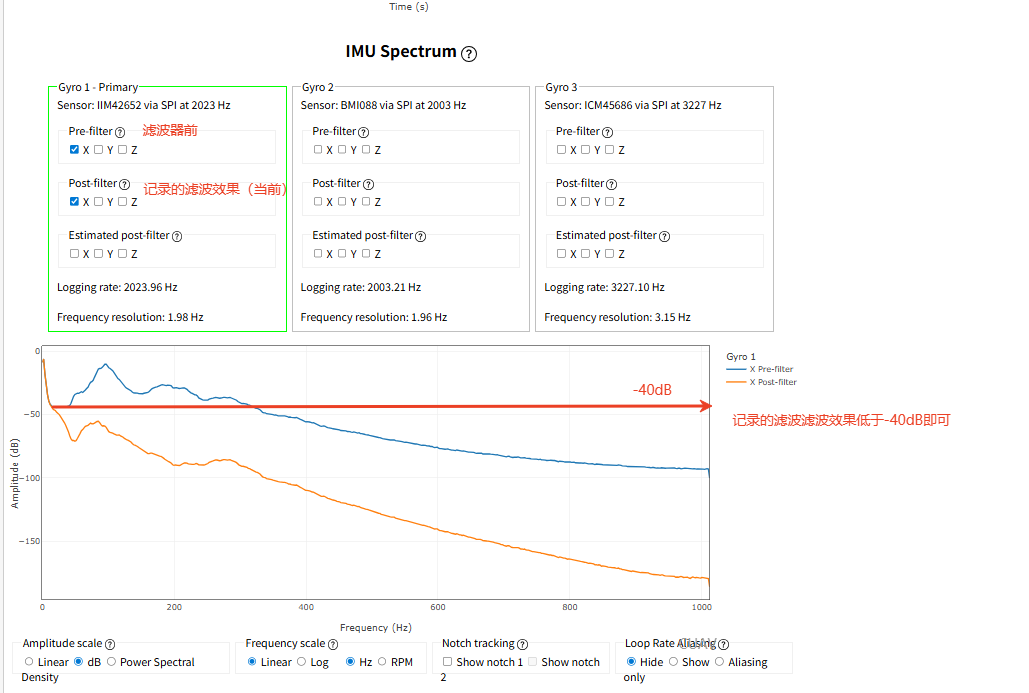
- Look at the IMU spectrum, choose an axis (X is usually enough) and compare before filtering with the predicted after.
The predicted result comes from the filter parameters you enter below.
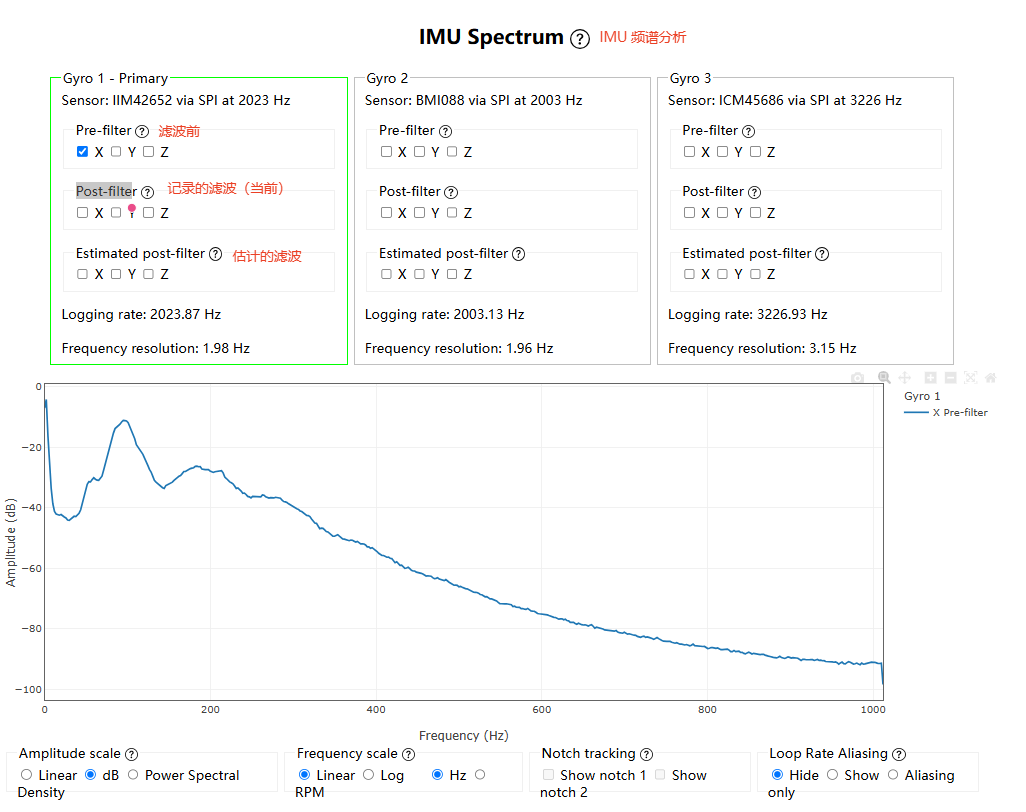
The goal is to bring peaks above 40 down below -40 dB, while disturbing the rest of the spectrum as little as possible so you do not add phase delay.
Configure the filter as described under Dynamic notch filter and look at the predicted result.
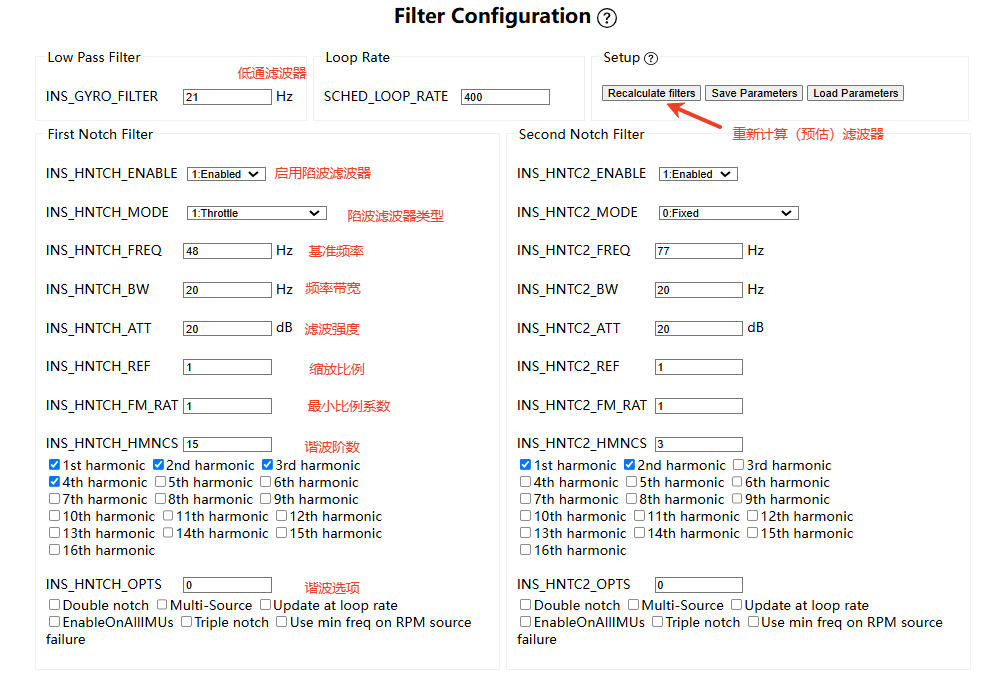
| Parameter | What it does | How to set it |
|---|---|---|
INS_HNTCH_ENABLE | Master switch for the dynamic harmonic notch filter | Set to 1 |
INS_HNTCH_MODE | How the notch tracks frequency | 1: Throttle when there is no ESC telemetry; 3: ESC telemetry is recommended when there is |
INS_HNTCH_FREQ | Notch centre frequency in the hover condition | From the motor fundamental peak in the hover IMU spectrum, or from the RPM |
INS_HNTCH_BW | Notch bandwidth | Set to between 1/4 and 1/2 of INS_HNTCH_FREQ; with multi-source enabled, no more than 1/4 |
INS_HNTCH_ATT | Notch attenuation | Below -40 dB is enough; do not set it higher than you need |
INS_HNTCH_REF | Reference throttle in throttle mode | Equal to the learned hover throttle, MOT_THST_HOVER, or 1 in ESC telemetry mode |
INS_HNTCH_FM_RAT | Minimum scaling of the notch frequency, which limits how low it goes at low throttle | Default 1; lower it a little if low-throttle vibration is obvious, but never below the gyro cutoff frequency |
INS_HNTCH_HMNCS | Harmonic bitmask — which motor harmonics to suppress | Set per the harmonic table below |
INS_HNTCH_OPTS | Extra notch options (multi-source and so on) | On a multi-motor aircraft, Multi-Source / update at loop rate is required |
- The IMU spectrum plot is your diagnostic: it shows where the vibration comes from and whether the harmonics line up with it.
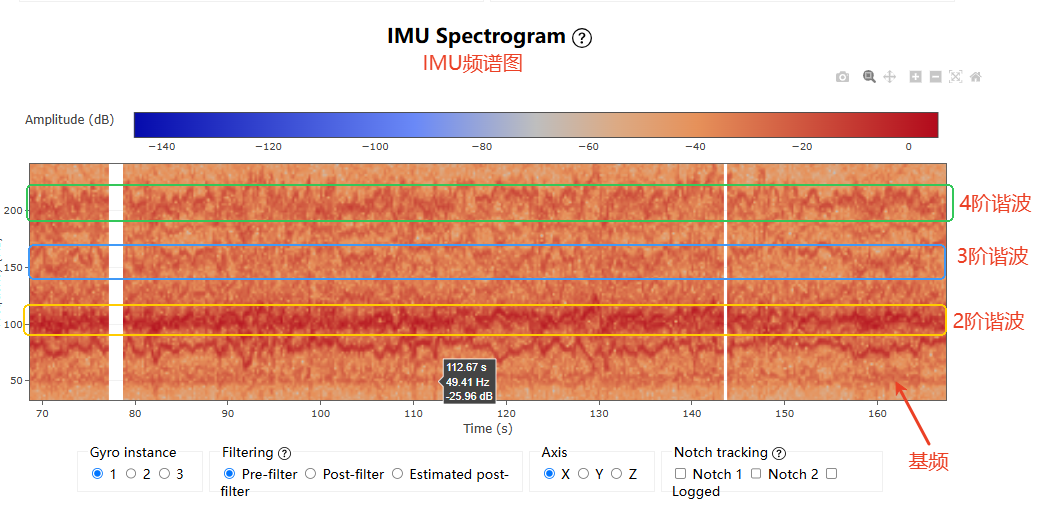
| Harmonic | Frequency | What causes it | Recommendation |
|---|---|---|---|
| 1st (fundamental) | 1× motor RPM frequency | Mechanical imbalance in the rotating motor | Always enable |
| 2nd | 2× fundamental | Periodic disturbance from a two-blade propeller | 4 motors: 1 + 2; add 3rd if the spectrum shows it |
| 3rd | 3× fundamental | Periodic disturbance from a three-blade propeller | 6 to 8 motors: 1 + 2 + 3 |
| 4th | 4× fundamental | Higher-order coupling in blades, motors or structure | Set from the spectrum |
| … intermediate | N× fundamental (5~15) | Blade wake, motor cogging, frame resonance — usually weak | Normally not needed |
| 16th | 16× fundamental | Very high-order coupling in the motor and propeller | - |
NOTE
Only enable the harmonics you need. In the example above the 3rd harmonic is weak, so 1 + 2 + 4 is fine.
WARNING
Keep the bandwidth as narrow, the attenuation as low and the number of notches as small as the result allows. Filters are expensive in CPU; too many will saturate the processor and the system will misbehave. On an STM32H7 controller, three harmonic filters on an octocopter is safe.
Multi-source notch, INS_HNTCH_OPTS
With multi-source, each motor gets its own notch matched to its own average throttle or RPM. On a multi-motor aircraft — especially one where the motors run at noticeably different speeds — the vibration frequencies differ, and multi-source tracks each one precisely. The cost is more CPU load.
- On a quadcopter with
INS_HNTCH_HMNCS = 3(1st and 2nd harmonic), ArduPilot runs 4 motors × 2 = 8 notch filters. - On an octocopter with
INS_HNTCH_HMNCS = 7(1st, 2nd and 3rd), it runs 8 × 3 = 24 notch filters.
Dynamic notch filter
Almost all drone vibration comes from the motors and propellers, and its frequency scales linearly with RPM. A dynamic notch moves its centre frequency with the throttle or motor RPM so it always sits on the peak — suppress the noise wherever it happens to be.
Tracking ESC RPM (recommended)
If the ESCs provide telemetry (DroneCAN or DShot), the harmonic notch reference frequency can come from that telemetry. This is the simplest and best-performing setup.
Working out the fundamental
- In the flight log, look at
ESC > X(X is the motor number)> RPM
fundamental = average motor RPM in hover / 60
For the example above:
fundamental = (2500 + 2900 + 3000 + 3200) ➗ 4 ➗ 60 = 48.3, so about 48.
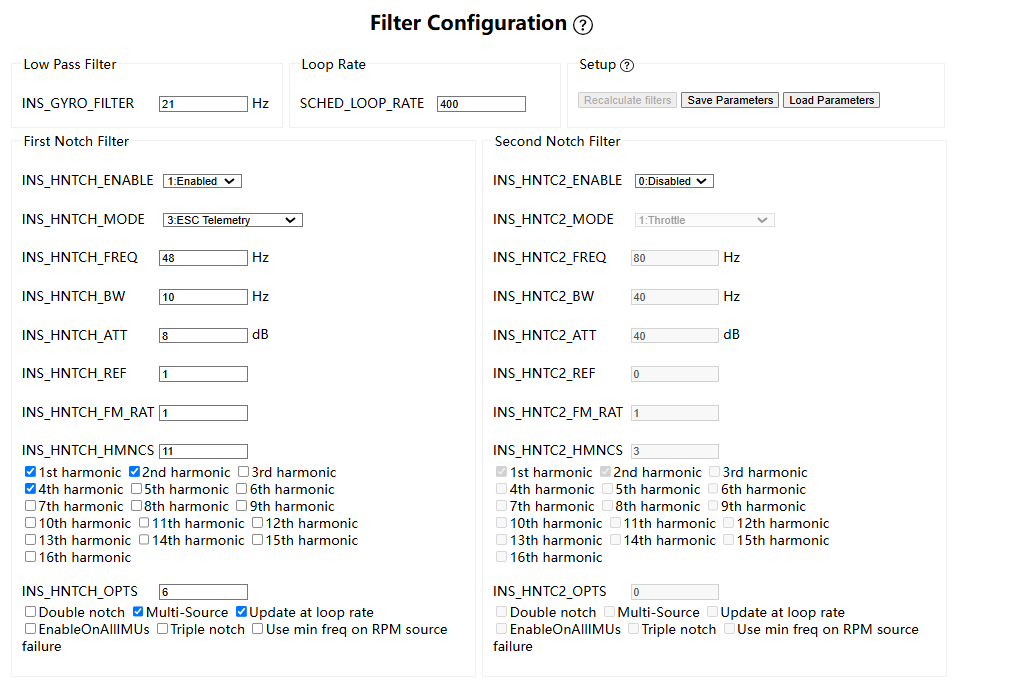
Notch settings
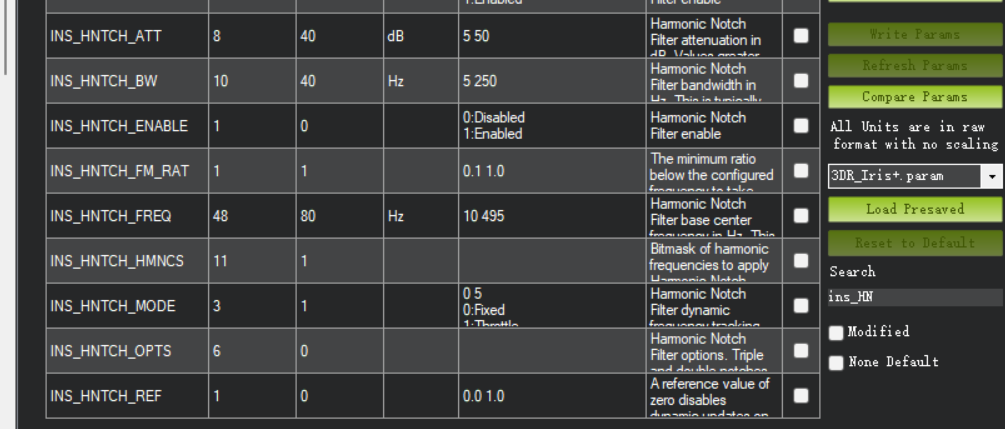
INS_HNTCH_ENABLE=1                     //Enable the notch filter.
INS_HNTCH_MODE=3                      //Notch mode: ESC telemetry.
INS_HNTCH_FREQ=48                    //Fundamental from the RPM; confirm it on the IMU spectrum.
INS_HNTCH_BW=10                      //With multi-source on, keep it below a quarter of the fundamental.
INS_HNTCH_ATT=8                     //Set from the IMU spectrum; anything below -40 dB is acceptable.
INS_HNTCH_REF=1                     //Scale of 1 in ESC telemetry mode
INS_HNTCH_FM_RAT=1                   //Set to 1
INS_HNTCH_HMNCS=11                   //1st and 2nd are required on a quadcopter; 3rd and 4th depend on the spectrum — here the 4th had strong noise.
INS_HNTCH_OPTS=6 //Multi-Source / update at loop rate is required- Generate the predicted spectrum.
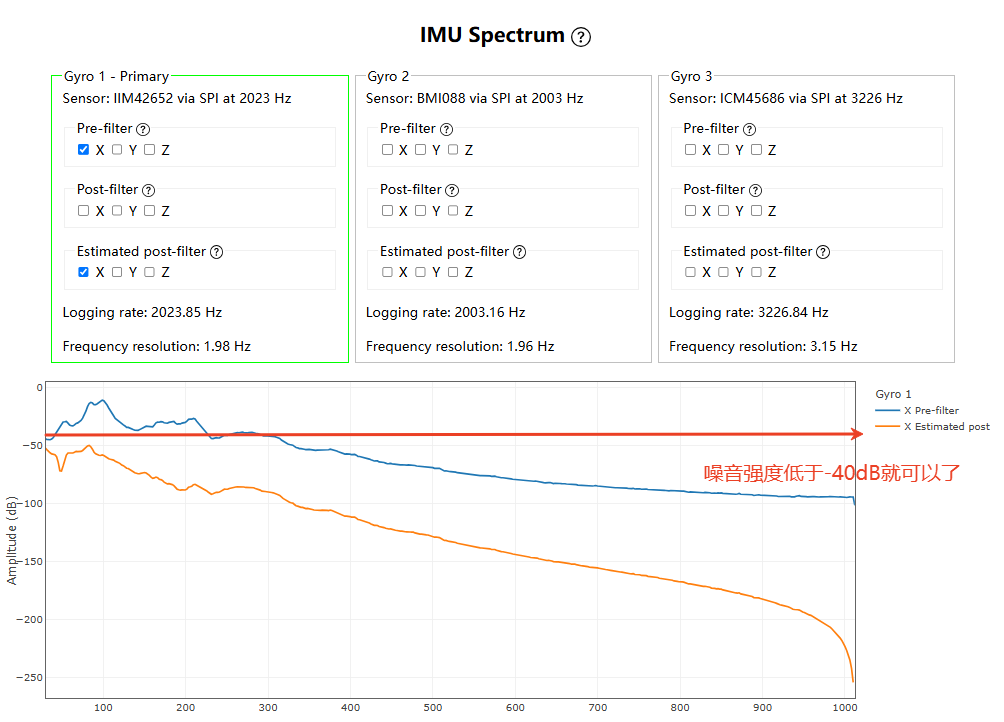
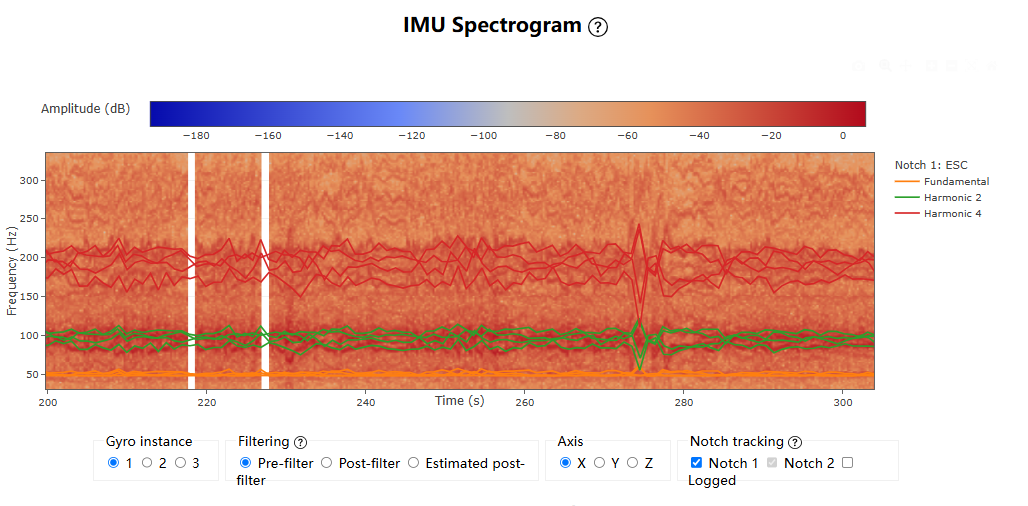
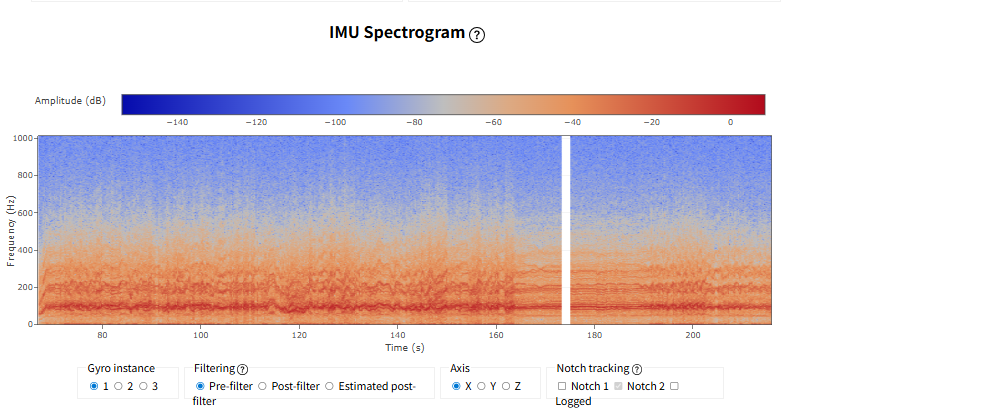
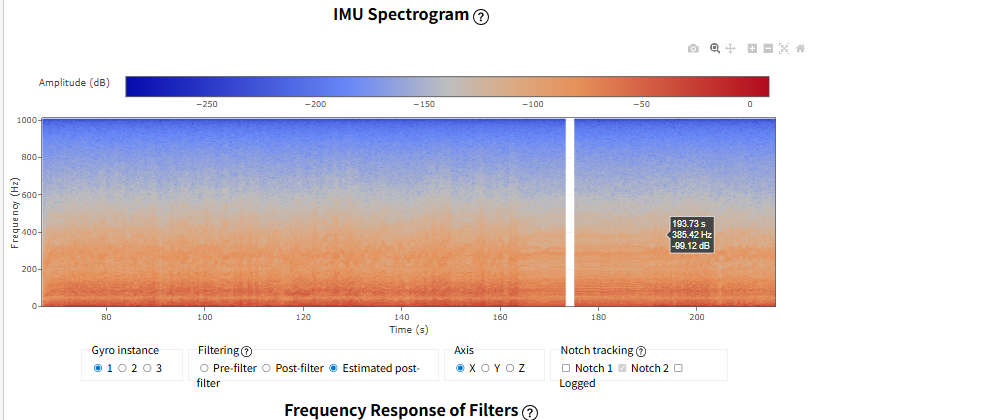
- Adjust the parameters until the prediction looks right, then check the spectrogram to confirm the notches are tracking the high-amplitude vibration.
- Connect the controller to the ground station and write the matched parameters from the full parameter list.
Throttle-based notch
Without ESC telemetry, drive the notch from throttle instead.
Finding the fundamental
Using a Raefly CP900 quadcopter as the example.
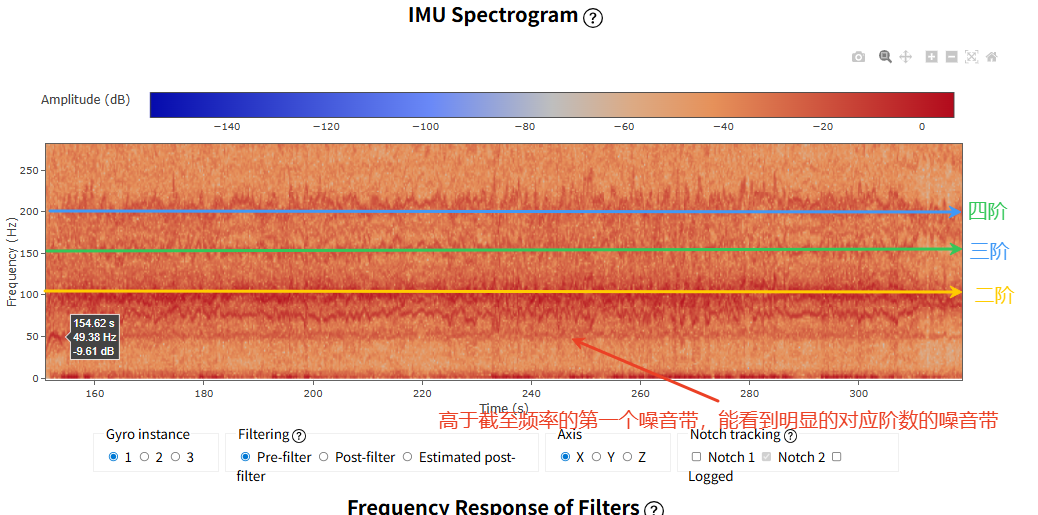
- The first vibration curve above the low-pass cutoff appears around 50 Hz, and above it you can see harmonic orders at multiples of about 50 Hz.
- So the reference frequency goes around 50 Hz; in this case 48 Hz was chosen.
- Adjust the notch settings until the prediction looks right.
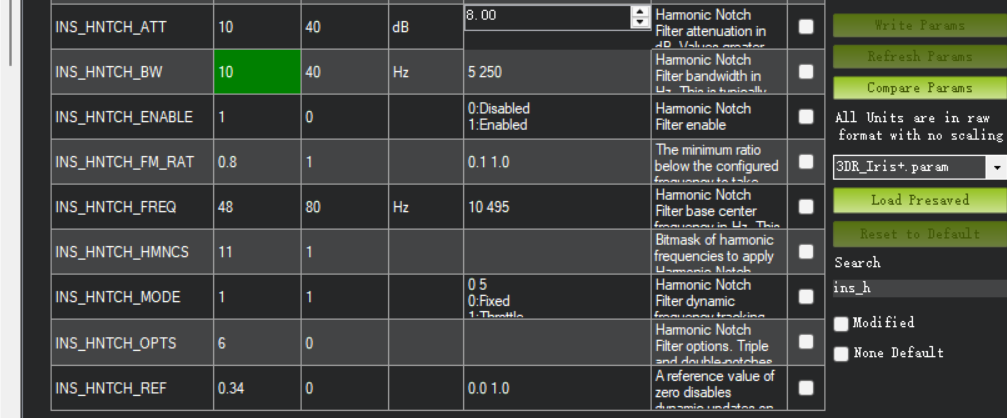
INS_HNTCH_ENABLE=1                     //Enable the notch filter.
INS_HNTCH_MODE=1                       //Notch mode: throttle.
INS_HNTCH_FREQ=48                    //Fundamental from the RPM; confirm it on the IMU spectrum.
INS_HNTCH_BW=10                      //With multi-source on, keep it below a quarter of the fundamental.
INS_HNTCH_ATT=10                     //Set from the IMU spectrum; anything below -40 dB is acceptable.
INS_HNTCH_REF=MOT_THST_HOVER         //Equal to the throttle in hover
INS_HNTCH_FM_RAT=0.8                 //Notch starts scaling once throttle drops 20% below hover; lower it if low-throttle vibration is bad, but never below the cutoff
INS_HNTCH_HMNCS=11                   //1st and 2nd are required on a quadcopter; 3rd and 4th depend on the spectrum — here the 4th had strong noise.
INS_HNTCH_OPTS=6                     //Multi-Source / update at loop rate is required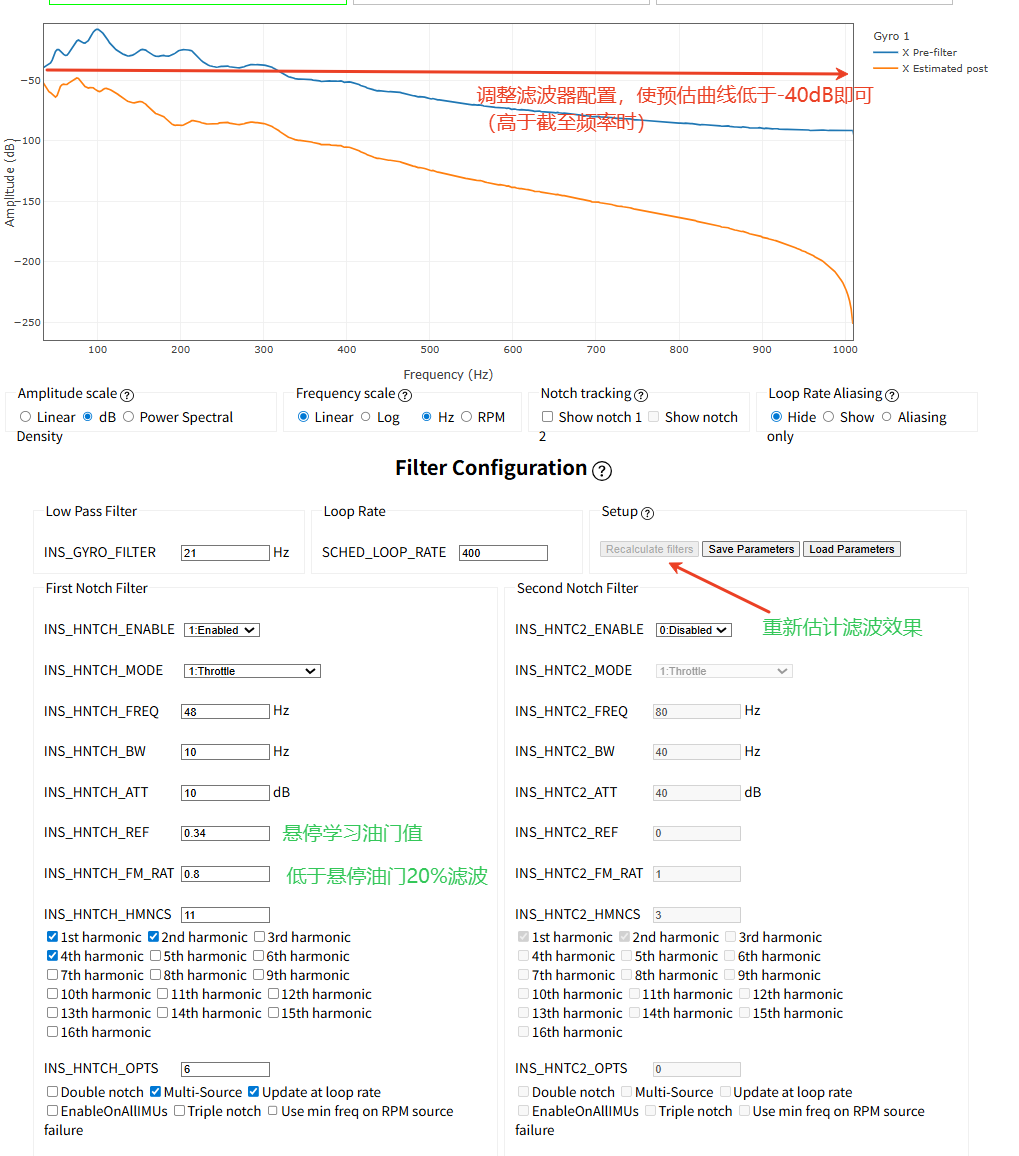
- Connect the controller to the ground station and write the matched parameters from the full parameter list.
Checking the result
Once the notch is set up, fly for at least 30 seconds and load the log. Everything above the low-pass cutoff should now sit below -40 dB.
Second notch filter
With more than one vibration source, a single notch may not be enough. A second notch filter (INS_HNTCH2) can be enabled.
Configure it as you need; a fixed-frequency notch (INS_HNTCH2_MODE = 0) is the usual recommendation.