

First Flight
WARNING
The first flight is the most dangerous moment in the life of an aircraft. It is nothing like a tuned machine — it can crash or run away at any point, so treat it with respect and follow the rules. Fly only when all of the following are in place:
- The first flight must happen in a safe, open area, well clear of obstacles and sensitive sites.
- Keep the pilot at a safe distance. Spectators should stand behind cover, with a barrier and a clear escape route — a runaway aircraft can fly straight at people or at the pilot.
- PWM range setup
- Complete the pre-flight check, and know how to arm and disarm the aircraft and how to switch flight modes.
- Finish the other preparation in this page.
Before tuning
LGC Ground Station has an AI model that matches starting parameters to your aircraft's specification. These parameters decide how much work the tuning that follows will be.
TIP
Before any tuning, finish the motor throttle setup. That keeps the aircraft out of the motor dead zone, which would otherwise lose attitude control.
Aircraft power configuration
Power configuration is closely tied to the PID and related parameters. Enter the aircraft specification and the system generates defaults for that airframe — always start from those defaults, then refine.
- Connect LGC Ground Station and open UAV Setup > Tuning.
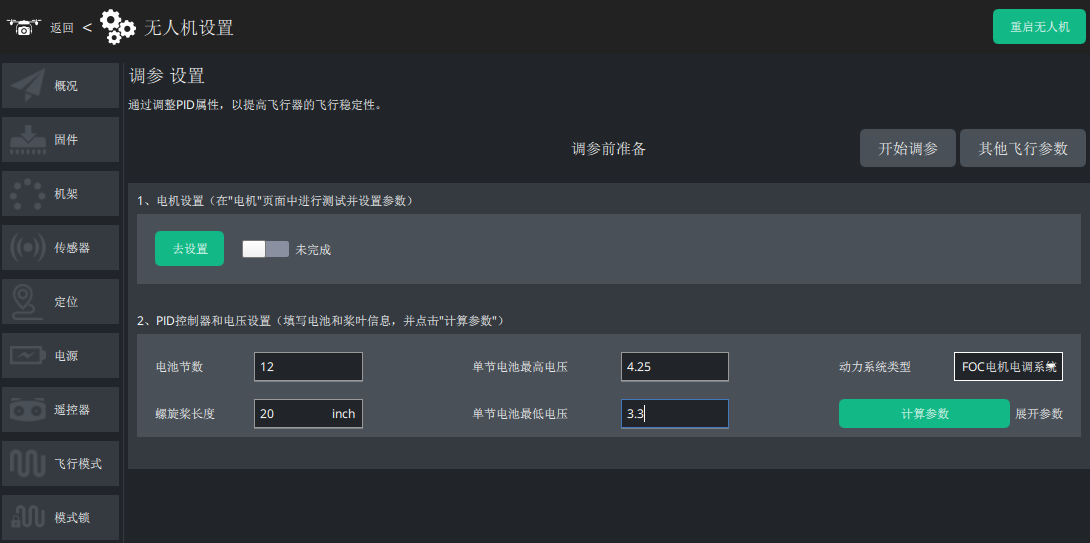
| Parameter | Description | Notes |
|---|---|---|
| Battery cells (S) | How many cells are wired in series in the pack | Usually printed on the battery label; add them up when packs are in series |
| Max cell voltage (V) | Full-charge voltage of one cell | Common values: 4.25 / 4.35 / 4.45 V; used to compute the pack's full voltage; MOT_BAT_VOLT_MAX |
| Power system type | The motors and ESCs the aircraft uses | Used to match MOT_THST_HOVER; too low loses attitude control while braking, too high misbehaves at speed |
| Propeller length (in) | Propeller size | Used to match the controller model and to compute accelerometer and gyro cutoff frequencies |
| Min cell voltage (V) | Minimum safe voltage of one cell | Common values: 3.5 / 3.3 V; used for the pack's minimum voltage and tied to the low voltage failsafe |
- When the fields are filled in, click Calculate parameters. The system shows the defaults its model produced.
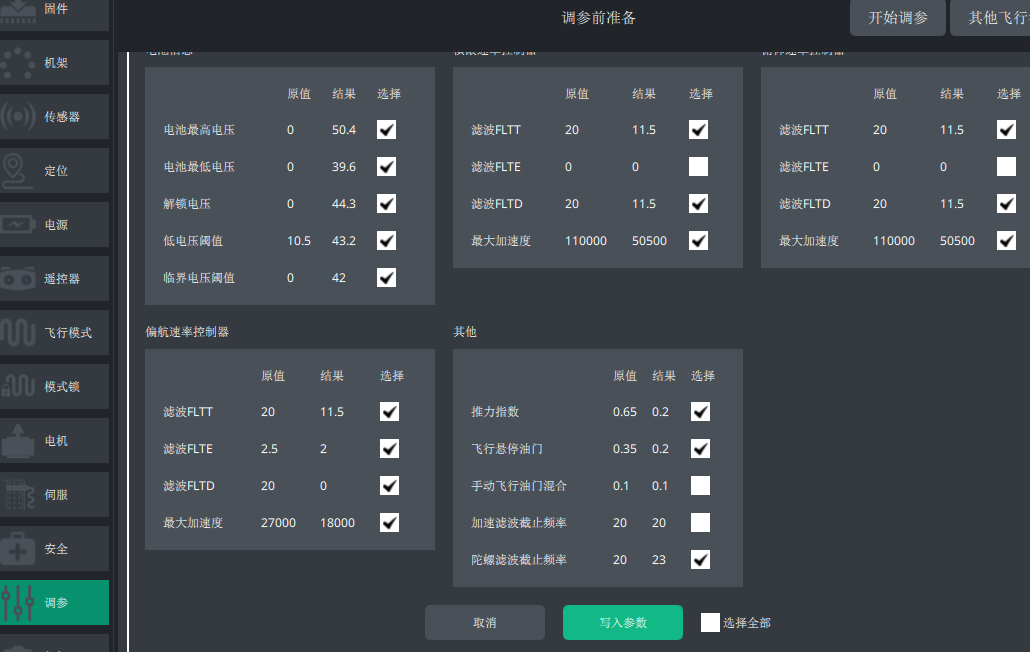
- Tick the parameters you want, then click Write parameters to send them to the controller.
Logging configuration
WARNING
The first flight is mainly about checking how the aircraft behaves and recording data for tuning and fault analysis. Getting good logging configured matters.
On machines with an F4 processor, small propellers, a slow microSD card, or simply no ability to log raw gyro data, use batch logging:
INS_LOG_BAT_MASK=1
INS_LOG_BAT_OPT=4
INS_RAW_LOG_OPT=0
LOG_BITMASK=180223  //tick fast attitude and PID
On vehicles with an F7 or H7 processor, large propellers and a fast microSD card, where raw gyro logging is possible, enable raw gyro logging:
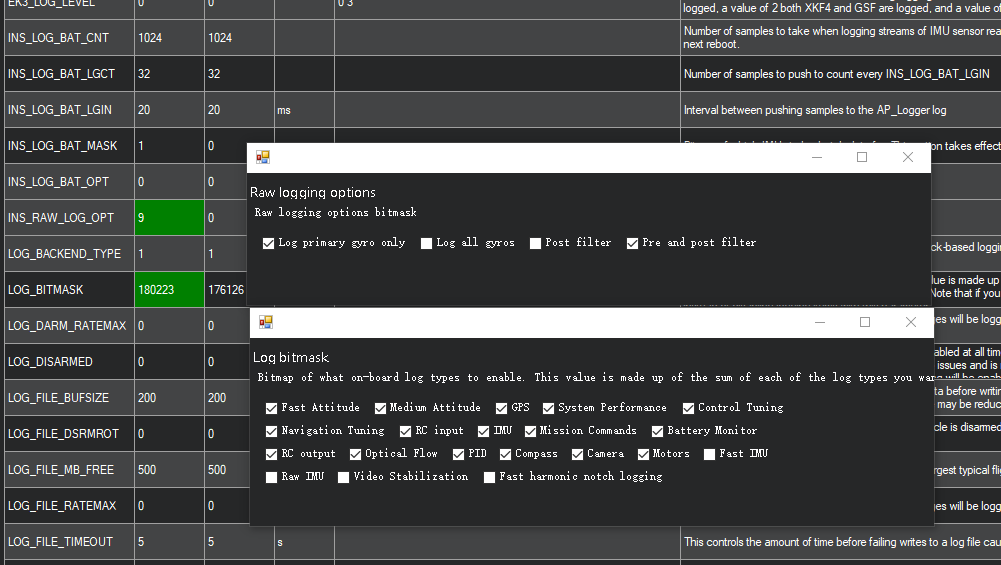
INS_LOG_BAT_MASK=1
INS_LOG_BAT_OPT=0
INS_RAW_LOG_OPT=9    //log before and after filtering, plus the primary gyro, for notch filter analysis
LOG_BITMASK=180223  //tick fast attitude and PID; needed for PID review
Safety switch and GPS
The safety switch is normally built into the GPS module. It stops a stray arm command from hurting anyone: the motors only arm once you press and hold the safety switch until its LED stays lit. If you are experienced enough to be sure you will never arm by accident, you can disable it with:
BRD_SAFETY_DEFLT=0NOTE
You can also configure it from the GPS screen in LGC Ground Station.
Adjusting the initial flight parameters
NOTE
The default PIDs suit most light and small aircraft. Micro racing quads and mid-to-large payload machines may need different defaults.
Starting the flight
- Find a pilot who is comfortable in Stabilize mode and take off in Stabilize.
NOTE
The first flight and the tuning flights need a skilled pilot. Beginners, or pilots who have only flown consumer drones, should not be doing this — if you have never flown Stabilize, hire an experienced pilot.
- Press and hold the safety switch on the GPS until it stays lit.
- With all the necessary configuration done, the controller status LED blinks green, which means every check passed and arming is allowed. If it blinks yellow, read the ground station message and clear the alert.
Arming
- Pull the throttle stick to minimum and the yaw stick fully right, hold for about 3 seconds and wait for the aircraft to arm. (Throttle minimum with yaw fully left disarms.)
TIP
If arming fails, see warnings and troubleshooting
- Raise the throttle slowly and lift off, watching for obvious oscillation or large wobble.
TIP
If it oscillates or swings so badly that it will not take off cleanly, land immediately and adjust the PIDs.
- Hold the aircraft at about 1 m and make small pitch and roll inputs to see how it responds — that tells you what the PID tuning needs.
NOTE
If the aircraft is not stable on the first flight, land it and work through the tuning steps. Adjust the PIDs following the tuning guide until it is stable.
Disarming
- Make sure the aircraft has landed, then pull the throttle to minimum and the yaw stick fully left, hold for about 3 seconds.
WARNING
Memorise the arm and disarm stick positions before you take off. Keep pitch and roll centred while doing them, and land and disarm immediately if the aircraft gets away from you.
Appendix
Flight modes that cannot arm
TIP
Some modes do not allow arming. See the table below.
| Mode that cannot arm | Exception |
|---|---|
| AUTO | When bit 0 of AUTO_OPTIONS is set (arming allowed in this mode) |
| AUTOTUNE | — |
| BRAKE | — |
| CIRCLE | — |
| FLIP | — |
| GUIDED | Through the MAVLink DO_ARM/DISARM command, a Lua script, or a general-purpose auxiliary switch once GUID_OPTIONS is enabled |
| LAND | — |
| RTL | — |
| SMARTRTL | — |
| SYSID | — |
| AVOIDADSB | — |
| FOLLOW | — |
| AUTOTUNE | — |
TIP
If you have set it up, you can arm and disarm with an RCx_OPTION switch — see switch option 153.
Arming fails?
If the aircraft still will not arm or disarm after you use the stick positions, work through the table below.
| Status | What to do |
|---|---|
| Main status LED blinking yellow | Connect LGC Ground Station over the telemetry link and deal with the alert. |
| Main status LED blinking green | Calibrate the transmitter or check ARMING_RUDDERR (arm or disarm). |
| Anything else | The current mode does not allow arming, or the safety switch has not been pressed (its LED must be lit solid) |