

Flight Parameter Tuning
When tuning a multirotor, the first goal is a stable airframe with no oscillation — everything after that builds on it.
- Put the aircraft in
STABILIZE. - Raise the throttle slowly until it lifts 2~3 m, and watch how pitch and roll respond.
WARNING
Tuning flights are dangerous. They are for professionals only, and the operator carries the risk; this page is technical reference, nothing more. If you cannot accept that risk, buy a ready-built drone instead.
If the airframe starts shaking or vibrating during the process, cut the throttle immediately and abort the takeoff or land. Finish the pre-tuning setup before you touch the PIDs.
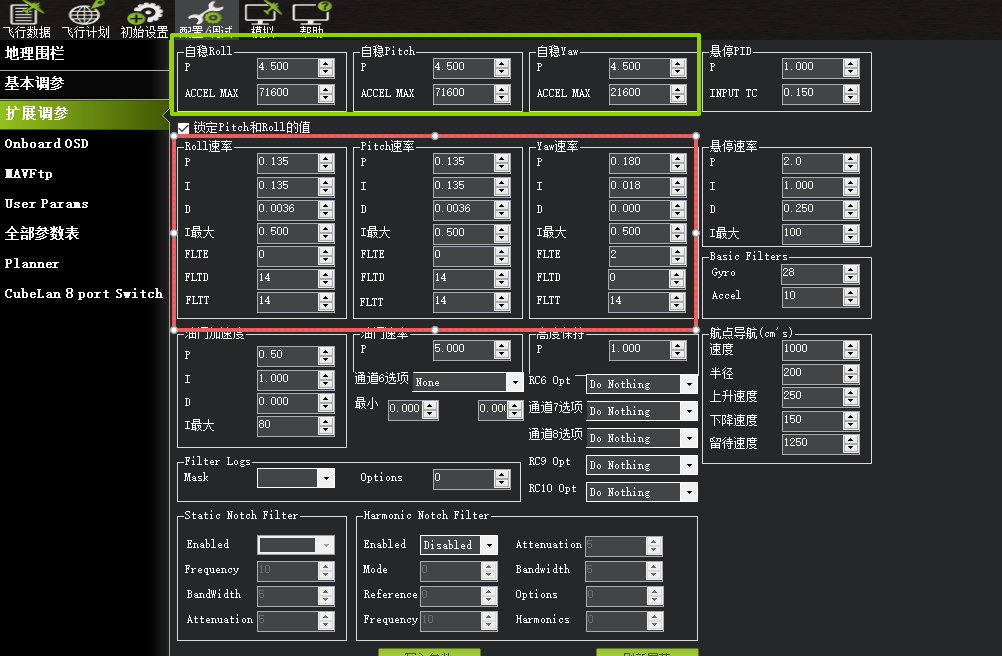
Default PID experience notes
NOTE
The Stabilize (angular rate) P sets how fast and how hard the attitude is corrected; the rate P sets how steady it flies. Stabilize P strongly affects the rate P. Unless you need more agility, want a different feel at the sticks, or the rate P has hit the system's limit, leave the angular rate P alone. The larger it is, the better the wind rejection. In ordinary tuning you work on the rate PID in the red box first.
TIP
The defaults suit small aircraft. Micro and light machines need a lower rate P; mid-to-large machines usually need a higher one. Within one airframe class: more power means a lower rate P; softer arms or wings mean a higher D to suppress the vibration; a higher angular rate P means the matching rate P goes down.
- For wheelbase 250 and below, if it shakes as soon as it leaves the ground, start from:
| Axis | Parameter | Default | Suggested start (lower P to cut the shake) |
|---|---|---|---|
| Roll | ATC_RAT_RLL_P | 0.135 | 0.07 |
| Roll | ATC_RAT_RLL_I | 0.135 | 0.07 |
| Roll | ATC_RAT_RLL_D | 0.0036 | 0.0016 |
| Pitch | ATC_RAT_PIT_P | 0.135 | 0.07 |
| Pitch | ATC_RAT_PIT_I | 0.135 | 0.07 |
| Pitch | ATC_RAT_PIT_D | 0.0036 | 0.0016 |
| Yaw | ATC_RAT_YAW_P | 0.180 | Adjust to suit |
| Yaw | ATC_RAT_YAW_I | 0.018 | Adjust to suit |
| Yaw | ATC_RAT_YAW_D | 0.000 | Adjust to suit |
- On large heavy-lift drones, tilt the motors outward by 3° for better yaw stability, or more if the airframe needs it, so the heading does not drift on takeoff. (Rule out magnetometer and transmitter stick issues first.)
| Axis | Parameter | Default | Suggested start (raise it) |
|---|---|---|---|
| Yaw | ATC_RAT_YAW_P | 0.180 | 0.5 or higher |
Multirotors with a low thrust-to-weight ratio and weak power need higher default PI values:
| Axis | Parameter | Default | Suggested start (raise it) |
|---|---|---|---|
| Roll | ATC_RAT_RLL_P | 0.135 | 0.25 |
| Roll | ATC_RAT_RLL_I | 0.135 | 0.25 |
| Pitch | ATC_RAT_PIT_P | 0.135 | 0.25 |
| Pitch | ATC_RAT_PIT_I | 0.135 | 0.25 |
| Yaw | ATC_RAT_YAW_P | 0.180 | 0.5 or higher |
- Airframes with flexible arms or wings
A soft airframe shakes at high frequency. Dropping P alone makes the attitude response sluggish and the body wobble. Raise D instead — it suppresses the vibration while keeping the response.
Note: the proper fix is to stiffen the structure.
| Axis | Parameter | Default | Suggested start (raise D to cut the shake) |
|---|---|---|---|
| Roll | ATC_RAT_RLL_D | 0.0036 | 0.0040 or higher |
| Pitch | ATC_RAT_PIT_D | 0.0036 | 0.08 or higher |
WARNING
These are values from experience, meant for the first test flight only. To match a specific airframe properly, work through the rate PID guide using how it actually flies.
Rate PID tuning guide
TIP
The order we recommend for those new to this: set rate P, then rate I (normally I = P), then adjust D for the conditions (lower D if the aircraft feels stiff, raise it if it buzzes). After the test flight, review the log and refine.
| Term | What it does | When wrong | Which way to move | Step size |
|---|---|---|---|---|
| P (rate proportional) | Speed and strength of the error correction | Too small: slow rate response, weak feel, attitude lags Too large: high-frequency buzz, overshoot | Raise it if the body wallows or power feels weak; lower it if it buzzes | 0.01~0.04 |
| I (rate integral) | Corrects accumulated error | Too small: error is never removed and keeps building Too large: extra small corrections, bounce-back, low-frequency swing | It tolerates a wide range — normally keep it equal to P | Move gradually toward P |
| D (rate derivative) | Predicts and damps error, kills high-frequency buzz | Too small: buzz cannot be suppressed Too large: sluggish, stiff response | Raise it when it buzzes, lower it when it feels slow | 0.0002~0.0004 |
Typical symptoms and what to do
| Axis | Core parameter (ArduPilot) | Symptom and treatment |
|---|---|---|
| Roll / pitch | ATC_RAT_P (rate P) | Slow wallowing, weak response → raise P |
| Roll / pitch | ATC_RAT_P / D (rate P, rate D) | High-frequency buzz, overshoot → lower P or raise D |
| Roll / pitch | ATC_RAT_I (rate I) | In normal use set it equal to rate P |
| Yaw | ATC_RAT_YAW_P (rate P) | Yaw will not hold, spins, track drifts → raise P |
| Yaw | ATC_RAT_YAW_P (rate P) | Yaw too aggressive, oscillates → lower P |
NOTE
Tuning is really about matching the ratio between P and D so the aircraft responds quickly yet flies steadily. In normal conditions the FLIT, FLTD and the gyro and accelerometer cutoff frequencies come from the parameters generated by the pre-tuning setup. If the motors screech, try lowering the gyro cutoff frequency.
Stabilize P (angular rate) loop
Outer loop (Stabilize): Stabilize P is your stick sensitivity — how much angular rate is commanded to correct an attitude error.
NOTE
Normally leave Stabilize P alone. If you want a livelier feel at the sticks, this is the parameter to change, because it strongly affects how rate P must be matched; the higher it goes, the lower rate P has to be, and too high makes rate P impossible to match.
If you do want more sensitivity, raise it in 20% steps until the airframe starts to shake, then back off 20%.
Vertical (throttle) PID tuning
- Set
MOT_HOVER_LEARNto 2 to enable hover throttle learning.
TIP
If the aircraft bobs up and down in AltHold, halve the position and velocity loop gains: PSC_POSZ_P(PSC_D_POS_P) and PSC_VELZ_P(PSC_D_VEL_Z). If AltHold is steady with no bobbing, leave the altitude parameters alone — the defaults work for most airframes.
- Take off in
STABILIZE, climb to 5 m, then switch toAltHold(be ready to go back to Stabilize if it loses altitude control). - If the motors buzz or the throttle surges, lower
PSC_POSZ_PandPSC_VELZ_Pby 30% each time. - Hover for at least 30 seconds so the hover throttle value converges, then land and disarm.
- Read
MOT_THST_HOVERand set the parameters like this:
PSC_ACCZ_P(PSC_D_ACC_P) = 1.5 × MOT_THST_HOVER
PSC_ACCZ_I(PSC_D_ACC_I) = 2 × PSC_ACCZ_P(PSC_D_ACC_P)
ATC_THR_MIX_MAX = 0.9 // applies when MOT_THST_HOVER < 0.3- Take off in
STABILIZEagain, climb to 5 m and switch toAltHold. Once altitude hold is working, you can take off directly inAltHold(it needs over 60% throttle output to lift off). - Next, tune the Loiter control loop.
TIP
After the hover throttle learning run with no payload, set MOT_HOVER_LEARN back to 0 to disable it. Otherwise flying with a payload rewrites the value and the throttle starts surging.
NOTE
Most airframes need no changes to the altitude parameters at all.
Losing height in fast forward flight
This is mostly the controller's exposed barometer picking up airflow in flight, which makes the altitude reading wander. Options:
Option 1: fix the cause (physical shielding)
| Approach | What to do | How | Cautions |
|---|---|---|---|
| Block the airflow | Fit a cover over the controller | Physically shields the barometer from direct airflow | 1. Do not seal it completely — leave vent holes; 2. Keep the sensor ventilated for heat; 3. Do not block any other ports |
Option 2: weight the altitude sources down
| Approach | Parameter | What it does | Recommended | When to use |
|---|---|---|---|---|
| Add GPS altitude correction | EK3_OGN_HGT_MASK | When the primary height source is not GPS, uses GPS height to correct its offset and datum drift over time | Set to 1 when GPS is trustworthy (RTK, for example) | Barometric altitude has a slight offset and the GPS signal is solid |
| Adjust sensor weighting | EK3_ALT_M_NSE | The RMS noise of the height measurement — larger values lower the barometer's weight and raise that of GPS and the accelerometer | Raise it when wind disturbance is significant | Airflow through the barometer makes altitude readings jump |
Option 3: change the primary altitude source (pick one)
| Approach | Parameter | What it does | Recommended | Precondition |
|---|---|---|---|---|
| Switch the primary barometer | BARO_PRIMARY | Which barometer the controller prefers | Pick the one least exposed to airflow | The controller has more than one barometer |
| Switch the vertical position source | EK3_SRC1_POSZ | Sets the EKF3 vertical position (height) source | Set to 3 (GPS as the height source) when using RTK | An RTK module is fitted and its height data is trustworthy |
Option 4: wind estimation compensation
Wind estimation compensation guide
Loiter parameters
Loiter (position loop) PID tuning
TIP
Finish the pitch and roll PID tuning before you start on the Loiter position loop. Some wobble and buzz that never showed in Stabilize or AltHold appears in Loiter. Most airframes need no changes to the position loop parameters.
| Parameter | Core function | How it works | Tuning and troubleshooting |
|---|---|---|---|
| PSC_POSXY_P | Position loop P (horizontal) | Converts the gap between actual and target position into a desired horizontal velocity for the velocity controller — the core position parameter, setting how fast position error is answered | 1. Too small: it will not hold position, drifts 2. Too large: correction too strong, it shakes or overshoots when holding a point 3. Regular circular drift is almost always compass calibration or GPS, not this parameter |
| PSC_VELXY_P | Velocity loop P (horizontal) | Converts the gap between desired and actual velocity into a target acceleration — sets how hard a velocity error is corrected right away | 1. Too small: velocity lags, turns respond late, which shows up as position drift 2. Too large: over-aggressive correction, velocity overshoot, the airframe darts |
| PSC_VELXY_D | Velocity loop D (horizontal) | Damps short-term velocity changes during position control, smoothing the response | 1. Too small: cannot damp velocity swings; gusty wind makes it shake or dart 2. Too large: over-damped, turns and speed changes feel stiff and lag |
| PSC_VELXY_I | Velocity loop I (horizontal) | Corrects long-term steady-state velocity error | 1. Too small: a fixed velocity offset never goes away 2. Too large: integral winds up fast and overshoots |
TIP
Order: PSC_POSXY_P first (the foundation), then PSC_VELXY_P (the core of the velocity loop), then match PSC_VELXY_D and PSC_VELXY_I.
Braking
If the airframe rocks badly or drops altitude when you brake in Loiter, check these:
| Parameter | Notes | Remarks |
|---|---|---|
| MOT_THST_EXPO | Throttle curve thrust compensation | Lower values ease the rocking and roll-over risk when braking at low speed; 0~0.2 is suggested for power sets or FOC drives |
| Loit_BRK_ACCEL | Loiter braking acceleration | Higher values brake harder and faster in Loiter |
| Loit_BRK_JERK | Braking jerk | Higher values make the braking force change more sharply; twice Loit_BRK_ACCEL is recommended |
| Loit_BRK_DELAY | Braking delay | How long it coasts after the stick centres before braking; higher values smooth the transition and delay the brake |
| LOIT_ACC_MAX | Maximum acceleration for position error correction | - |
| LOIT_ANG_MAX | Maximum tilt angle in Loiter | - |
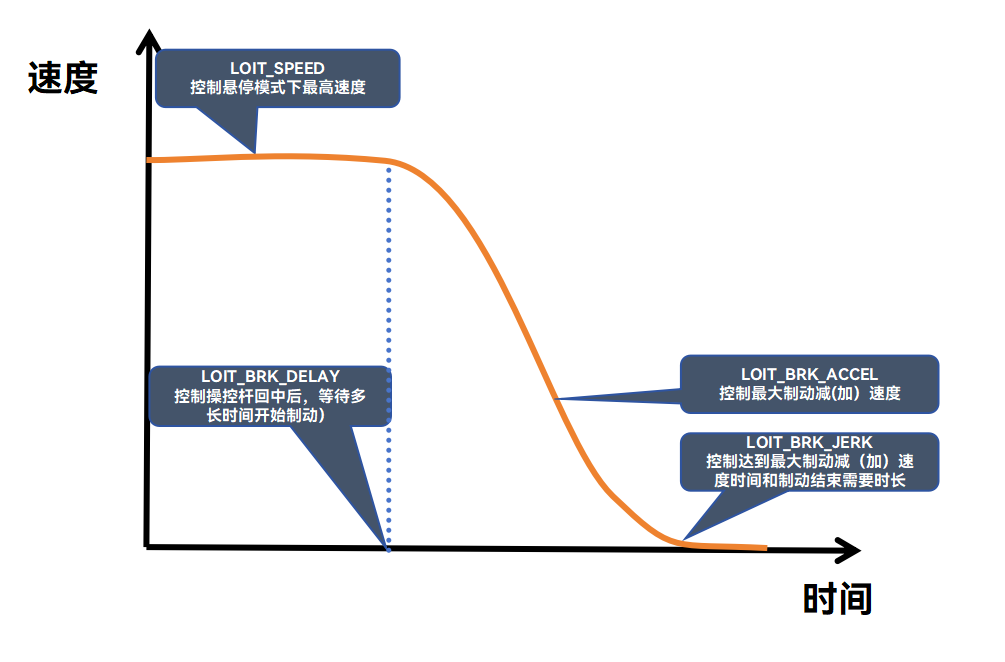
Loiter handling
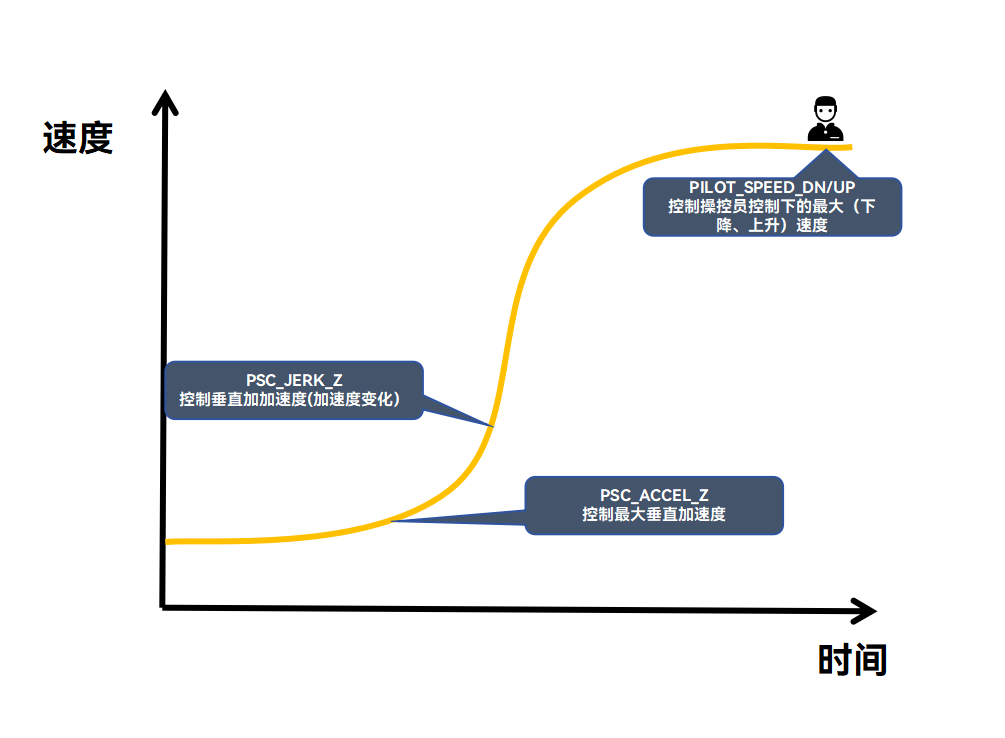
| Parameter | Notes | Remarks |
|---|---|---|
| PSC_JERK_Z | Vertical jerk | Controls how fast vertical acceleration changes |
| PSC_ACCEL_Z | Maximum vertical acceleration | Controls how quickly vertical speed changes |
| PILOT_SPEED_DN/UP | Maximum manual climb and descent speed | - |
Softer, smoother stick feel
Beginners, and anyone used to consumer drones, can keep the airframe gentle even at full stick by limiting the commanded acceleration:
| Parameter | Unit | Notes |
|---|---|---|
| ATC_RATE_P_MAX | °/s | Maximum pitch rate |
| ATC_RATE_R_MAX | °/s | Maximum roll rate |
| ATC_RATE_Y_MAX | °/s | Maximum yaw rate |
TIP
Set these to taste — the smaller the value, the gentler and slower the response. 30 °/s is the usual recommendation.
Tilt angle limits (optional)
For almost everyone a 30° maximum tilt does the job; change it if your work needs more. 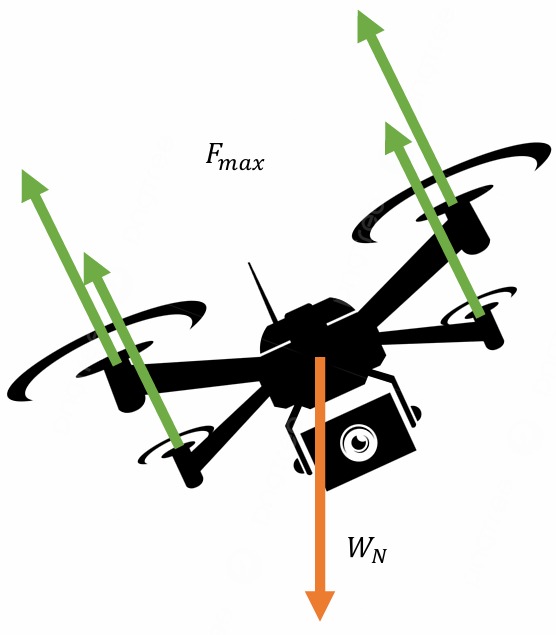
| Parameter | Unit | Notes |
|---|---|---|
| ANGLE_MAX | degrees | Maximum tilt for all modes |
| PSC_ANGLE_MAX | degrees | Maximum tilt in position-hold modes; 0 means use ANGLE_MAX |
| LOIT_ANGLE_MAX | degrees | Maximum commanded tilt in Loiter; 0 means two thirds of ANGLE_MAX |
TIP
A larger limit makes turns and translational acceleration quicker, but holding attitude gets harder and it asks more of both the controller's algorithms and the pilot.
Throttle PID gain
Even a well-tuned multirotor can briefly lose attitude control when the throttle is slammed. Fast throttle-up or throttle-down easily produces pitch or roll excursions, and it shows up worst on high thrust-to-weight racing quads. ATC_THR_G_BOOST helps.
When ATC_THR_G_BOOST is non-zero, a fast throttle change adds dynamic gain to the PID loops, up to a maximum of 1. With it enabled, rate PID gains are doubled and angular rate PID gains rise with them; smaller values give less extra gain.
WARNING
This feature has not been fully tested. Enable it with care.