

Mission Commands
This page details the mission commands Copter supports — the MAVLink commands that run as part of a mission (see the AUTO flight mode).
Each command below is a navigation command (NAV) or a do command. Navigation commands (Takeoff, Waypoint and so on) move the aircraft; do commands (Do Set Servo, Do Set Cam Trig Dist and so on) are auxiliary and do not change its position.
Takeoff
MAV_CMD_NAV_TAKE_OFF
Climbs from the current position to the specified altitude. This should be the first command of any fully automatic mission.
TIP
Once armed, the aircraft climbs straight to the specified altitude. If it is already above that altitude the takeoff command is ignored and it goes on to the next waypoint; the same applies if the next command is a do command, which also does not run.
Set the takeoff altitude on the simple mission card:
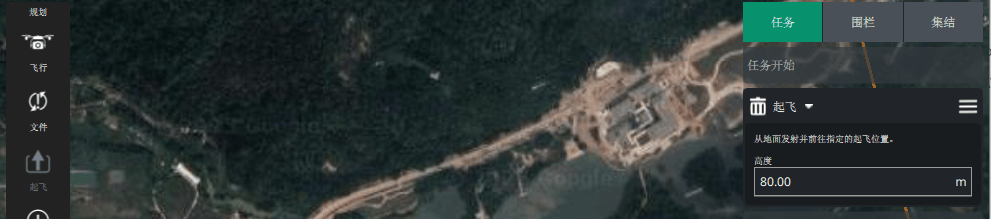
All the open parameters of the takeoff command:
| Param | Name | Type | Unit | Description (Copter / Plane) |
|---|---|---|---|---|
| param1 | Takeoff pitch / spin-up time | float | deg/s | Plane: takeoff pitch angle; Copter: spin-up time after arming |
| param2 | Reserved | float | - | Normally 0 |
| param3 | Reserved | float | - | Fixed at 0, no meaning |
| param4 | Takeoff yaw (nose direction) | float | deg | 0 = north, 90 = east, 360 = wraps; --.-- (NAN) follows the current heading per WP_YAW_BEHAVIOR |
| param5 | Target latitude | float | deg | Takeoff point latitude (WGS84) |
| param6 | Target longitude | float | deg | Takeoff point longitude (WGS84) |
| param7 | Target altitude | float | m | Altitude to climb to |
Waypoint
Goal: fly in a straight line to the given latitude, longitude and altitude in metres.
The first waypoint needs the Waypoint tool in the flight toolbar — click it, then click the target on the map. Waypoint properties are set on the simple mission card:
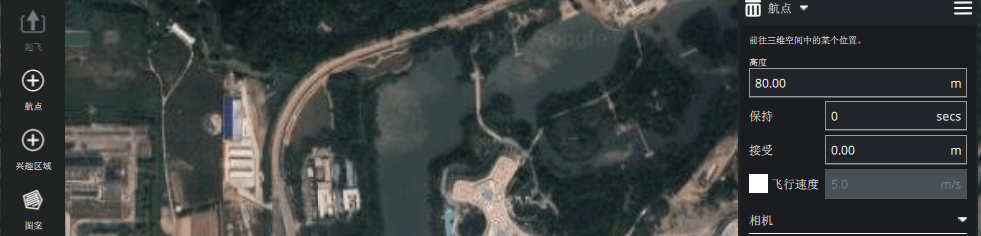
- Altitude: the target altitude for that waypoint, in metres
- Hold/delay: how long to wait at the waypoint before the next command, in seconds
- Waypoint radius (accept): not supported; use the
WPNAV_RADIUSparameter - Speed: tick it and set a speed and the card becomes a compound one, adding a change-speed command before the waypoint
- Camera: camera and gimbal settings can be combined into a compound card
Waypoint parameters:
| Param (label) | Description | Range | Unit |
|---|---|---|---|
| 1 (Hold time) | Time to hold at the waypoint (ignored by Plane; hold time for Copter) | min: 0 | s |
| 2 (Waypoint radius) | Acceptance radius — entering it counts as reaching the waypoint | min: 0 | m |
| 3 (Pass radius) | 0 passes exactly through the waypoint; above 0 means a fly-by; positive circles clockwise, negative anticlockwise, with track control | - | m |
| 4 (Yaw) | Target heading at the waypoint (Copter). NAN means follow the current yaw mode (next waypoint, home and so on) | - | deg |
| 5 (Latitude) | Latitude | - | - |
| 6 (Longitude) | Longitude | - | - |
| 7 (Altitude) | Altitude | - | m |
Spline waypoint
MAV_CMD_NAV_SPLINE_WAYPOINT (82)
A spline waypoint takes exactly the same parameters as an ordinary one (latitude, longitude, altitude, delay), but the aircraft flies a smooth path to it — vertically and horizontally — instead of straight lines.

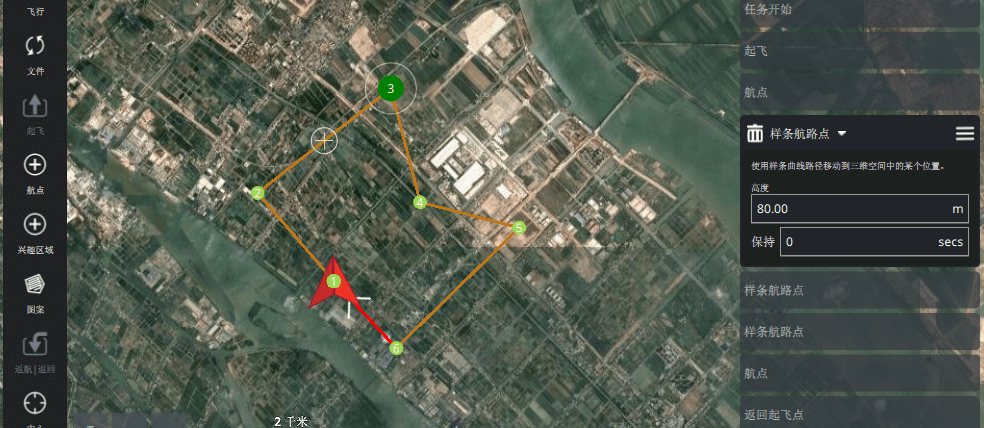
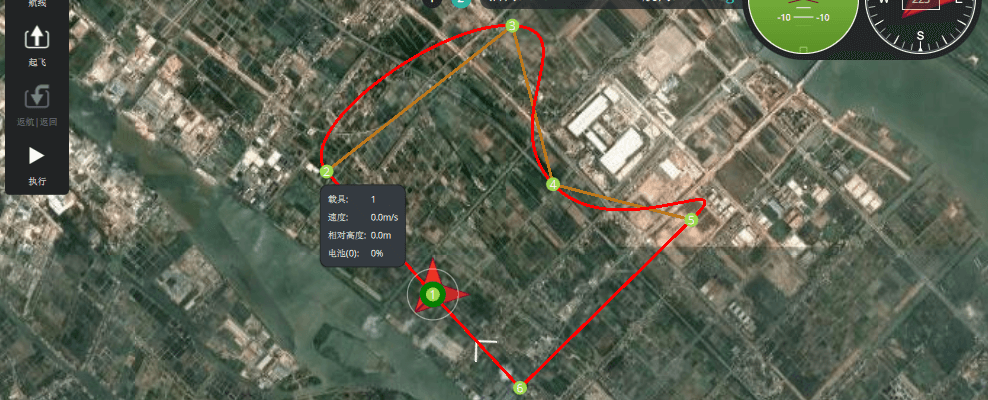
The pictures above show how it behaves:
- Waypoint #2 is an ordinary waypoint, so the aircraft flies a straight line to #1; #3, #4 and #5 are spline waypoints, so it curves smoothly through them; #6 is ordinary again and it flies in straight.
Loiter time
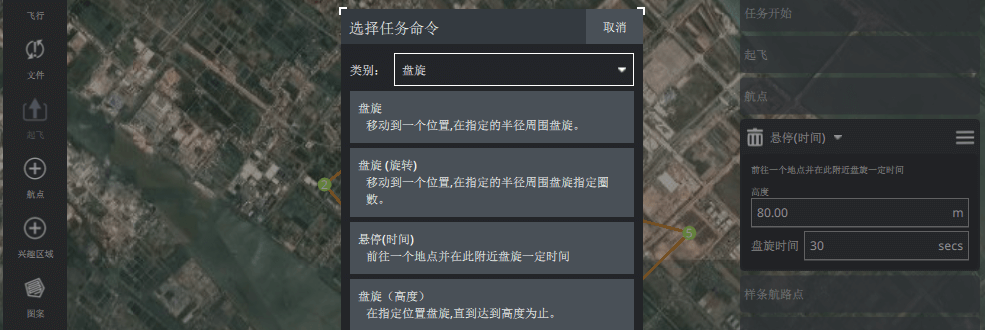
MAV_CMD_NAV_LOITER_TIME (19)
The aircraft flies to the position and loiters there for the specified number of seconds before the next command.
| Param (label) | Description | Range | Unit |
|---|---|---|---|
| 1 (Time) | Loiter time; the clock only starts once the position and altitude are reached | min: 0 | s |
| 2 (Heading required) | Leave the loiter only once the heading faces the next waypoint; 0 leaves when the timer expires. Only 0/1 are valid | MAV_BOOL | - |
| 3 (Radius) | Loiter radius on Plane; positive is clockwise, negative anticlockwise. No effect on Copter or Heli | - | m |
| 4 (Yaw track position) | Exit track rule on Plane: 0 converges to the centre, 1 flies straight to the next waypoint, NAN is the system default | - | - |
| 5 (Latitude) | Target latitude | - | - |
| 6 (Longitude) | Target longitude | - | - |
| 7 (Altitude) | Target altitude | - | m |
Loiter turns
MAV_CMD_NAV_LOITER_TURNS (18)
The mission equivalent of Circle mode. Loiters at the position for at least the given number of full circles, then continues when the track meets the circle again. The radius comes from the parameters. At radius 0 a multirotor or helicopter spins on the spot for the given number of turns; a negative radius turns anticlockwise. A radius above 255 m is marked down to the nearest 10 m.
| Param (label) | Description | Range | Unit |
|---|---|---|---|
| 1 (Turns) | Number of complete circles | min: 0 | - |
| 2 (Heading required) | Leave the loiter only once the heading faces the next waypoint; 0 leaves after the turns are done. Only 0 and 1 are valid | MAV_BOOL | - |
| 3 (Radius) | Loiter radius on Plane; positive clockwise, negative anticlockwise. Not used on Copter | - | m |
| 4 (Yaw track position) | Exit track rule on Plane: 0 converges to the centre, 1 flies straight to the next waypoint, NAN is the system default | - | - |
| 5 (Latitude) | Centre latitude | - | - |
| 6 (Longitude) | Centre longitude | - | - |
| 7 (Altitude) | Loiter altitude | - | m |
Loiter unlimited
MAV_CMD_NAV_LOITER_UNLIM (17)
The aircraft flies to the position and stays there indefinitely. The mission does not move past this command.

| Param (label) | Description | Unit |
|---|---|---|
| 1 | Unused | - |
| 2 | Unused | - |
| 3 (Radius) | Loiter radius for forward-flight vehicles only (not multirotors); positive clockwise, negative anticlockwise | m |
| 4 (Yaw) | Target yaw; NAN follows the current yaw mode (next waypoint, home and so on) | deg |
| 5 (Latitude) | Latitude | - |
| 6 (Longitude) | Longitude | - |
| 7 (Altitude) | Altitude | m |
Loiter to altitude
MAV_CMD_NAV_LOITER_TO_ALT
Climbs or descends to the target altitude at the given latitude and longitude; if both are 0 the command runs where the aircraft is. It only counts as complete once the altitude and heading are reached.
TIP
As ArduPilot works, after the previous waypoint the aircraft will already be easing toward this command's altitude on the way in — which is risky when descending. Adding a waypoint to lead it in avoids that.

| Param (label) | Description | Range | Unit |
|---|---|---|---|
| 1 (Heading required) | Leave the loiter only once the heading faces the next waypoint (MAV_BOOL_FALSE: leave on reaching the altitude). Values other than 0 or 1 are invalid | MAV_BOOL | - |
| 2 (Radius) | Loiter radius for forward-flight vehicles only (not multirotors); positive clockwise, negative anticlockwise, 0 uses standard loiter | - | m |
| 3 | Unused | - | - |
| 4 (Yaw track position) | Exit position and track to the next waypoint for forward-flight vehicles only: 0 converges to the centre track after leaving, 1 flies straight from the exit point to the next waypoint; other values are the angle in degrees between the loiter tangent and the centre track; NAN is the system default | min: 0, max: 1, step: 1 | - |
| 5 (Latitude) | Latitude | - | - |
| 6 (Longitude) | Longitude | - | - |
| 7 (Altitude) | Altitude | - | m |
RTL
MAV_CMD_NAV_RETURN_TO_LAUNCH (20)
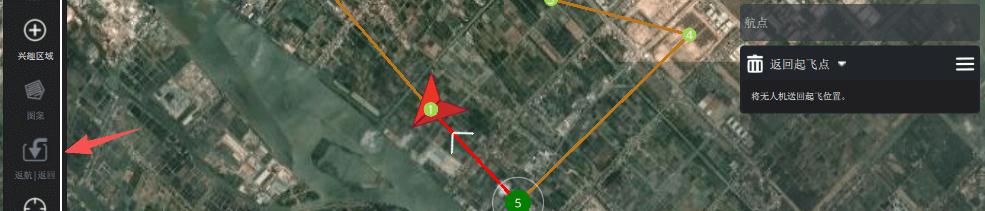
This one can be added quickly from the RTL/Return button in the flight toolbar.
The mission version of RTL mode. As with RTL itself, the aircraft first climbs to the altitude in the parameters (15 m by default) and then comes home. Home is where it last armed. The command takes no parameters and is normally the last command in a mission.
Land
MAV_CMD_NAV_LAND (21)
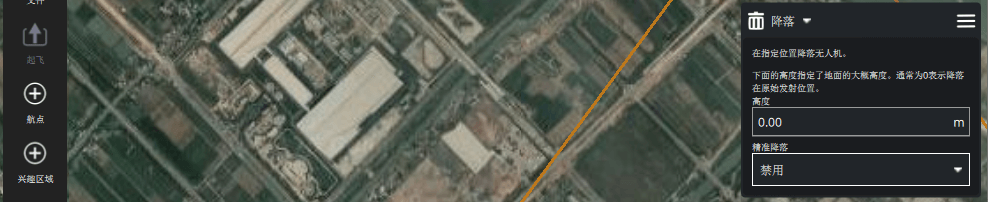
The aircraft lands where it is, or at the given latitude and longitude. Equivalent to LAND.
- Latitude, longitude — the target. Left at zero, it lands where it is.
| Param (label) | Description | Range | Unit |
|---|---|---|---|
| 1 (Abort altitude) | Minimum target altitude at which the landing is aborted (0 = undefined, use the system default) | - | m |
| 2 (Landing mode) | Precision landing mode | PRECISION_LAND_MODE | - |
| 3 | Unused | - | - |
| 4 (Yaw) | Target yaw; NAN follows the current yaw mode (next waypoint, home and so on) | - | deg |
| 5 (Latitude) | Latitude | - | - |
| 6 (Longitude) | Longitude | - | - |
| 7 (Altitude) | Landing altitude (ground level in the current frame) | - | m |
Navigation delay
MAV_CMD_NAV_DELAY (93)
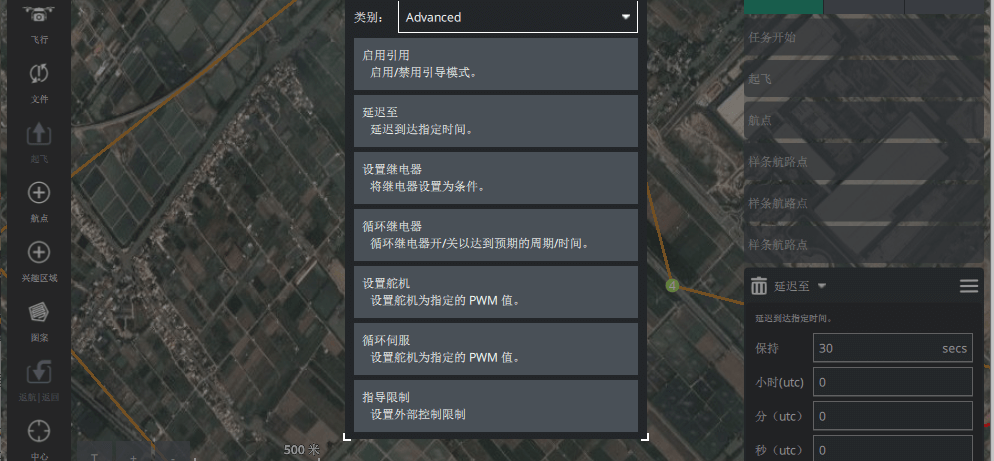
Holds at the current point for a set time, pausing the mission until the seconds are up or an absolute time arrives.
- Hold/delay time in seconds; -1 to ignore it.
- UTC hours, minutes and seconds set an absolute time; UTC is universal time, so Beijing time minus 8 hours.
| Param (label) | Description | Range | Unit |
|---|---|---|---|
| 1 (Delay) | Delay; -1 enables the absolute UTC time fields | min: -1, step: 1 | s |
| 2 (Hour) | Hour (24-hour UTC; -1 ignores it) | min: -1, max: 23, step: 1 | - |
| 3 (Minute) | Minute (24-hour UTC; -1 ignores it) | min: -1, max: 59, step: 1 | - |
| 4 (Second) | Second (24-hour UTC; -1 ignores it) | min: -1, max: 59, step: 1 | - |
| 5 | Unused | - | - |
| 6 | Unused | - | - |
| 7 | Unused | - | - |
TIP
Use this rather than a condition_delay command. A condition delay does not hold up navigation: the aircraft carries on to the next waypoint at once, and if that completes first, the pending do command is ignored.
Do jump
MAV_CMD_DO_JUMP (177)
Jumps to a given command in the mission list, repeating that section a set number of times.
| Param (label) | Description | Range |
|---|---|---|
| 1 (Item) | Mission item number to jump to | min: 0, step: 1 |
| 2 (Repeat) | Number of repeats | min: 0, step: 1 |
| 3 | Unused | - |
| 4 | Unused | - |
| 5 | Unused | - |
| 6 | Unused | - |
| 7 | Unused | - |
TIP
Despite the name, Do-Jump is really a navigation command, not a do command. Condition commands such as CONDITION_DELAY do not affect it — the jump happens as soon as it is reached. A mission may contain at most 100 jumps.
Payload place
MAV_CMD_NAV_PAYLOAD_PLACE (94)
The aircraft flies to the position and descends steadily (the maximum drop is parameter 1) until the motor output senses the package has touched down. The gripper then releases and it climbs back to the waypoint altitude.
| Param (label) | Description | Range | Unit |
|---|---|---|---|
| 1 (Max descent) | Maximum descent distance | min: 0 | m |
| 2 | Unused | - | - |
| 3 | Unused | - | - |
| 4 | Unused | - | - |
| 5 (Latitude) | Latitude | - | - |
| 6 (Longitude) | Longitude | - | - |
| 7 (Altitude) | Altitude | - | m |
- PLDP_SPEED_DN: descent rate after reaching the waypoint —
LAND_SPEED, or this value if non-zero. - PLDP_THRESH: the percentage drop in thrust that means the payload has landed. The reference thrust is measured over the two seconds before descending.
- PLDP_RNG_MAX: if non-zero, the maximum height above ground, from a downward rangefinder, at which release is allowed. The gripper only opens below that height with thrust reduced. If it is non-zero but there is no rangefinder, the mission is aborted and the aircraft climbs on to the next waypoint.
- PLDP_DELAY: seconds to wait after releasing before climbing, so a payload can be swapped if the gripper is set to re-grip after a delay (see GRIP_AUTOCLOSE).
Condition delay
MAV_CMD_CONDITION_DELAY (112)
Delays the next do command by the given number of seconds. In the example above, command #4 (Do Set Waypoint) is delayed; this command does not stop the aircraft. The delay timer only stays armed until the next waypoint, so if the do command has not fired by then it never will.
- Time (s) — the delay applied to the next do command, in seconds.
Condition distance
MAV_CMD_CONDITION_DISTANCE (114)
Delays the next do command until the aircraft is within the given number of metres of the next waypoint. It does not stop or pause the aircraft; it only gates the do command.
- Distance (m) — how close to the next waypoint the aircraft must be before the next do command starts.
Condition yaw
MAV_CMD_CONDITION_YAW (115)
Turns the nose to a given heading, through a given angle.
- deg — desired heading in degrees (0 = north, 90 = east and so on) when the rel/abs field is 0 (absolute)
- Speed, deg/s — how fast the aircraft turns toward that heading
- Dir, 1 = CW — turn direction to reach the angle (1 = CW, -1 = CCW, 0 = always the shortest way, only valid when rel/abs = 0)
- rel/abs (0 = absolute, 1 = relative) — whether the Deg field is an absolute heading (0) or relative to the current heading (1)
Do auxiliary function
Runs any auxiliary function from inside a mission, with no switch needed. Set AuxFunction to the RCx_OPTION value from that page. Switch is the switch position: 0 = low, 1 = middle, 2 = high.
Change speed
MAV_CMD_DO_CHANGE_SPEED (178)
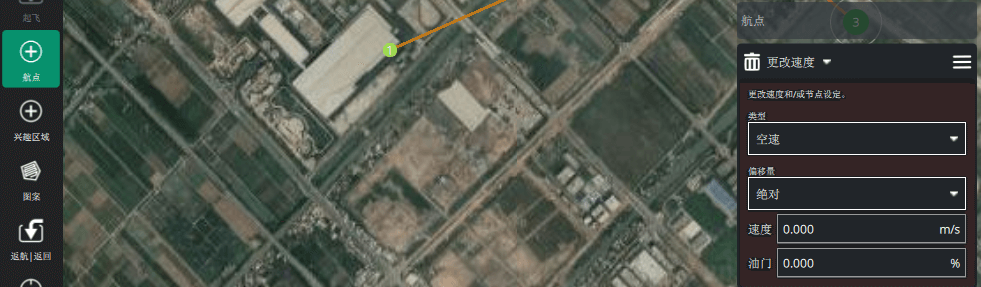
Changes the speed and/or throttle setpoint. It holds until something overrides it or the mode changes. The simple mission card exposes:
- Type: airspeed, ground speed, climb speed, descent speed
- Offset: absolute, relative
- Speed: target speed
- Throttle
| Param | Description | Range | Unit |
|---|---|---|---|
| 1 | Speed type set in parameter 2 (airspeed, ground speed and so on) | SPEED_TYPE | - |
| 2 | Speed (-1 means unchanged, -2 means back to the default) | min: -2 | m/s |
| 3 | Throttle (-1 means unchanged, -2 means back to the default) | min: -2 | % |
| 4 | Unused | - | - |
| 5 | Unused | - | - |
| 6 | Unused | - | - |
| 7 | Unused | - | - |
Continue and change altitude
MAV_CMD_NAV_CONTINUE_AND_CHANGE_ALT (30)
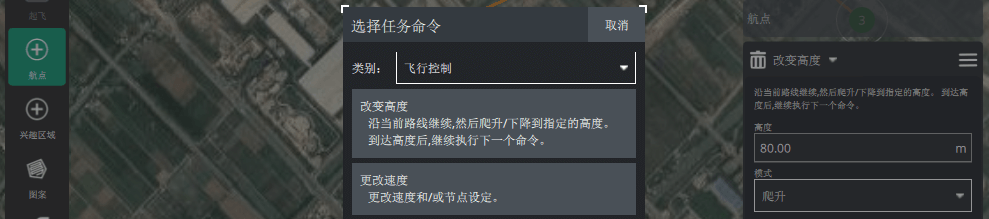
Keeps flying the current track while climbing or descending to the given altitude. The next command only runs once that altitude is reached.
| Param | Description | Range | Unit |
|---|---|---|---|
| 1 (Action) | Climb, descend or neither (0 = neutral, complete within 5 m of the commanded altitude; 1 = climb, complete at or above it; 2 = descend, complete at or below it) | min: 0, max: 2, inc: 1 | - |
| 2 | Unused | - | - |
| 3 | Unused | - | - |
| 4 | Unused | - | - |
| 5 | Unused | - | - |
| 6 | Unused | - | - |
| 7 | Target altitude | - | m |
Set camera trigger distance
MAV_CMD_DO_SET_CAM_TRIGG_DIST (206)
Sets the camera trigger distance for this flight: every time that distance is covered, the camera fires. To stop triggering, add DO_SET_CAM_TRIGG_DIST = 0 later in the mission.
| Param (label) | Description | Range | Unit |
|---|---|---|---|
| 1 (Distance) | Trigger distance. 0 stops triggering. | min: 0 | m |
| 2 (Shutter) | Shutter open time. -1 or 0 means ignore. | min: -1, inc: 1 | ms |
| 3 (Trigger) | Fire the camera once now (MAV_BOOL_TRUE). Values other than 0 or 1 are invalid. | MAV_BOOL | - |
| 4 (Target camera ID) | Target camera: 7–255 is a MAVLink camera component ID; 1–6 is a camera wired to the controller (no separate component ID); 0 means all cameras. Use it to address one camera from a MAV_CMD in a mission. | min: 0, max: 255, inc: 1 | - |
| 5 | Unused | - | - |
| 6 | Unused | - | - |
| 7 | Unused | - | - |
Camera control
MAV_CMD_DO_DIGICAM_CONTROL (203)
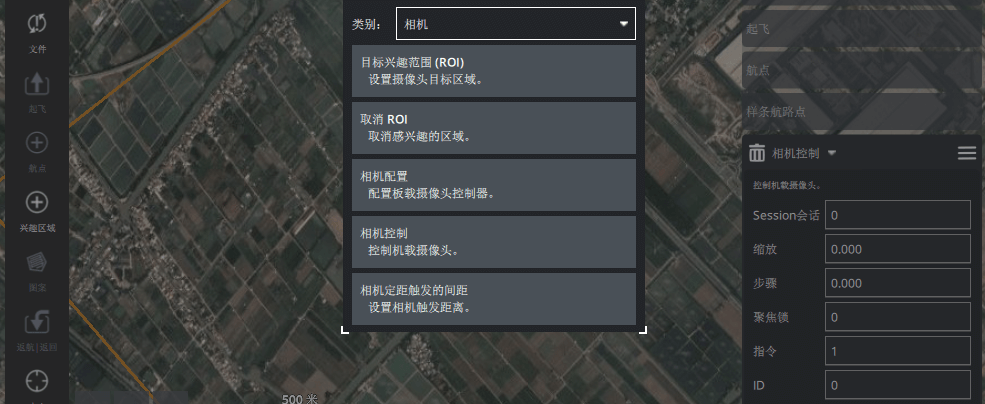
Fires the shutter once. Set the Shutter Cmd field to 1.
| Param (label) | Description |
|---|---|
| 1 (Session control) | Session control, such as showing or hiding the lens |
| 2 (Zoom absolute) | Absolute zoom position |
| 3 (Zoom relative) | Zoom step, offsetting from the current position |
| 4 (Focus) | Lock, unlock or relock focus |
| 5 (Shoot command) | Shoot command |
| 6 (Command identity) | Command identity |
| 7 (Shot ID) | Test shot identifier. Set to 1, the image is captured but not counted in the internal frame count |
Camera configuration
MAV_CMD_DO_DIGICAM_CONFIGURE (202)
Sets the camera's configuration.
| Param (label) | Description | Range | Unit |
|---|---|---|---|
| 1 (Mode) | Shooting mode: program auto (P), shutter priority (TV), aperture priority (AV), manual (M) and so on | min: 0, inc: 1 | - |
| 2 (Shutter speed) | Shutter speed as the denominator over one second (500 means 1/500 s) | min: 0, inc: 1 | - |
| 3 (Aperture) | Aperture as an f-number (2.8, 4.0, 5.6 and so on) | min: 0 | - |
| 4 (ISO) | ISO sensitivity (80, 100, 200 and so on) | min: 0, inc: 1 | - |
| 5 (Exposure) | Exposure type enumeration | - | - |
| 6 (Command identity) | Command identity | - | - |
| 7 (Engine cut-off) | Time to cut the main engine before triggering (0 means never) | min: 0, inc: 1 | ds (tenths of a second); 0 is fine |
Gimbal pitch and yaw
MAV_CMD_DO_GIMBAL_MANAGER_PITCHYAW (1000)
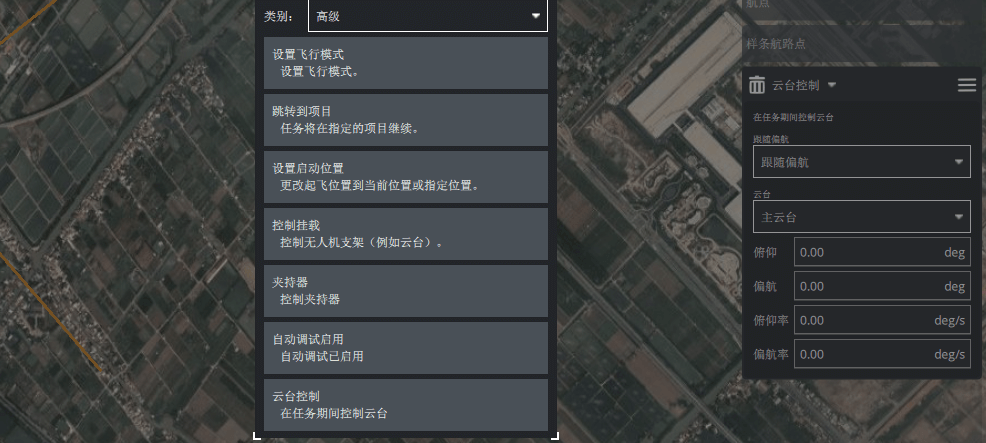
Moves the gimbal to the required pitch and yaw, in degrees. Positive pitch is up, negative is down; positive yaw is clockwise, negative anticlockwise. With flags at 0 the yaw is in the body frame (0 = straight ahead of the aircraft); with flags at 16 it is in an earth-frame (0 = true north).
| Param (label) | Description | Range | Unit |
|---|---|---|---|
| 1 (Pitch) | Pitch angle (positive is nose up; relative to the aircraft in follow mode, to the horizon in lock mode) | min: -180, max: 180 | deg |
| 2 (Yaw) | Yaw angle (relative to the aircraft in follow mode, positive to the right; absolute north in lock mode) | min: -180, max: 180 | deg |
| 3 (Pitch rate) | Gimbal pitch rate (positive is nose up), within what the hardware can do | no fixed range; 0–60 suggested, per the gimbal manual | deg/s |
| 4 (Yaw rate) | Gimbal yaw rate (positive is clockwise), within what the hardware can do | no fixed range; 0–60 suggested, per the gimbal manual | deg/s |
| 5 (Gimbal manager flags) | The core flags for frame of reference and operating mode | GIMBAL_MANAGER_FLAGS (common values below) | - |
| 7 (Gimbal device ID) | Component ID of the gimbal: 0 for all; 1-6 for non-MAVLink gimbals; 7-255 for MAVLink gimbal component IDs. Send separately for each gimbal | 0-255 | - |
Common
GIMBAL_MANAGER_FLAGSvalues:
- 0: default (body frame, gimbal follows the aircraft)
- 16: earth frame (yaw locked to true north)
- 32: lock mode (gimbal attitude fixed in the world, not following the aircraft)
- 64: RC control priority (the transmitter overrides this command)
Set region of interest
MAV_CMD_DO_SET_ROI (201)
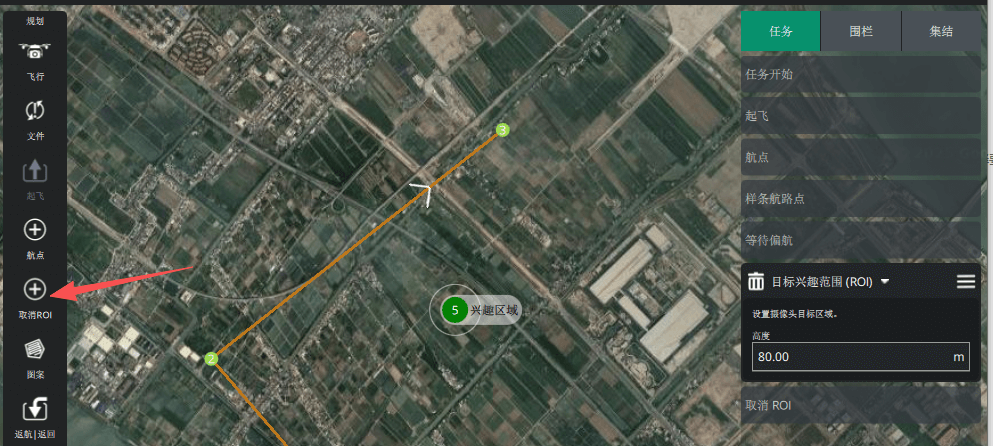
Points the nose or the gimbal at a region of interest, and keeps it there until the mission ends. Adding DO_SET_ROI_NONE later (with latitude, longitude and altitude all zero) clears the target and returns to the default behaviour of facing the next waypoint.
| Param (label) | Description | Range | Unit |
|---|---|---|---|
| 1 (ROI mode) | Region-of-interest mode | MAV_ROI | - |
| 2 (WP index) | Waypoint index or target ID (depends on parameter 1) | min: 0, inc: 1 | - |
| 3 (ROI index) | ROI index (lets the aircraft track several) | min: 0, inc: 1 | - |
| 4 | Unused | - | - |
| 5 | With MAV_ROI_WPNEXT: pitch offset to the next waypoint. With MAV_ROI_LOCATION: latitude | - | - |
| 6 | With MAV_ROI_WPNEXT: roll offset to the next waypoint. With MAV_ROI_LOCATION: longitude | - | - |
| 7 | With MAV_ROI_WPNEXT: yaw offset to the next waypoint. With MAV_ROI_LOCATION: altitude (m) | - | - |
Set relay
MAV_CMD_DO_SET_RELAY (181)

Drives a relay pin high or low.
| Param (label) | Description | Range | Unit |
|---|---|---|---|
| 1 (Instance) | Relay instance number | min: 0, inc: 1 | - |
| 2 (Setting) | Setting (1 = on, 0 = off) | min: 0, inc: 1 | - |
| 3 | Unused | - | - |
| 4 | Unused | - | - |
| 5 | Unused | - | - |
| 6 | Unused | - | - |
| 7 | Unused | - | - |
Repeat relay
MAV_CMD_DO_REPEAT_RELAY (182)
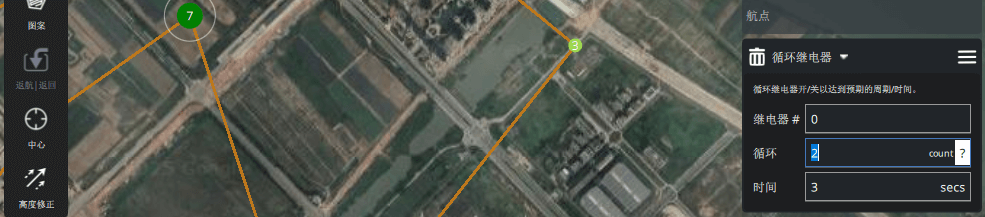
Toggles a relay pin a given number of times. In the example above, starting with the relay off, it goes high and then low again after 3 seconds.
Set servo
MAV_CMD_DO_SET_SERVO (183)
Sets a servo to the required PWM value.

Repeat servo
MAV_CMD_DO_REPEAT_SERVO (184)
Cycles between the nominal value and the required PWM, for a given number of cycles at a given period.
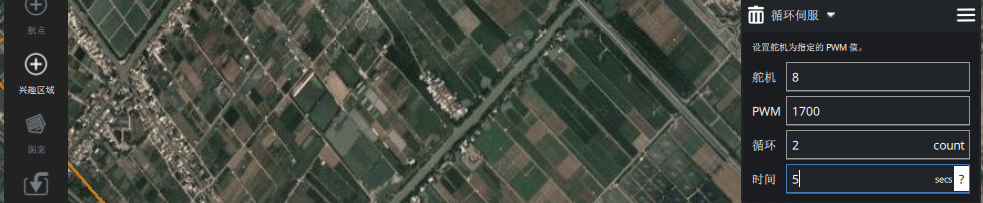
Mount control
MAV_CMD_DO_MOUNT_CONTROL(205)
- The legacy MAVLink command for steering a gimbal or camera mount. It has been superseded by
MAV_CMD_DO_GIMBAL_MANAGER_PITCHYAW(ID 1000) and similar.
| Param (label) | Description | Range | Unit |
|---|---|---|---|
| 1 (Pitch) | Pitch angle (or rate, depending on mode) | - | deg / deg/s |
| 2 (Roll) | Roll angle (or rate, depending on mode) | - | deg / deg/s |
| 3 (Yaw) | Yaw angle (or rate, depending on mode) | - | deg / deg/s |
| 4 (Target latitude) | Target latitude (GPS_POINT mode) | - | deg |
| 5 (Target longitude) | Target longitude (GPS_POINT mode) | - | deg |
| 6 (Target altitude) | Target altitude (GPS_POINT mode) | - | m |
| 7 (Mount mode) | Gimbal operating mode (MAV_MOUNT_MODE enumeration) | MAV_MOUNT_MODE | - |
- MAV_MOUNT_MODE values:
0:MAV_MOUNT_MODE_RETRACT(retract)1:MAV_MOUNT_MODE_NEUTRAL(neutral)2:MAV_MOUNT_MODE_MAVLINK_TARGETING(MAVLink targeting)3:MAV_MOUNT_MODE_RC_TARGETING(RC targeting)4:MAV_MOUNT_MODE_GPS_POINT(GPS point)
Gripper
MAV_CMD_DO_GRIPPER (211)
Operates a gripper from a mission.
| Param (label) | Description | Range | Unit |
|---|---|---|---|
| 1 (Gripper ID) | Gripper ID. For a gripper wired to the controller, 1-6; in a mission you can use 1-6 (controller gripper) or a MAVLink gripper's component ID; 0 means all grippers. | min: 0, inc: 1 | - |
| 2 (Action) | The gripper action to carry out. | GRIPPER_ACTIONS | - |
| 3 | Unused | - | - |
| 4 | Unused | - | - |
| 5 | Unused | - | - |
| 6 | Unused | - | - |
| 7 | Unused | - | - |
Winch
MAV_CMD_DO_WINCH (42600)
Drives a winch to lift or lower a package.
| Param (label) | Description | Range | Unit |
|---|---|---|---|
| 1 (Instance) | Winch instance number | min: 1, inc: 1 | - |
| 2 (Action) | Action to carry out | WINCH_ACTIONS | - |
| 3 (Length) | Cable length to pay out (negative retracts) | - | m |
| 4 (Rate) | Pay-out rate (negative retracts) | - | m/s |
| 5 | Unused | - | - |
| 6 | Unused | - | - |
| 7 | Unused | - | - |
WINCH_ACTIONSvalues (common definitions):0:WINCH_RELATIVE(relative length control)1:WINCH_ABSOLUTE(absolute length control)2:WINCH_RETRACT(retract the cable fully)3:WINCH_RELEASE(pay the cable out fully)4:WINCH_HOLD(hold the current position)