

Barometer Temperature Drift Compensation
Board temperature climbs steadily once the controller is powered. On a tightly packed board the barometer sits next to the heat sources, so the pressure reading drifts along with the temperature: the altitude display creeps up or sinks even though nothing has moved. It shows worst in AltHold and Auto.
Barometer temperature compensation (TCAL) makes the controller learn the temperature-to-pressure relationship for itself, then corrects the reading against the current board temperature so that drift goes away.
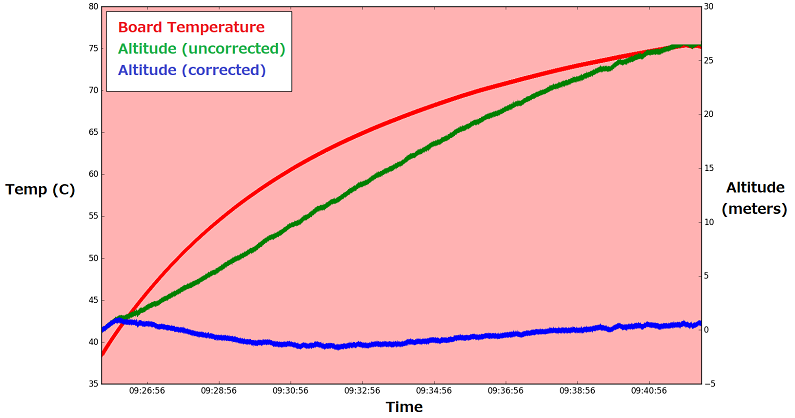
▲ Board temperature rising from 38 °C to 76 °C: uncompensated altitude drifts out to +25 m, while the compensated trace stays on 0
NOTE
Requires Copter 3.6 or later.
Parameters
| Parameter | What it does | Values |
|---|---|---|
TCAL_ENABLED | Temperature compensation switch | 0 off1 use the learned values (no further learning)2 learn new values and use them |
TCAL_BARO_EXP | Learned barometer correction exponent | Read-only; non-zero once learning has finished |
TCAL_TEMP_MIN | Lowest board temperature seen while learning | Read-only, in °C |
TCAL_TEMP_MAX | Highest board temperature seen while learning | Read-only, in °C |
Calibration steps
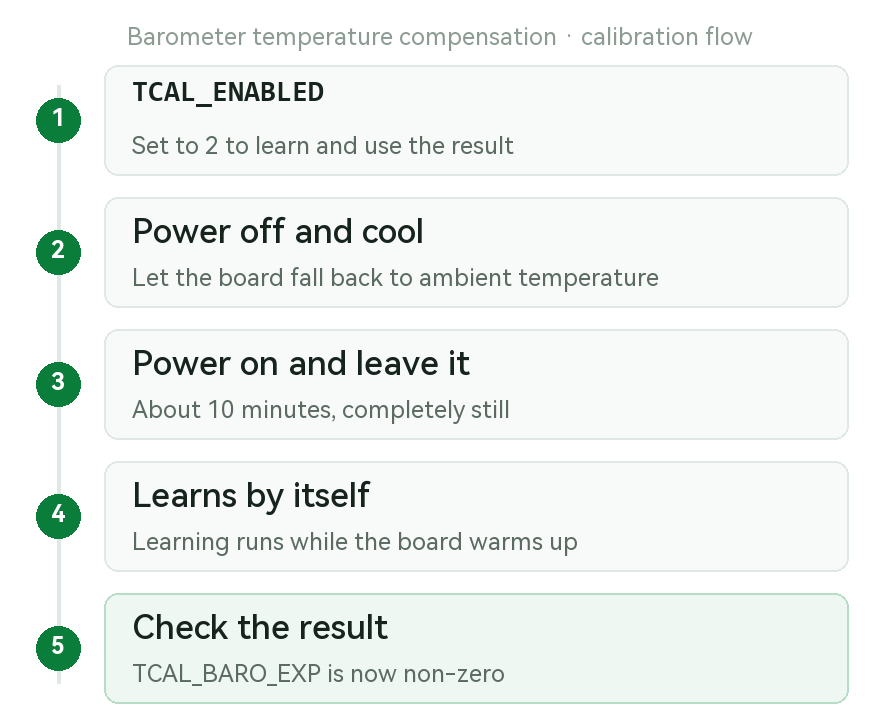
▲ The idea: cool the controller down first, then let it learn as it warms up
- Set
TCAL_ENABLEDto2(learn and use the result) - Power off and let the controller cool for a few minutes
- Power on and leave it sitting for about 10 minutes
- It learns automatically as the board warms up
- When learning finishes,
TCAL_BARO_EXPbecomes non-zero - Optional: set
TCAL_ENABLEDto1afterwards to use the learned values without learning again
TIP
Learning only happens while the controller is completely still — do not move it during those 10 minutes.