

Airspeed Sensor
A fixed-wing or VTOL aircraft gets its lift from the pressure difference and momentum exchange as air flows over the wing. Airspeed — the wing's speed relative to the air — is what sustains that lift. The airspeed sensor measures it and feeds it into the flight control system in real time, keeping the aircraft inside its safe speed band and out of the stall that a gust or too-slow flight would otherwise cause.
Installing the airspeed sensor
- Mount the sensor under the wing (with the pitot tube protruding slightly) or in the nose.
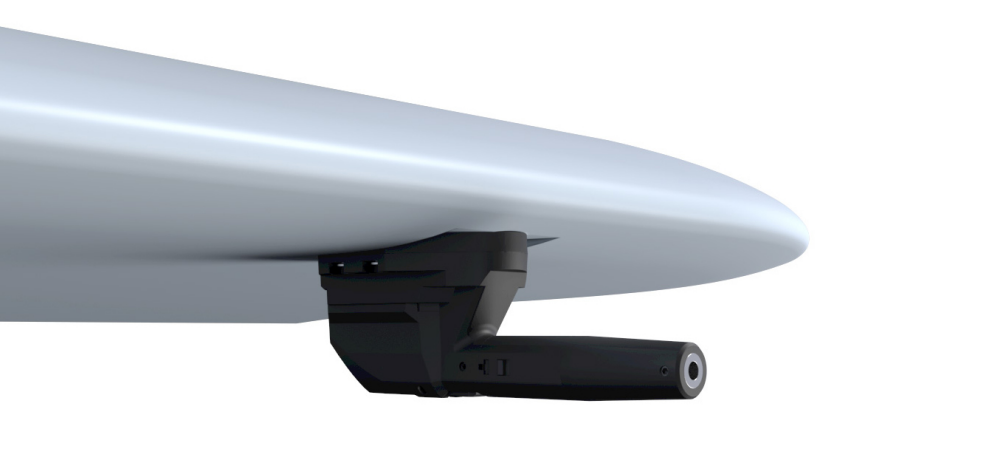
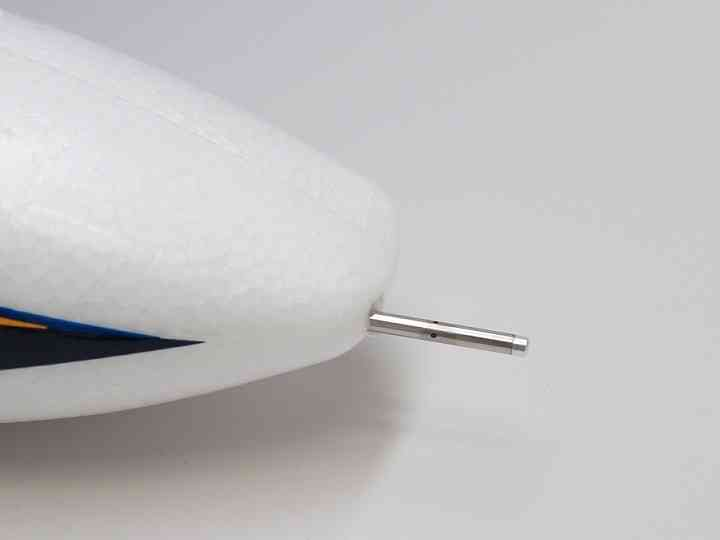
Enabling the airspeed sensor
Connect the controller to LGC Ground Station.
Open UAV Setup > Sensors > Airspeed.
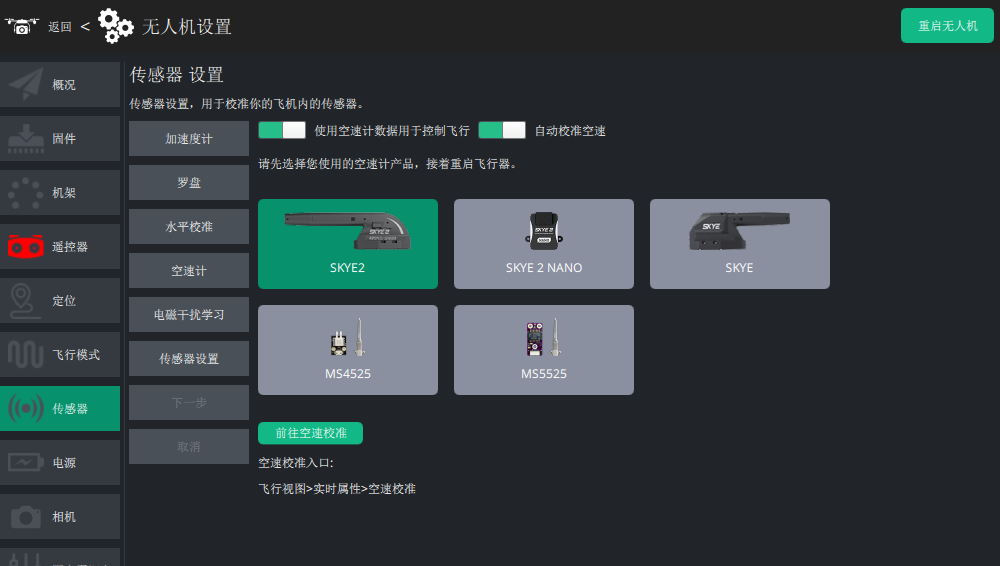
- Use airspeed: once on, airspeed data drives the aircraft's speed control. With it off the sensor still reports, but the system does not act on it. //
ARSPD1_USE/ARSPD_USE - Auto-calibrate airspeed: lets the aircraft learn the airspeed ratio in flight. //
ARSPD1_RATIO
Checking the sensor
Before flight, connect the ground station and check the airspeed with no wind: it should flicker between 0 and 3 m/s. Outside that band, zero the airspeed.
Cup the pitot tube and blow into it — if the reading follows the airflow, the sensor is working.
Zeroing the airspeed
If the reading sits above 3 m/s with no wind, zero it before takeoff.
How to zero it:
- Open LGC Ground Station and connect the controller.
- Make sure the pitot tube is out of any airflow (you can shield it with your hand, but do not block it).
- On the LGC flight data screen, open Live data on the left and click Airspeed calibration.
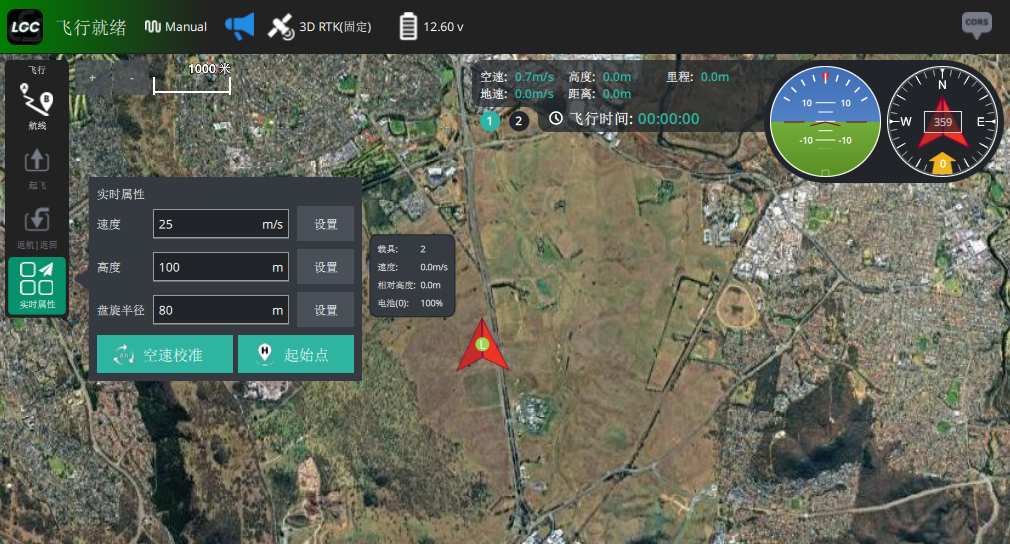
- Wait until the airspeed reads 0~3 m/s and the calibration completes.
Calibrating the airspeed sensor
Airspeed ratio varies with installation and between individual sensors, so calibrate on the first flight. Set ARSPD_AUTOCAL to 1 to enable auto calibration.
Then calibrate (either method):
- Take off in QStabilize or QLoiter, switch to FBWA and fly about five circuits. When the ground station messages say calibration is done, land and set
ARSPD_AUTOCALback to 0. - If you are not comfortable flying FBWA, fly with the airspeed sensor enabled but not used: on the airspeed screen turn Use airspeed off (do not do this in strong wind). The aircraft then flies on ground speed. Take off, fly about five circuits in Loiter, wait for the calibration message, then land.
Airspeed parameters
| Parameter | Description |
|---|---|
| ARSPDx_TYPE | Airspeed sensor type |
| ARSPDx_USE | Whether airspeed data is used (0 = disabled; 1 = used) |
| ARSPD_AUTOCAL | Auto calibration (0 = off; 1 = on) |
| ARSPD_BUS | I2C bus the sensor is on |
| ARSPD_OFFSET | Airspeed offset (do not change unless you must) |
| ARSPD_OFF_PCNT | Maximum percentage the offset may change between calibrations |
| ARSPD_OPTIONS | Airspeed option bitmask; the ARSPD_WIND_MAX threshold decides whether the sensor is disabled or re-enabled |
| ARSPD_PIN | Signal pin of an analogue airspeed sensor (not needed on the SKYE2) |
| ARSPD_PRIMARY | Which airspeed sensor is primary when several are connected |
| ARSPD_PSI_RANGE | Sensor measurement range in PSI (do not change unless you must) |
| ARSPD_RATIO | Airspeed calibration ratio |
| ARSPD_SKIP_CAL | Disables the ground zero calibration (do not change unless you must) |
| ARSPD_TUBE_ORDER | Static and dynamic port order (0 = normal; 1 = swapped; 2 = auto-detect) |
| ARSPD_WIND_GATE | How sensitive the re-enable logic is |
| ARSPD_WIND_MAX | Largest allowed difference between airspeed and ground speed; beyond it the controller disables that sensor |
| ARSPD_WIND_WARN | Warns once the airspeed-to-ground-speed difference exceeds this value; if set to 0 the ARSPD_WIND_MAX threshold is used |