

Survey Camera Setup
ArduPilot can drive a camera shutter from a servo output or a relay — on command from the transmitter, from the ground station, or automatically during a mission.
NOTE
Survey cameras do not all speak the same protocol. Check with your supplier that the camera supports MAVLink. The Share 102S five-lens camera, for example, needs a separate MAVLink-capable firmware build.
Hardware connection
Here a Share 102S five-lens camera is connected to the controller as the example.
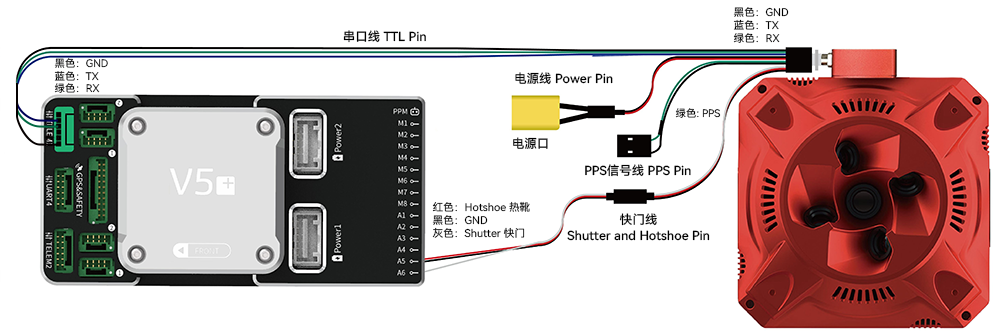
| Controller port | Pin | Camera connector |
|---|---|---|
| TELEM1/TELEM2/UART4 | GND | GND |
| RTS | - | |
| CTS | - | |
| RX | TX | |
| TX | RX | |
| 5V+ | - | |
| Servo | A6 (s+) | Shutter |
| A5 (S+) | Hot shoe | |
| GND | GND |
Enabling MAVLink
In the full parameter list, set:
For TELEM1:
Serial1_baud=256
Serial1_protocol=2
For UART4:
Serial4_baud=256
Serial4_protocol=2
Setting up the shutter trigger
Pick one of the two trigger methods:
Triggering the camera with PWM
CAM1_TRIGG_TYPE=0         //Trigger type: 0 = PWM, 1 = relay
Servo14_Function=10       //Set A6/M14 as the shutter trigger; use your actual channel
CAM_FEEDBACK_PIN=54       //Set A5/M13 as the hot shoe feedback input; use your actual channel
CAM_TRIGG_DIST=0          //Disable GPS distance-based triggering
CAM_AUTO_ONLY=1           //Where distance triggering may run; must be 1 so it only triggers in Auto
RC?_OPT=9                 //Channel for transmitter shutter; e.g. RC7_OPT=9 makes channel 7 take a photo when switched high
Serial1_baud=256          //Baud 256 (the Share 102S default)
Serial1_protocol=2        //MAVLink, so the camera can get GPS data from the controller (if it supports it)
Triggering the camera with a relay
CAM_TRIGG_TYPE=1       //Trigger type: 0 = PWM, 1 = relay
CAM_RELAY_ON=1         //Relay active level: 0 = low, 1 = high — the Share 102S triggers on high
Relay_pin=55           //Relay trigger pin; 55 is A6/M14, other pins work too — see the pin map
Servo14_Function=-1    //Set this output to relay camera trigger (-1) on M14/A6
CAM1_FEEDBACK_PIN=54   //Hot shoe feedback input; 54 is M13/A5
CAM1_TRIGG_DIST=0      //GPS distance triggering must be 0, or any GPS offset will fire the shutter
CAM1_AUTO_ONLY=1       //Distance triggering is allowed in Auto only; must be 1
CAM1_DURATION=1        //Shutter open time; 1 = 100 ms
Testing
There are two ways to test the shutter:
From the transmitter
RC?_OPTION=9 //? = the shutter channel; RC7_OPTION=9 uses channel 7. Flip the switch to trigger.From the ground station
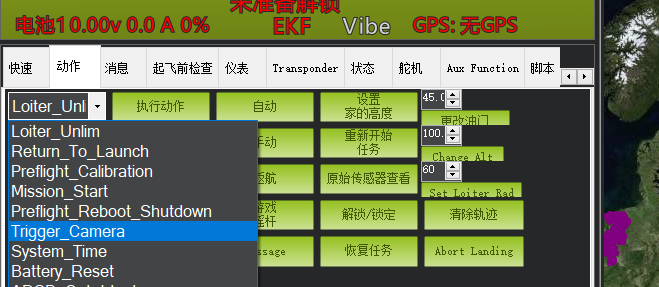
On the Actions tab of Mission Planner's Flight Data screen, choose Trigger camera and click to execute — the camera should fire.
More survey tutorials
Setting out ground control pointsRTK rover configurationSetting up an RTK base stationSurvey mission planning